Lie on the floor, look up, and watch a ceiling fan spin above you. Every time a blade passes over your face, you’re wearing something completely different. A cozy sweater turns into a Halloween costume, then into a red Christmas dress, then into a magazine-cover look.
 Create the Rain Dance Trend ♫
Upload your image and create rain dance music video
Create the Rain Dance Trend ♫
Upload your image and create rain dance music video
That’s the AI ceiling fan trend, and it’s all over social feeds right now. It looks like it took a full day of filming, but you only need your photo, dress pictures, and a good prompt.
This blog shows you how to make a ceiling fan transition video with LightX, with ready-to-copy prompts for men, women, kids, and seasonal looks.
What Is the AI Ceiling Fan Trend?
The idea is simple. The camera looks straight up from the floor, a fan rotates overhead, and each blade swipe works like a transition. Your outfit changes every time the blade crosses the frame.
People used to make this the hard way. They taped a phone to the ceiling, lay under the fan in one outfit, filmed, changed clothes, and repeated the same shot four or five times, then stitched the clips together. It worked, but it took a lot of effort, and getting the angle identical every time was painful.
AI removes all of that. You upload photos or describe the look you want, and the tool builds the whole spinning-fan video with the outfit changes for you.
Why This Trend Works (and Who It’s For)
The trend works because it’s hard to look away from. The spinning fan keeps your eyes on the screen, and each blade swipe promises a new outfit, so people rewatch these clips to catch every change. It’s also easy to make, since the AI does the filming and editing for you.
Here’s who gets the most out of it:
Everyday creators: You can post a trending Reel or Short without a wardrobe, a tripod, or editing apps. One photo and one prompt are enough.
Fashion lovers: You can try five styles in about ten seconds. It’s a quick way to decide what suits you before you buy anything.
Parents: Make a cute costume clip of your kids without the “wait, one more outfit change” routine.
Small business owners: You can show an entire collection in one short video, with every blade swipe revealing a new product.
Clothing Brands: Big names like Zara, Mango, and H&M can show a full collection in one clip, one new piece per blade swipe.
Photographers and stylists: You can preview different looks for a client in a single clip, which is easier than explaining them in words.
What You Need Before You Start
Get these ready first, and the whole process takes just a few minutes.
- One clear photo of yourself: Face the camera in good light, with your face fully visible. Avoid sunglasses, heavy filters, and group photos.
- Upto 4-5 Outfit Photos or prompts: Use one dress or outfit per image, on a plain background if possible, so the AI can see the color and design clearly. Alternatively, you can just try your fashion ideas using prompts for all four-five outfits.
- A theme: Pick one, like autumn, Halloween, Christmas, or fashion editorial, and choose all four outfits to match.
- A short prompt: Describe the scene (you lying under a spinning ceiling fan) and say that your outfit changes with each blade swipe.
- A LightX account: Log in to the AI video tool, and you’re ready to start.
Prompts You Can Copy and Paste
The golden rule is to describe the scene once, then list the outfits in order. That tells the AI that the camera, the fan, and the person all stay the same, and only the clothes change.
Swap in your own details, such as hair color, room style, or outfit colors, to make each one yours.
1. Autumn Prompt
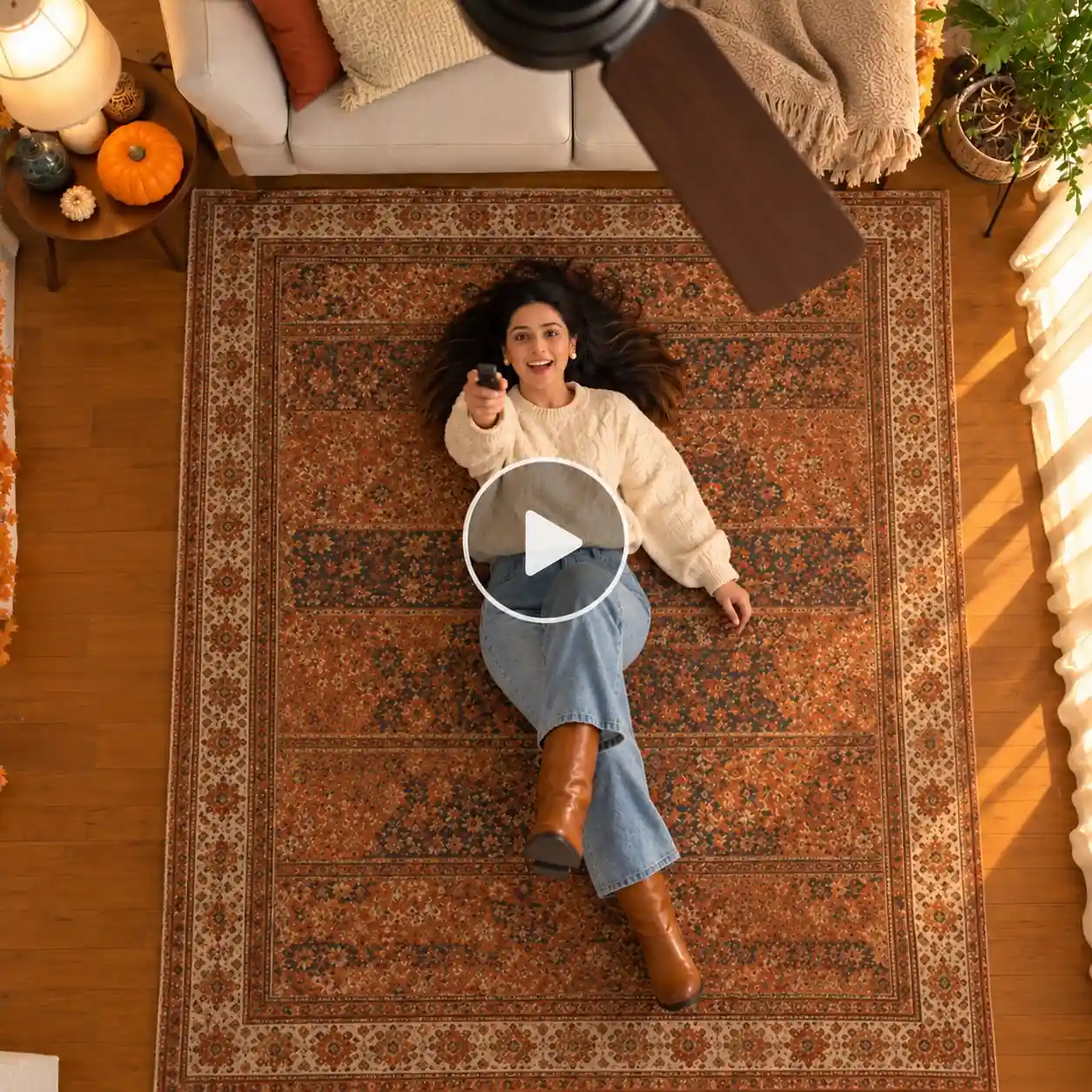
THEME: Autumn. Cozy, warm, golden-hour fall mood.
IMAGE: Image 1 is the person, who can be anyone. Use only the face, hair, skin tone and body build from Image 1. Do not copy its clothes.
CAMERA: One fixed ceiling-mounted camera looking straight down. It never moves, zooms or changes angle.
BACKGROUND: Cozy living room with a beige sofa, wooden floor and a rust-and-mustard rug in the middle. A dried-leaf garland, a small pumpkin and a warm lamp. Soft golden window light. A wooden ceiling fan hangs between the camera and the person. The room never changes.
OUTFIT 1: Chunky cream cable-knit sweater, blue jeans, brown boots.
OUTFIT 2: Rust and brown plaid flannel shirt over a white tee, olive corduroy pants, mustard beanie.
OUTFIT 3: Camel trench coat with belt, grey scarf, dark trousers, dark boots.
OUTFIT 4: Deep burgundy or forest-green knit top with a dark blazer or long coat, tailored dark pants, polished shoes.
ACTION: The person sits on the sofa in Outfit 1, slips off playfully and lands on their back on the rug, laughing. They pick up a TV remote, point it at the ceiling and press the button. The fan starts slowly, then spins faster. Each time a blade passes in front of the camera, the outfit instantly changes: Outfit 2, then 3, then 4. They end in Outfit 4, smiling at the camera.
RULES: Same face, hair, body, pose and room throughout. Only clothes change, only when a blade passes. No extra people, text or logos. Smooth, realistic transitions.
STYLE: Warm golden cinematic light, realistic, sharp, vertical video.
2. Halloween Prompt
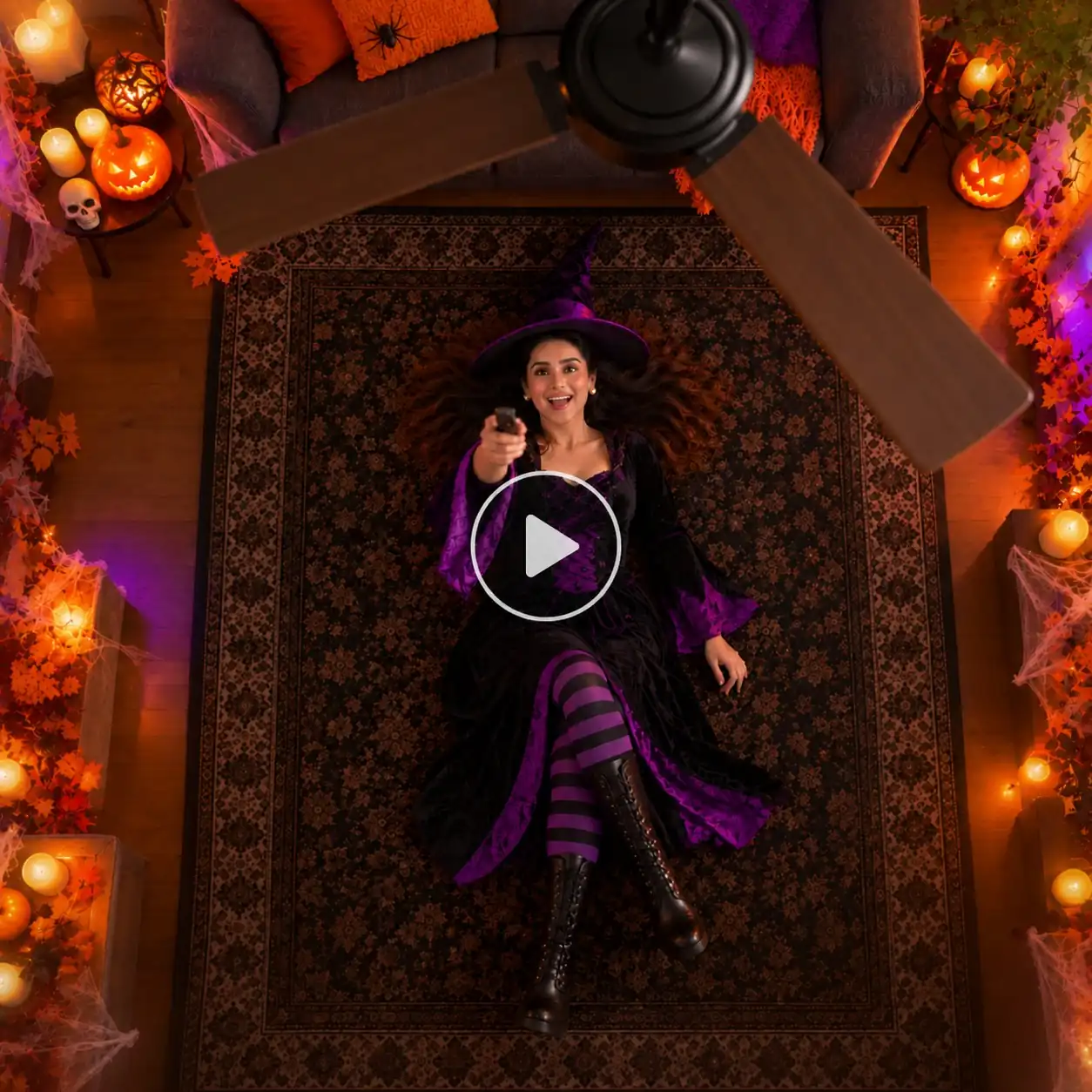
THEME: Halloween. Spooky but fun and family-friendly, moody orange and purple mood.
IMAGE: Image 1 is the person, who can be anyone. Use only the face, hair, skin tone and body build from Image 1. Do not copy its clothes.
CAMERA: One fixed ceiling-mounted camera looking straight down. It never moves, zooms or changes angle.
BACKGROUND: Dim living room with a dark sofa, dark wooden floor and a black rug in the middle. Orange string lights, carved pumpkins, soft cobwebs in the corners and flameless candles. Moody orange and purple glow. A black ceiling fan hangs between the camera and the person. The room never changes.
OUTFIT 1: Witch or wizard costume: long black robe or dress with purple trim, tall pointed hat.
OUTFIT 2: Vampire costume: black outfit with high collar and a red-lined cape.
OUTFIT 3: Skeleton costume: black bodysuit with a white bone print.
OUTFIT 4: Pumpkin costume: bright orange jacket or dress with black accents and a small green stem hat.
ACTION: The person sits on the sofa in Outfit 1, slips off playfully and lands on their back on the rug, laughing. They pick up a TV remote, point it at the ceiling and press the button. The fan starts slowly, then spins faster. Each time a blade passes in front of the camera, the costume instantly changes: Outfit 2, then 3, then 4. They end in Outfit 4, grinning at the camera.
RULES: No blood, gore or scary faces. Same face, hair, body, pose and room throughout. Only clothes change, only when a blade passes. No extra people, text or logos. Smooth, realistic transitions.
STYLE: Moody cinematic orange light, realistic, sharp, vertical video.
3. Christmas Holiday Prompt
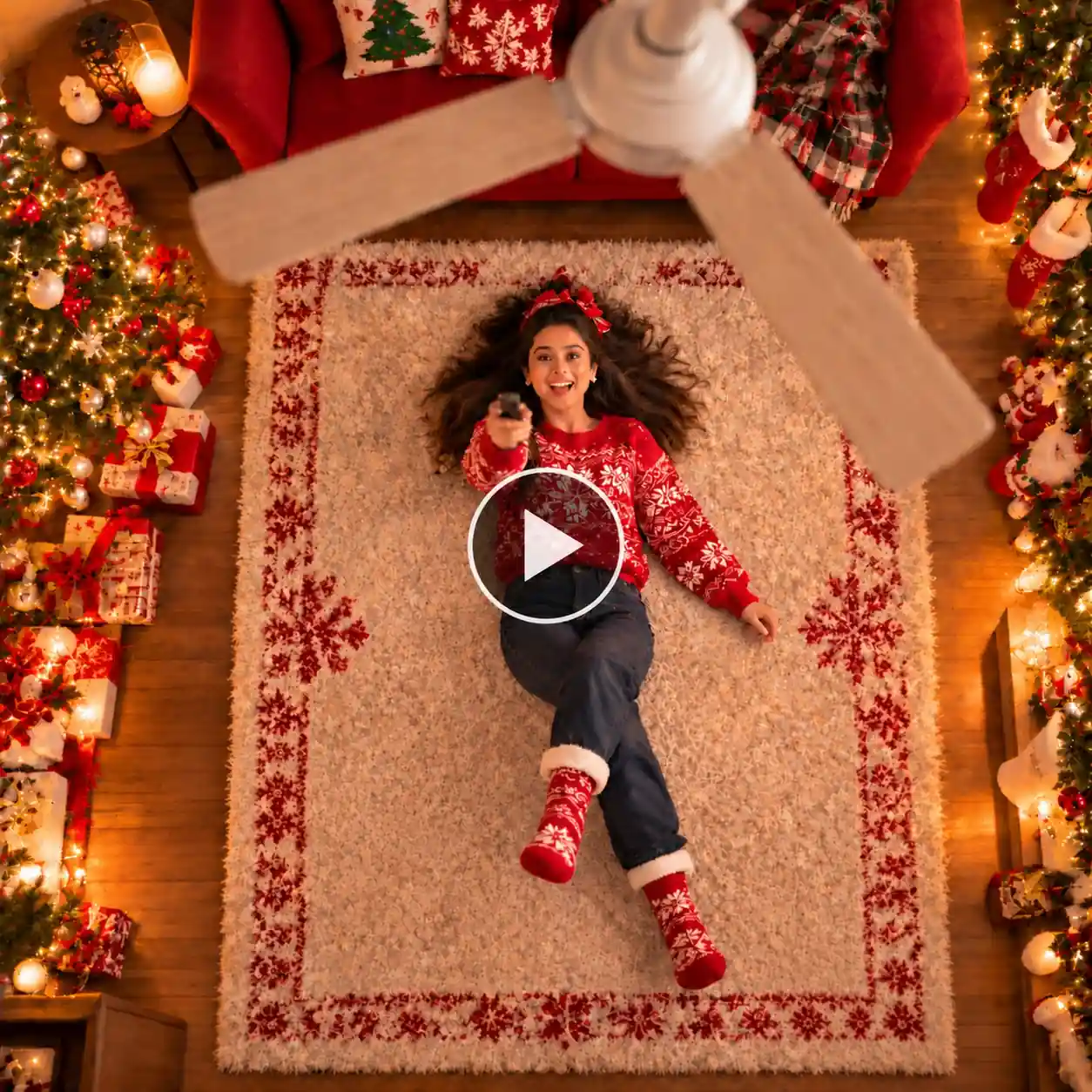
THEME: Christmas. Warm, cozy, festive holiday mood.
IMAGE: Image 1 is the person, who can be anyone. Use only the face, hair, skin tone and body build from Image 1. Do not copy its clothes.
CAMERA: One fixed ceiling-mounted camera looking straight down. It never moves, zooms or changes angle.
BACKGROUND: Living room with a red sofa, wooden floor and a fluffy white rug in the middle. A decorated Christmas tree, wrapped gifts, hanging stockings and glowing fairy lights. A warm festive glow. A white wooden ceiling fan hangs between the camera and the person. The room never changes.
OUTFIT 1: Red knit Christmas sweater with white snowflakes, dark jeans, warm socks.
OUTFIT 2: Emerald green velvet blazer or dress with red accessories, dark trousers or tights.
OUTFIT 3: Santa-style look: red jacket or dress with white fur trim, black belt, Santa hat.
OUTFIT 4: Elegant gold or champagne party outfit, sequins or satin, polished shoes.
ACTION: The person sits on the sofa in Outfit 1, slips off playfully and lands on their back on the rug, laughing. They pick up a TV remote, point it at the ceiling and press the button. The fan starts slowly, then spins faster. Each time a blade passes in front of the camera, the outfit instantly changes: Outfit 2, then 3, then 4. They end in Outfit 4, smiling warmly at the camera.
RULES: Same face, hair, body, pose and room throughout. Only clothes change, only when a blade passes. No extra people, text or logos. Smooth, realistic transitions.
STYLE: Warm festive cinematic light, realistic, sharp, vertical video.
4. Fashion editorial magazine shoot
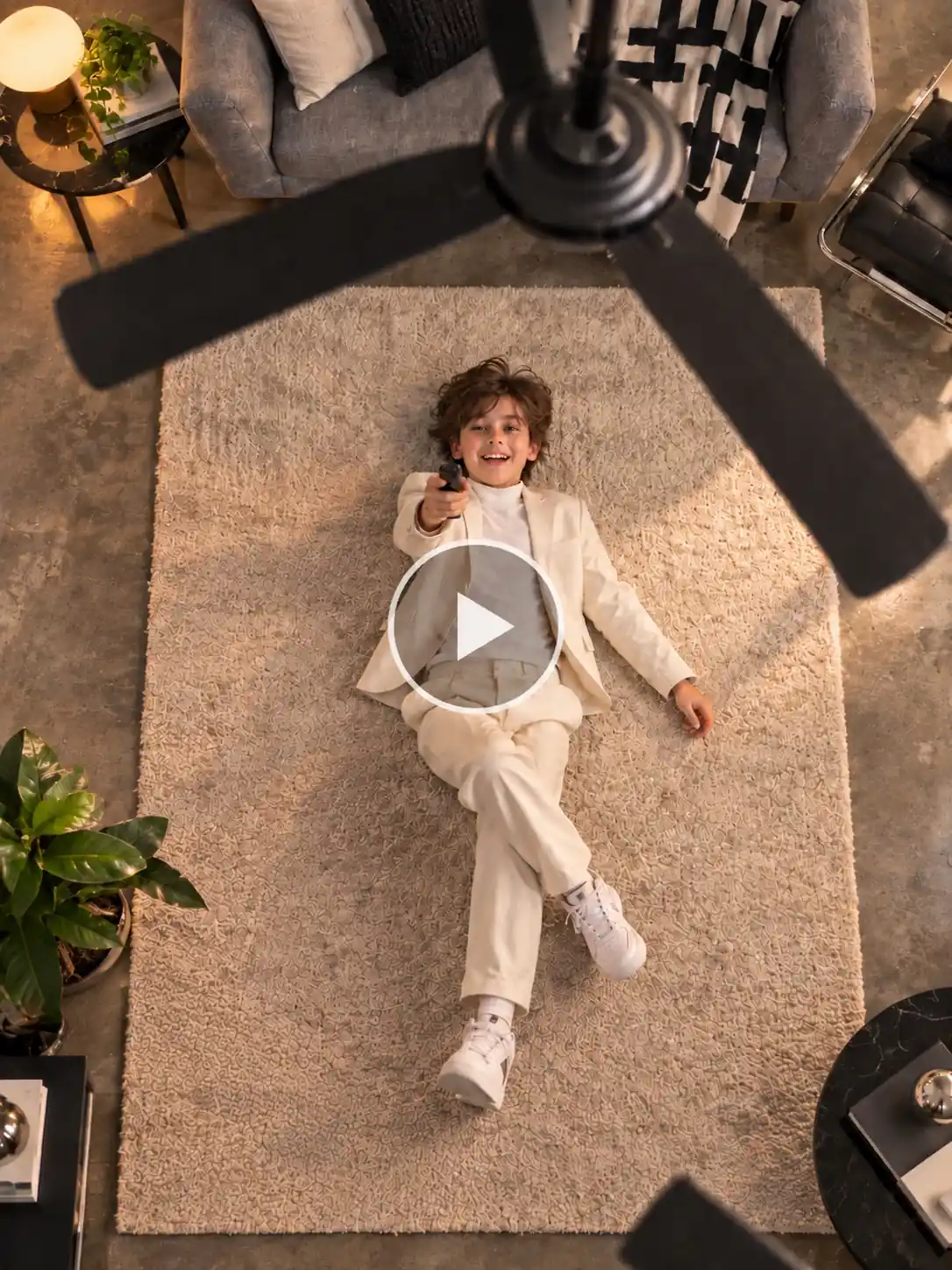
IMAGE: Image 1 is the person, who can be anyone. Use only the face, hair, skin tone and body build from Image 1. Do not copy its clothes.
CAMERA: One fixed ceiling-mounted camera looking straight down. It never moves, zooms or changes angle.
BACKGROUND: Minimalist modern space styled like a studio shoot. A sleek grey sofa, polished concrete floor and a neutral cream rug in the middle. One designer chair in the corner. Soft, even studio light. A slim white or black minimalist ceiling fan hangs between the camera and the person. The room never changes.
OUTFIT 1: Structured white or cream power suit with a crisp shirt, sharp tailoring, polished shoes.
OUTFIT 2: Bold statement outerwear: oversized red trench coat or black leather jacket over an all-black base layer, black boots.
OUTFIT 3: Metallic look: silver or chrome two-piece set or sculptural metallic jacket with matching trousers or skirt.
OUTFIT 4: Couture finale: black tuxedo with satin lapels or a floor-length gown in one bold color with a dramatic silhouette.
ACTION: The person sits on the sofa in Outfit 1, slips off with a confident, playful move and lands on their back on the rug. They pick up a remote, point it at the ceiling and press the button. The fan starts slowly, then spins faster. Each time a blade passes in front of the camera, the outfit instantly changes: Outfit 2, then 3, then 4. They end in Outfit 4, holding a calm, confident look at the camera.
RULES: Same face, hair, body, pose and room throughout. Only clothes change, only when a blade passes. No extra people, text or logos. Smooth, realistic transitions.
STYLE: High-fashion editorial lighting, crisp details, realistic, sharp, vertical video.
How to Use This Trend for Marketing and Promotion
- Clothing brands: Upload four products from one collection and show them in a single video, with each swipe revealing a new piece. Post it as a “new arrivals” Reel and link the products in the caption.
- Seasonal sales: Make a Halloween, Christmas, or Diwali version with four festive outfits from your catalog. Post it a week before the festival so it lands while people are shopping.
- Boutiques and local shops: Run a weekly “4 looks, 1 spin” series. A fixed format makes your page easy to recognize and gives followers a reason to come back.
- Salons and makeup artists: Show four different looks, such as natural, party, bridal, and glam. It’s a quick way to display your range without a long portfolio post.
- Photographers and stylists: Send clients a preview clip of four style options before the shoot, so they can pick a favorite and you skip the long explanations.
- Jewelry and accessory brands: Keep the same outfit and change only the accessories, like earrings, necklaces, or bags, to show how one piece of jewelry works with different styles.
- Influencers and creators: Post it as a trend video to get more reach, and end with the question “Which outfit is your favorite?” Comments push the video to more people.
- Giveaways and polls: Ask followers to vote for their favorite outfit in the comments, then offer that item as a discount or giveaway prize.
Quick tip: Add your brand name or logo in the caption and the first comment, so people know where to shop after they watch.
Related blog: How to Make the Trendy Rain Dance Video
How to Make the Video With LightX: Step by Step
The whole process takes a few minutes. Here’s how it goes.
Step 1: Upload images
Add one clear photo of yourself and four dress photos, one outfit per image.
Step 2: Write a prompt
Describe yourself lying under a spinning ceiling fan, with your outfit changing at each blade swipe in the order of the dress photos. Add “same face, same pose.”
Step 3: Pick a model
Choose Wan or Seedance, whichever gives you the smoother transitions.
Step 4: Set your options
Choose a vertical ratio, a 5-10 second length, the highest resolution, and audio if you want music.
Step 5: Click Generate
Your video is ready in moments. Check the outfit order, then regenerate if anything looks off.
5 Reasons to Make the Ceiling Fan Trend with LightX
1. Join a trend people already love
The ceiling fan outfit change is going viral right now. People watch these videos again and again just to see each new look. Making yours with LightX puts you in front of an audience that is already looking for this kind of video.
2. Skip the hard part of the trend
The real trend needs a phone taped to the ceiling, the same pose every time, and many outfit changes. It’s easy to get the angle wrong. With LightX, the AI keeps the camera, the fan, and your pose the same, so you get a clean video on the first try.
3. Get the blade-swipe change without editing
The best moment in this trend is when the fan blade passes and the outfit changes. Doing that by hand takes careful cutting and timing. LightX makes each blade swipe the moment your outfit changes, so the effect looks smooth and natural.
4. Make your own version of the trend
Most people post the same few looks. With LightX, you can use your own outfit photos or pick a theme like Halloween, Christmas, autumn, or fashion editorial. That makes your video different from everyone else’s.
5. Post while the trend is hot
Trends fade fast, and a video made in a few minutes gets posted while people are still watching this one. The tall video size fits Reels, TikTok, and Shorts, so you can download it and share it right away.
Related blog: How to Make A Carpool Video
Tips for the Best Results
- Keep the scene simple: One person, one fan, one room. Extra details confuse the AI.
- Add “same face, same pose”: This keeps you looking like you in every outfit.
- Name the order: Say “outfit 1, outfit 2, outfit 3, outfit 4” so the dresses appear in the order of your photos.
- Stick to four outfits: More than that makes each look flash by too fast.
- Be specific about clothes: Mention colors and fabrics, like “red satin dress,” instead of just “nice dress.”
- Say the camera angle: Use “shot from directly above, looking up” so the view stays the same.
- Match the lighting: Add one lighting word, like “warm light” or “moody orange light,” so the mood stays consistent.
- Test and tweak: If one outfit looks off, change just that line in the prompt and generate again.
Conclusion
The AI ceiling fan trend is popular because it’s simple, quick, and fun to watch. You don’t need a studio, a wardrobe, or editing skills. You need a photo, a clear prompt, and about five minutes. Pick your theme, copy a prompt, tweak the outfits, and let LightX do the rest. Then watch your outfits change with every spin of the fan.
FAQ
What aspect ratio should a ceiling fan transition video be?
Go with 9:16. That’s the tall size everyone uses on Reels, TikTok, and Shorts, so your video fits the screen, and nothing gets cut off.
How many outfit changes can I fit in one video?
Four is the sweet spot. You get enough variety, and each outfit stays on screen long enough for people to actually see it. You can try more, but the changes start to feel rushed.
Can I use a full-body photo or only a portrait?
Either one works. What matters most is a clear, bright face. A full-body photo can help the AI get your body shape right, but a simple portrait does the job too.
How do I keep the pose the same after each outfit change?
Just tell the AI. Add a line like “same face, same pose, same room all the way through.” It also helps to say the camera never moves, so only your clothes change.
Should I name each outfit separately?
Yes, it really helps. Write Outfit 1, Outfit 2, Outfit 3, and Outfit 4, and describe each one on its own line. That way the AI doesn’t mix the clothes up, and they show in the order you want.
Can I change the hairstyle, makeup, or room instead of the outfit?
You can. The trend works with any kind of change, not only clothes. Just try changing one thing at a time so the video stays clean and easy to follow.
 Create the Unforgettable UNO Trend 🃏
Upload your image and turn an UNO move into a viral transition.
Create the Unforgettable UNO Trend 🃏
Upload your image and turn an UNO move into a viral transition.