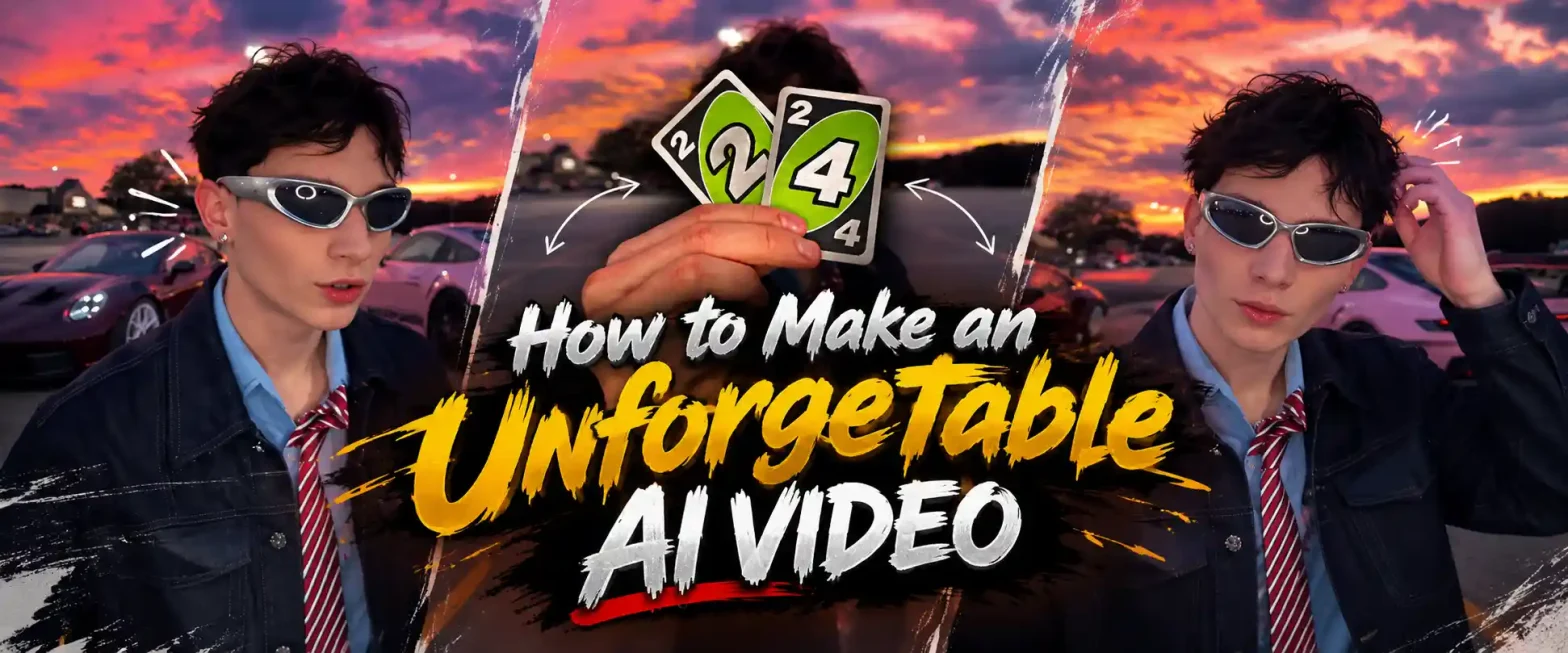
Someone holds up two cards that read 2 and 4, and the whole screen goes blank. The cards drop, the beat kicks in, and there they are, standing in front of their dream car. Sometimes two Porsches roll in right behind them.
 Create the Ceiling Fan Trend 🪭
Upload your image and reveal a new look with every spin.
Create the Ceiling Fan Trend 🪭
Upload your image and reveal a new look with every spin.
That’s the unforgettable AI trend, and it’s all over Reels and TikTok right now. It looks like a big car shoot, but you only need your photo, a car picture, and a good prompt.
This blog shows you how to make an unforgettable AI video with LightX, with ready-to-copy prompts for sports cars, luxury cars, and a walk-to-the-car reel.
What Is the Unforgettable AI Trend?
The unforgettable trend on TikTok and Instagram Reels is a cinematic video challenge set to the hit song “Unforgettable” by French Montana featuring Swae Lee. It’s the video trend people are recreating right now, and it has a simple, easy-to-follow format.
You start close to the camera, holding Uno-style cards that form the number 24. When the beat kicks in, the cards fall away, and the scene opens up to you posing next to your favorite car. Many people add a short line to the camera, like “I’ve had enough convo for 24,” and then show off the ride. That’s why it’s also called the unforgettable video trend.
People used to make this the hard way. They borrowed a car, found a good location, filmed the car moment, filmed the reveal, and then edited both clips to match the song. It worked, but it took a lot of time, and the cards, the light, and the pose never matched perfectly.
AI removes all of that. You upload a photo, describe the scene, and the tool builds the whole AI car reveal video for you. You can even make an AI video from a photo of a car you don’t own yet.
Why This Trend Works (and Who It’s For)
The trend works because the payoff is quick. The cards build a little curiosity, and the reveal gives people exactly what they were waiting for. It’s also easy to make, since the AI does the filming and editing for you.
Here’s who gets the most out of it:
- Everyday creators: You can post a trending Reel without a car, a camera crew, or editing apps. One photo and one prompt are enough.
- Car lovers: You can show off your dream car, even if it’s still a dream. Many people use this to share the car they plan to own one day.
- Car owners: Give your own car a cinematic reveal without a single hour of filming.
- Car dealers and rental shops: You can reveal a new arrival in a short clip that people actually want to watch till the end.
- Photographers and videographers: You can preview a car reveal idea for a client in one clip, which is easier than explaining it in words.
- Friends and couples: Turn a trend into a fun memory with your people in front of the car.
What You Need Before You Start
Get these ready first, and the whole process takes just a few minutes.
- One clear photo of yourself: Face the camera in good light, with your face fully visible. Avoid sunglasses, heavy filters, and group photos.
- One car photo (optional): Use a clear side or front shot of the car. If you don’t have one, you can simply describe the car in your prompt.
- A theme: Pick one, like a sports car, a luxury car, a night city drive, or a sunset road, and keep the whole video in that mood.
- A short prompt: Describe the Uno-style cards, the reveal, and the car. Say that your face and the scene stay the same throughout.
- A LightX account: Log in to the AI video tool, and you’re ready to start.
Prompts You Can Copy and Paste
The golden rule is to describe the scene once, then list the moments in order. That tells the AI what stays the same, which is the camera, the person, and the car, and what changes, which is the reveal.
Swap in your own details, such as car color, city, or outfit, to make each one yours. This is the best way to write an unforgettable AI video prompt that doesn’t look like everyone else’s.
1. Classic Uno Card Reveal Prompt
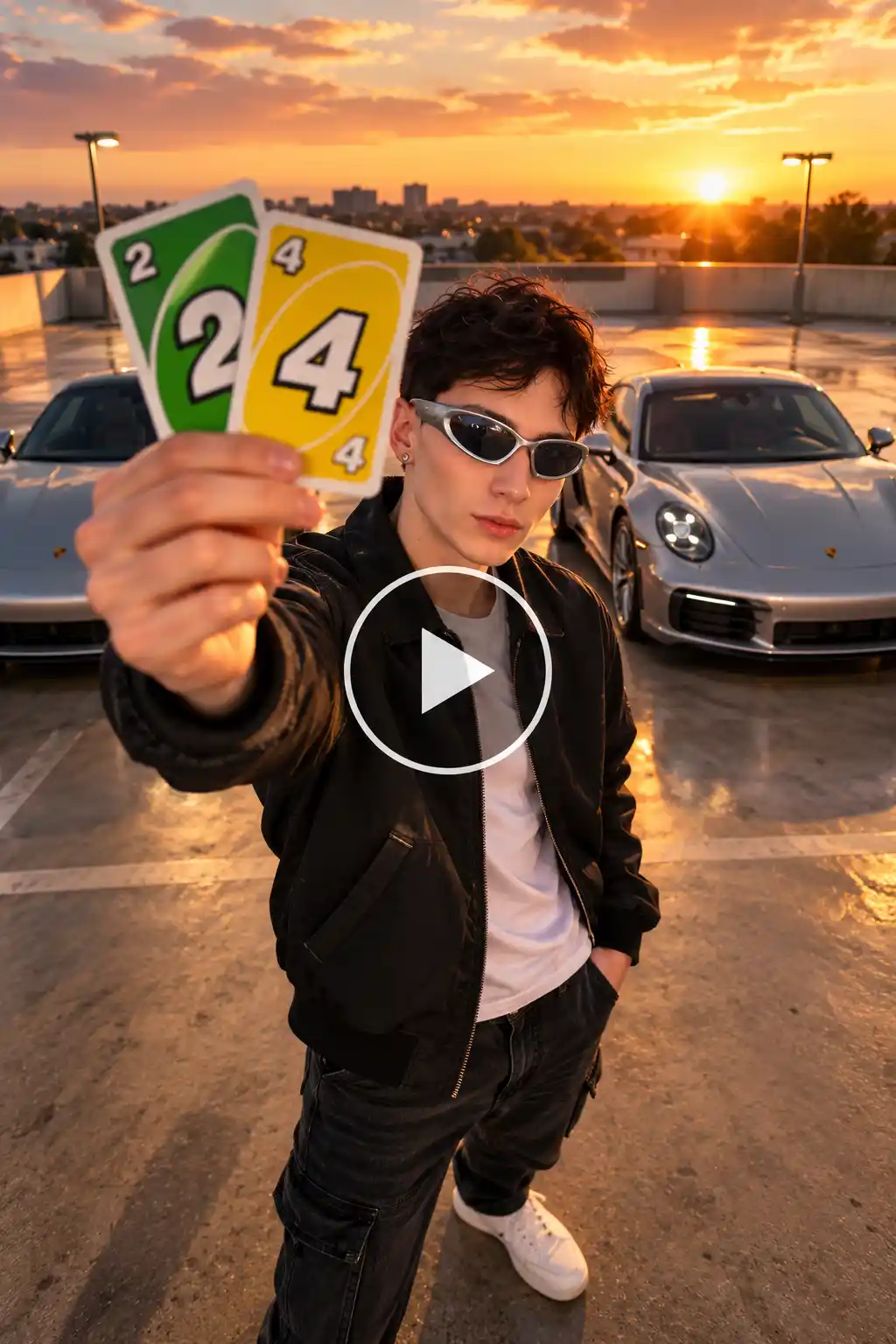
THEME: Classic unforgettable trend. Confident, cinematic, bold.
IMAGE: Image 1 is the person, who can be anyone. Use only the face, hair, skin tone and body build from Image 1. Do not copy its clothes.
CAMERA: A steady camera at chest height, facing the person. It stays still until the cards drop, then slowly pulls back.
BACKGROUND: An empty modern car park at golden hour, with clean concrete floor and soft sun flares. Two silver Porsches wait out of frame.
OUTFIT: Black jacket, white tee, dark jeans, clean sneakers.
ACTION: The person holds two Uno-style cards, a 2 and a 4, in front of the camera so they form 24 and cover the lens. The beat drops, the cards fall away, and the person stands with a calm look. Two Porsches appear behind them. They give a small nod and a half smile to the camera.
RULES: Same face, hair, body and outfit throughout. Only the cards and the cars change. No extra people, text or logos. Smooth, realistic motion.
STYLE: Warm golden cinematic light, realistic, sharp, vertical video.
2. Dream Sports Car Prompt
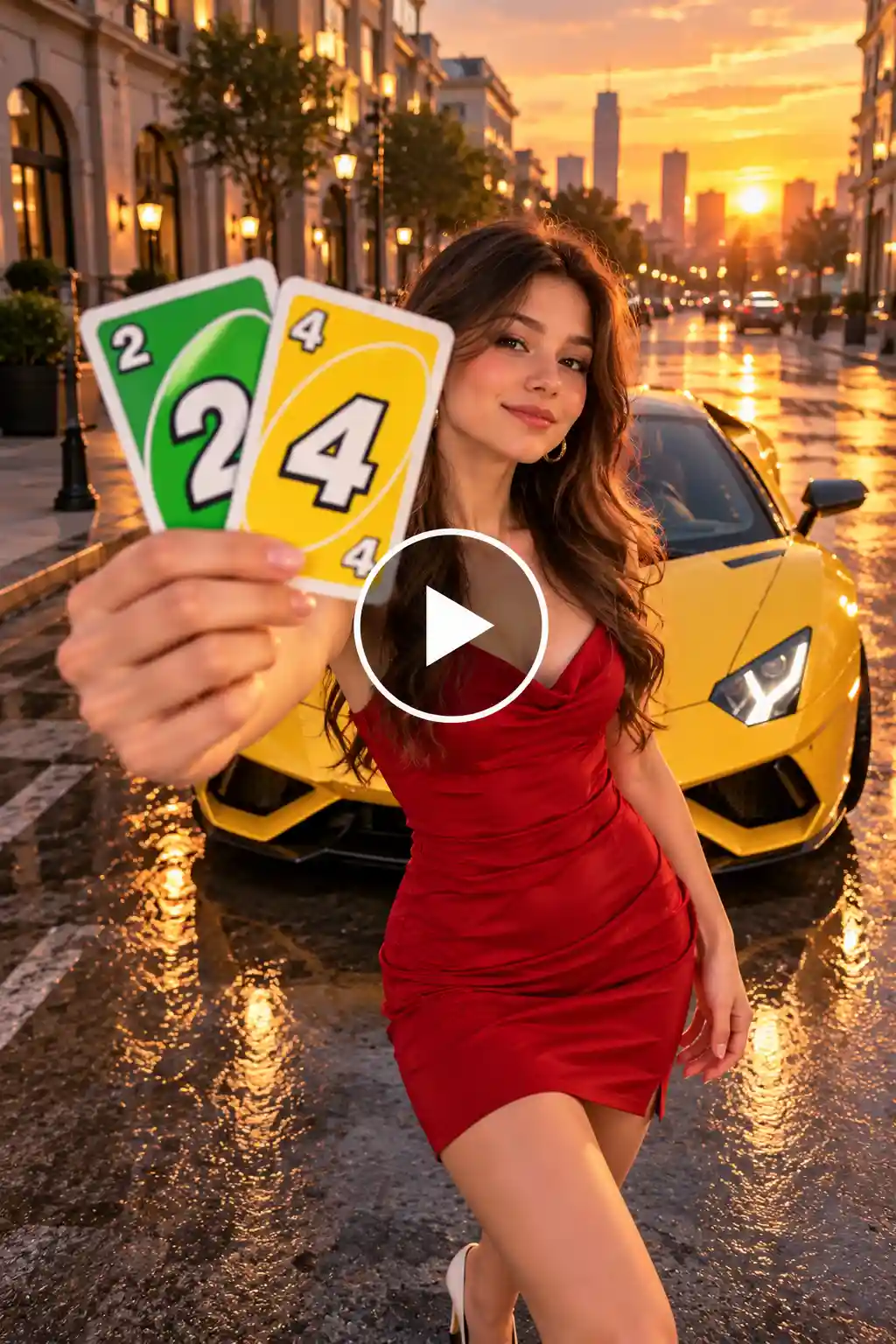
THEME: Dream sports car. Bold, glossy, high energy.
IMAGE: Image 1 is the person, who can be anyone. Use only the face, hair, skin tone, and body build from Image 1. Do not copy its clothes.
CAMERA: A steady camera facing the person. It stays fixed, then moves in slightly after the reveal.
BACKGROUND: A quiet city street at sunset with warm light on the buildings and a wet road that reflects the sky. A bright yellow sports car is parked behind the person.
OUTFIT: Fitted red dress, small gold earrings, white heels.
ACTION: The person holds two Uno-style cards, a 2 and a 4, close to the camera so the whole screen is covered. The cards drop, and the person stands in front of the yellow sports car. They glance at the car, then back at the camera, and smile.
RULES: Same face, hair, body and outfit throughout. The car shape and color never change. No extra people, text or logos. Smooth, realistic motion.
STYLE: Rich sunset color, glossy reflections, cinematic, sharp, vertical video.
3. Walk to the Car Reel Prompt
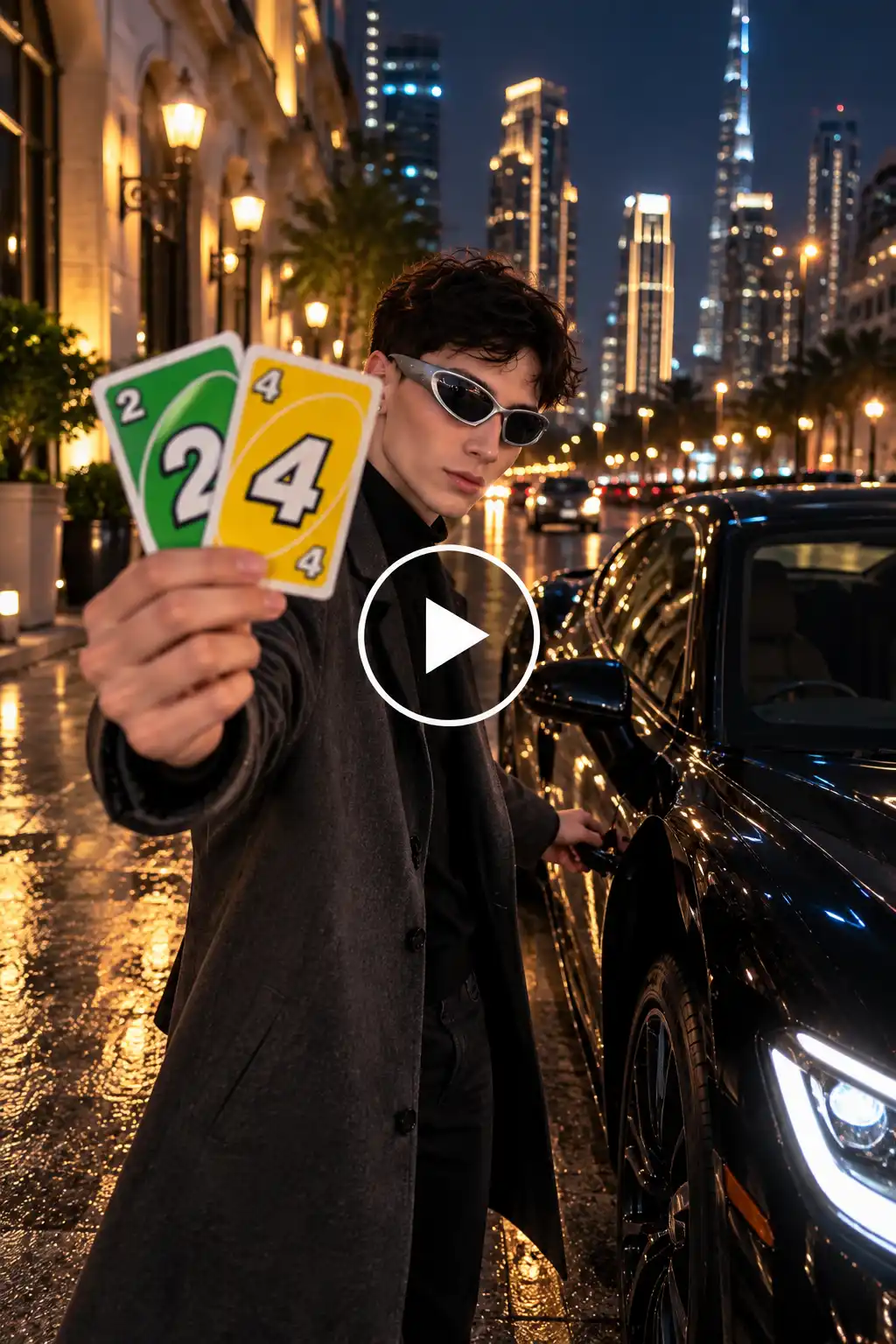
THEME: Luxury car lifestyle. Calm, confident, slow reveal.
IMAGE: Image 1 is the person, who can be anyone. Use only the face, hair, skin tone and body build from Image 1. Do not copy its clothes.
CAMERA: The camera follows from behind at a steady pace, then swings around to show the person’s face as they reach the car.
BACKGROUND: A quiet city street at night with soft street lights and glowing windows. A black luxury car with its headlights on waits at the curb.
OUTFIT: Long charcoal coat, black shirt, dark trousers, polished shoes.
ACTION: The person holds two Uno-style cards, a 2 and a 4, up to the camera, then lowers them and starts walking toward the car. They open the car door, pause, and look into the camera with a calm smile.
RULES: Same face, hair, body and outfit throughout. Only the walk and the reveal change. No extra people, text or logos. Smooth, realistic motion.
STYLE: Dark, moody cinematic light with soft highlights, realistic, sharp, vertical video.
4. Talking to Camera Prompt
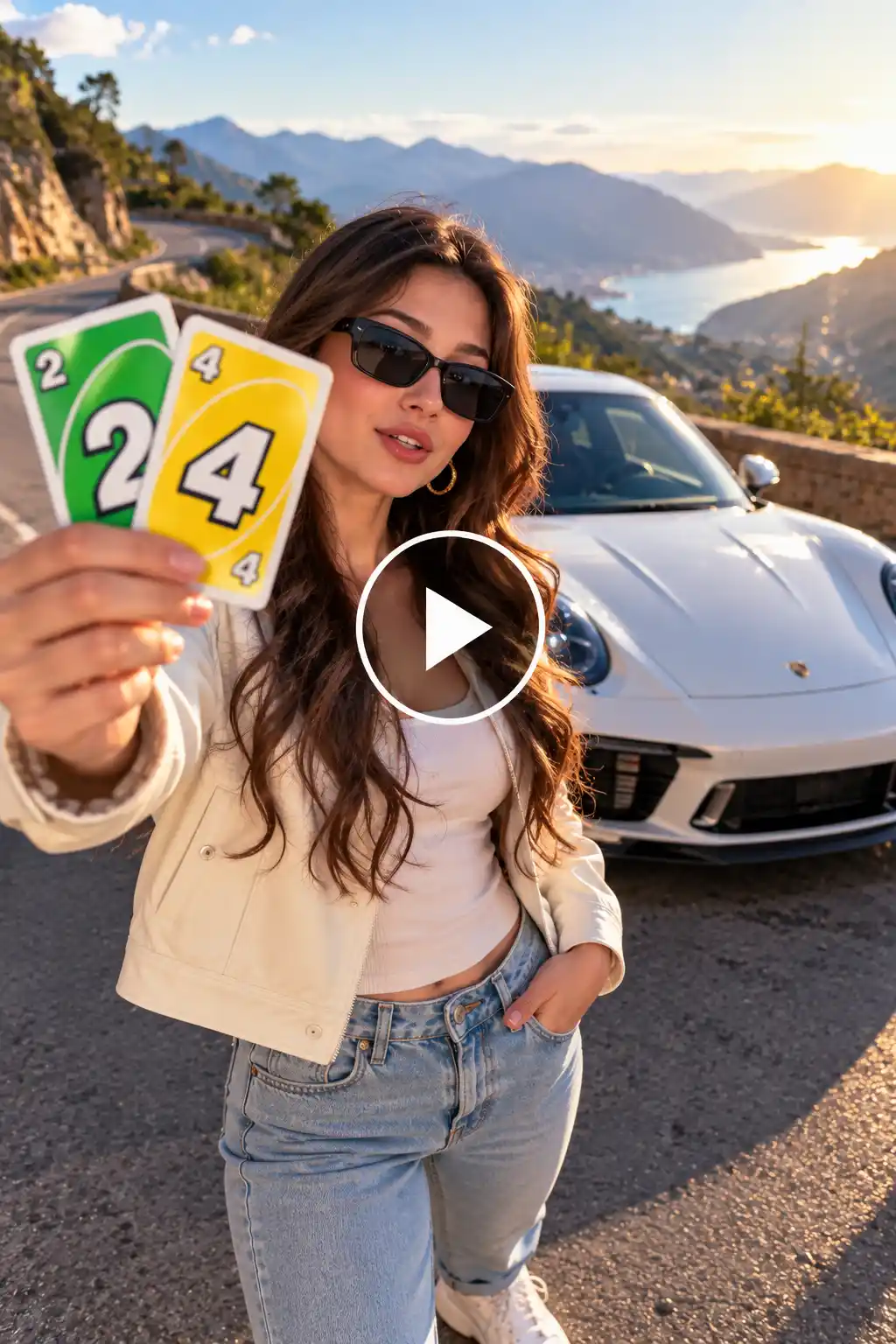
THEME: Cinematic talking-to-camera reveal. Friendly, stylish, scenic.
IMAGE: Image 1 is the person, who can be anyone. Use only the face, hair, skin tone and body build from Image 1. Do not copy its clothes.
CAMERA: A steady camera at face height. It stays still while the person speaks, then pulls back to show the car.
BACKGROUND: A quiet mountain road with soft morning light, green hills and a white sports car parked behind the person.
OUTFIT: Cream jacket, light jeans, white sneakers, dark sunglasses.
ACTION: The person holds two Uno-style cards, a 2 and a 4, over the lens. The cards drop, and the person looks straight at the camera and says one short line. They step aside to show the car behind them and smile.
RULES: Same face, hair, body and outfit throughout. Natural lip movement. No extra people, text or logos. Smooth, realistic motion.
STYLE: Soft morning light, clean colors, cinematic, sharp, vertical video.
How to Use This Trend for Marketing and Promotion
- Car dealerships: Upload a new model and show it with a card reveal. Post it as a “just arrived” Reel and add the price and location in the caption.
- Seasonal sales: Make a festive version with a decorated car for Diwali, Christmas, or the New Year. Post it a week before the festival, while people are shopping.
- Car rental and wedding car services: Show your cars one by one in a single clip, with each reveal on a new beat. It’s a quick way to display your fleet.
- Car detailing and wrap studios: Show the same car in four colors or finishes. Every card drop reveals a new look.
- Car accessory brands: Keep the car the same and change only the wheels, seat covers, or lights to show how one product changes the whole feel.
- Photographers and videographers: Send clients a preview clip before the shoot, so they can pick a favorite style and you skip the long explanations.
- Influencers and creators: Post it as a trend video to get more reach, and end with the question “Which car would you pick?” Comments push the video to more people.
- Giveaways and polls: Ask followers to vote for their favorite car in the comments, then offer a prize or a discount to one lucky voter.
Quick tip: Add your brand name or logo in the caption and the first comment, so people know where to find you after they watch.
Related blog: How to Make the Trendy Rain Dance Video
How to Make the Video With LightX: Step by Step
The whole process takes a few minutes. Here’s how it goes.
Step 1: Upload images
Go to the Reference to Video tool. Add one clear photo of yourself and one photo of the car you want in the reveal. If you don’t have a car, you can mention it in the prompt.
Step 2: Write a prompt
Describe the Uno-style cards forming 24, the cards dropping, and you standing in front of the car. Add “same face, same outfit,” so you look like you.
Step 3: Pick a model
Choose Wan or Seedance, whichever gives you the smoother reveal.
Step 4: Set your options
Choose a vertical ratio, a 5-10 second length, the highest resolution, and audio if you want music.
Step 5: Click Generate
Your video is ready in moments. Check the card drop and the car, then regenerate if anything looks off. Add the trending audio in your Reels or TikTok editor before you post.
5 Reasons to Make the Unforgettable Trend with LightX
1. Join a trend people already love
The card drop and the car reveal are going viral right now. People watch these clips again and again just to see the moment the cards fall. Making yours with LightX puts you in front of an audience that is already looking for this kind of video.
2. Skip the hard part of the trend
The real trend needs a car, a location, a camera, and a lot of timing. It’s easy to get the beat wrong. With LightX, the AI keeps the camera, the car, and your pose steady, so you can make an unforgettable video with AI on the first try.
3. Get the reveal without editing
The best moment in this trend is the second the cards drop. Doing that by hand takes careful cutting and timing. LightX builds the reveal into the video, so it looks smooth and natural.
4. Make your own version of the trend
Most people post the same few clips. With LightX, you can use your own photo, your own car, and your own theme, like a sports car, a luxury car, or a sunset drive. That makes your video different from everyone else’s.
5. Post while the trend is hot
Trends fade fast, and a video made in a few minutes gets posted while people are still watching this one. The tall video size fits Reels, TikTok, and Shorts, so you can download it and share it right away.
Related blog: How to Make A Carpool Video
Tips for the Best Results
- Keep the scene simple: One person, one car, one place. Extra details confuse the AI.
- Add “same face, same outfit”: This keeps you looking like you from the first frame to the last.
- Say what the cards show: Write “a 2 and a 4 forming 24” so the numbers come out clearly.
- Name the car: Mention the color and type, like “yellow sports car,” instead of just “nice car.”
- Be specific about the moment: Say “the cards drop, then the car appears” so the order stays right.
- Say the camera angle: Use “steady camera at chest height” so the view stays the same.
- Match the lighting: Add one lighting word, like “golden hour” or “moody night light,” so the mood stays consistent.
- Test and tweak: If one part looks off, change just that line in the prompt and generate again.
Conclusion
The unforgettable AI trend is popular because it’s simple, quick, and fun to watch. You don’t need a car, a crew, or editing skills. You need a photo, a clear prompt, and about five minutes. Now you know how to make an unforgettable AI video: pick your theme, copy a prompt, tweak the car and outfit, and let LightX do the rest. Then watch the cards drop, and the car appear.
FAQ
What photo works best for an unforgettable AI video?
Use a clear, bright photo of your face, looking straight at the camera. Avoid sunglasses, heavy filters, and group photos. A full-body photo also works, but a simple portrait is enough.
Can I add my own car or props to the video?
Yes. Upload a photo of your car, or describe it in your prompt with its color and type. You can also mention props like the Uno-style cards, so they show up exactly how you want.
What aspect ratio and video length should I use?
Go with 9:16, the tall size used on Reels, TikTok, and Shorts. Keep the video between 5 and 10 seconds, which is long enough for the card drop and the car reveal.
Should I label the video as AI-generated?
Yes, it’s a good idea. A short note like “Made with AI” in the caption keeps things honest and builds trust with your viewers. Some platforms also have their own AI label option, so use it when you post.
 Create the Rain Dance Trend ♫
Upload your image and create rain dance music video
Create the Rain Dance Trend ♫
Upload your image and create rain dance music video