If you spend any time on TikTok or Instagram these days, you have probably seen the wassup in a minute trend everywhere. Short videos of people or anime characters gently swaying side to side on a catchy beat keep showing up on feeds. Some show stylish streetwear anime characters on a clean white background. Others show three friends dancing together on a misty green hillside. Both versions feel fun, simple, and strangely addictive.
 Follow Us for Daily Trends
Get new prompts and creative ideas every day.
A lot of people are now searching for how to make a wassup in a minute ai video because the trend looks cool but seems hard to recreate by hand. The good news is that you do not need any dancing skills, editing experience, or drawing talent. With the right photo and an AI tool, you can make your own version in just a few minutes. Whether you want the anime look or the real-person field dance style, this blog will walk you through everything step by step in simple language.
In this blog, you will learn what the trend actually is, where it came from, which song is used, the difference between the two main styles, and the easiest ways to create your own Wassup in a Minute dance video from a photo. Let’s get into it.
What Is the Wassup in a Minute Trend?
The Wassup in a Minute trend is a 10–15 second AI video format based on a viral dance to the line “wassup, been a minute.” People commonly search it as wassup been a minute, “What’s Up Been A Minute,” or “wassup in a minute,” even though the lyric is technically “been a minute.”
There are two main styles:
- Anime sway: A hand-drawn, streetwear-style anime character of you sways side to side on a white background, usually holding cash and wearing a black puffer jacket, white tee, chain, baggy jeans, and sneakers.
- Hillside dance: You and two friends are placed into a three-person dance on a misty green hillside, with four quick shots, a close-up on the middle dancer, and a wide final shot.
It is blowing up because the format is easy to recreate, highly recognizable, and works for solo creators, friend groups, couples, and even pets. The viral Wassup in a Minute video trend also benefits from the familiar Jersey club beat, which makes the moves feel instantly satisfying.
How to create the Wassup in a Minute trend
Using a Ready-Made Template (Easiest Way)
Step 1: Upload your photos
Pick one clear full-body photo for the solo anime sway version, or three photos—one person per dancer—for the hillside group version. Make sure faces, outfits, and full bodies are easy to see.
- Solo version: Upload one clear photo of yourself.
- Trio version: Upload three photos, one for each dancer.
- Pet version: Upload one clear full-body photo of your pet.
Step 2: Choose the Wassup in a Minute template
Select “Wassup in a Minute Anime Sway” for the streetwear anime version, or “Wassup in a Minute Hillside Dance” for the misty green hillside three-person dance.
The AI will automatically add the side-to-side sway, head nods, group dance, close-up on the middle dancer, and final wide shot. For the hillside version, upload photos in the order you want them to appear; the first photo is usually the middle dancer who receives the close-up.
Step 3: Tweak the background if you want
Keep the original look for the most recognizable result:
- Anime version: Plain white background.
- Hillside version: Misty green hillside with a lake and mountains.
If you want a variation, type something simple like “soft morning fog over a grassy hillside,” “golden-hour hillside with light mist,” or “dreamy green field with distant mountains.” Avoid changing the setting too much, because the recognizable hillside look is a major part of the wassup in a minute field dance AI video trend.
Step 4: Set it to vertical
Choose 9:16 so the video fits perfectly on TikTok, Instagram Reels, and YouTube Shorts. Keep all three dancers fully visible, especially their hands, feet, and the final wide shot.
Step 5: Hit Generate and download
Click Generate, wait a few minutes, then preview the video. Check that the faces stay consistent, the dance matches the beat, and the final wide shot includes everyone. Download the MP4 and add the official trending sound if your export does not already include it.
If you want to make a video from scratch, use the Image to Video tool. LightX lets you upload an image, describe the animation, generate the video, and download it as an MP4.
Using Reference to Video (Step-by-Step Guide)
Step 1: Open the reference-to-video tool
Open LightX’s Reference to Video tool. It supports up to five reference images, a custom prompt, model selection, and settings for aspect ratio, video length, resolution, and audio.
Step 2: Upload your photo(s)
Upload one full-body photo for the anime sway version, or three photos for the hillside group dance. Good lighting and clear faces work best.
For the hillside version, upload your photos in this order:
- Image 1: Middle dancer — this person gets the close-up.
- Image 2: Right-side dancer.
- Image 3: Left-side dancer.
Step 3: Use a reference video (optional)
If you have the original Wassup in a Minute dance video from photos, upload it as a reference and tell the AI:
“Replace the three dancers with the people in my uploaded photos. Keep the same misty green hillside, low camera angle, group sway, close-up on the middle dancer, side-by-side dance, and final wide shot. Preserve the original choreography, timing, and camera cuts. Keep each person’s face, hairstyle, and outfit consistent throughout.”
Step 4: If you don’t have a reference clip, write a simple prompt
Use this Wassup in a Minute AI video prompt:
“Three people from my uploaded photos dance together on a misty green hillside with a lake and mountains in the background. They perform the viral Wassup in a Minute dance: gentle side-to-side sway, a close-up on the middle dancer, a side-by-side group dance, then a final wide shot. Keep the faces, outfits, and body proportions consistent. Natural movement, cinematic lighting, low camera angle, 15 seconds, vertical 9:16 video.”
For the anime sway version, use:
“Turn the person in my uploaded photo into a semi-realistic streetwear anime character. They wear a black puffer jacket, white T-shirt, silver chain, baggy jeans, and sneakers, and hold cash in one hand. On a plain white background, they sway side to side and nod their head to a Jersey club beat. Keep the face recognizable, maintain consistent proportions, use clean anime shading, and create a 10-second vertical 9:16 video.”
Step 5: Choose the model and settings
Start with Wan 3.0 or Seedance 2 Fast for a quick test. For the final version, use Seedance 2.5 or Wan 3.0 Prime, which LightX recommends for higher fidelity, native audio, cinematic motion, and consistent characters.
Set:
- Aspect ratio: 9:16
- Length: 10–15 seconds
- Resolution: Highest available
- Audio: Add the Jersey club sound if the tool supports native audio; otherwise, add the sound when posting
Step 6: Generate, review, and export
Click Generate, then watch the full clip before posting. If the faces drift, hands look unnatural, or the choreography does not match the beat, regenerate using a cleaner photo or a more specific prompt.
LightX recommends referring to images by their order, keeping one main action per clip, and describing the camera movement and lighting for better results.
Quick Tips for Better Results
- Use a sharp, front-facing photo with even lighting.
- Keep outfits simple; logos, patterns, hats, and sunglasses can reduce likeness accuracy.
- Put your most expressive friend in the middle for the hillside close-up.
- Generate a short test first, then create the final version once the look is right.
- Label the post as AI-generated when TikTok or Instagram offers the option.
Origin of the Wassup in a Minute Trend & Song Used
The sound came first. In January 2026, a producer named zbee released a Jersey club remix of Drake’s old song “From Time” (the one with Jhené Aiko). The short looping part sounds like “wassup, been a minute” to most people. That became the trend’s audio.
In late October 2026, an animator called ristyisvalid posted four anime-style streetwear characters swaying on a white background using that sound. The video blew up. The next day, he posted another one with the caption “Wassup in a minute,” and the name stuck.
Around the same time, creator Niana Guerrero posted a real-life version of the style, with two friends dancing on a misty hillside in Switzerland. That became the second popular style.
The anime look is often linked to “Atlanta Lock,” a fan style in which Blue Lock anime characters are redrawn as Atlanta rappers wearing big jackets, chains, and baggy clothes.
Anime Sway vs Hillside Dance Versions
Both versions use the same sound, but they look completely different. Choose the one that matches your content style: anime for a solo, stylized edit; hillside for a group or pet version.
|
Feature |
Anime Sway Version |
Hillside Dance Version |
|
Main look |
Streetwear anime character of you |
Three real-looking AI dancers |
|
Background |
Plain white, cut-out sticker style |
Misty green hillside, lake, and mountains |
|
People needed |
One clear photo |
Usually three photos, one per dancer |
|
Movement |
Side-to-side sway, head nods, cash flick |
Group sway, close-up, side-by-side dance, wide finish |
|
Best for |
Solo creators, anime fans, profile-style edits |
Friends, couples, families, pets, group content |
|
Typical length |
About 10 seconds |
About 15 seconds |
|
Format |
Usually 9:16 vertical |
Often 16:9 or 4:3-style original format, though vertical versions can be made |
The anime sway trend is the closest version to the original Atlanta Lock edit: a semi-realistic anime drawing of you in oversized streetwear, swaying about twice per second. The field dance trend, meanwhile, recreates Niana Guerrero’s hillside choreography with a lead close-up and three-person group formation.
Why People Say “Wassup in a Minute” Instead of “Been a Minute”
“Wassup in a Minute” and “Wassup Been a Minute” refer to the same viral sound, but the second version is closer to the actual lyric. In zbee’s Jersey club remix of Drake’s “From Time” featuring Jhené Aiko, the repeated hook is “wassup, been a minute,” which many viewers mishear as “wassup in a minute.” The mishearing became so common that “Wassup in a Minute” turned into the main trend name and hashtag, while “Wassup Been a Minute” is still widely used in captions, searches, and video titles. Both terms point to the same AI dance trend, so using either hashtag can help people find your version.
Trending prompts to try today (Copy-and-Paste Prompts)
1. Three-Person Hillside Version
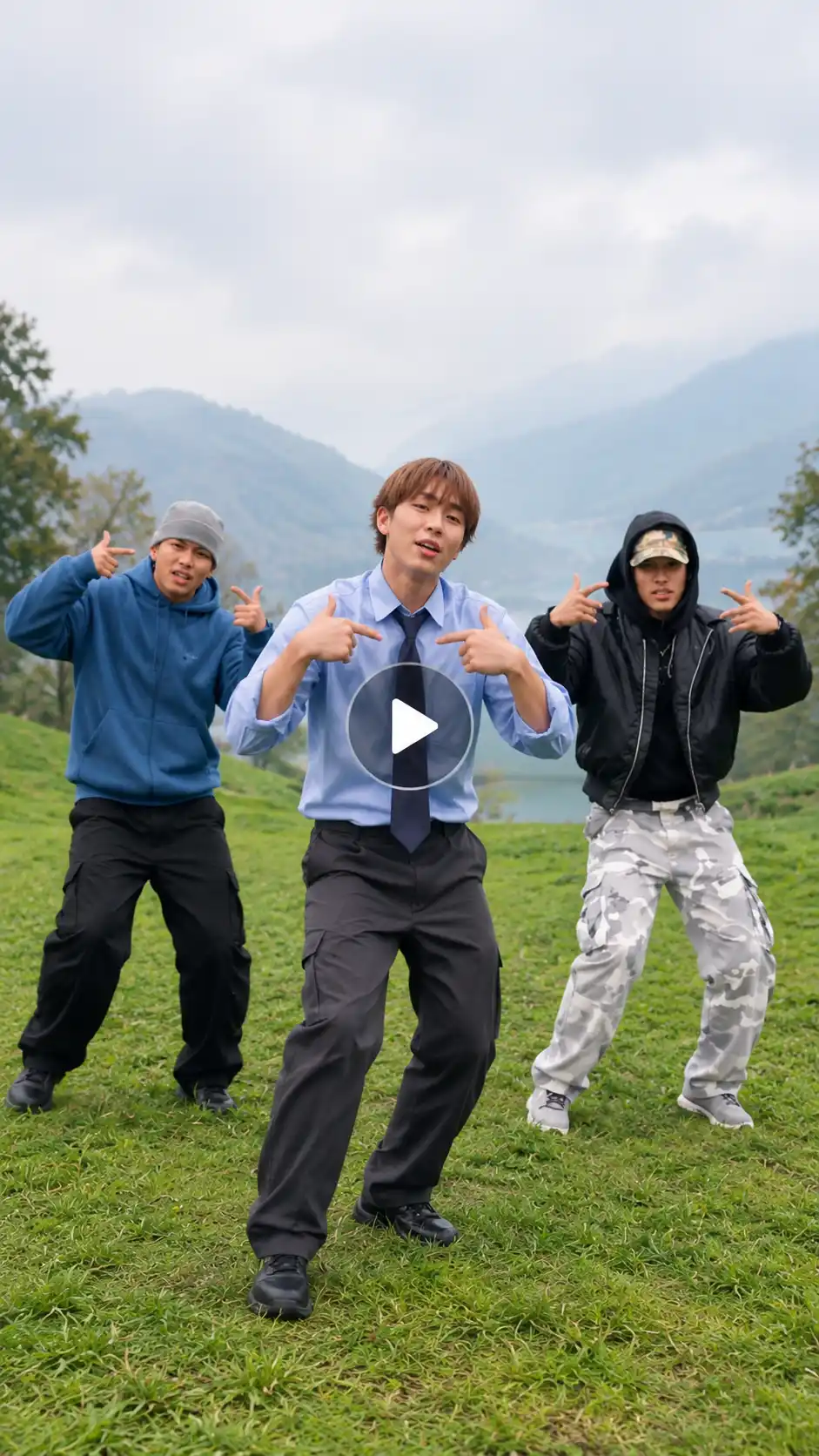
Use the three people in my uploaded reference photos as the three dancers.
Upload Pic 1: Middle dancer — this person gets the close-up.
Upload Pic 2: Right-side dancer.
Upload Pic 3: Left-side dancer.
Replace only the dancers in the source video. Keep the original misty green hillside, lake, mountains, camera cuts, choreography, timing, and lighting exactly the same.
Create a 15-second vertical 9:16 AI dance video on a misty green hillside above a calm lake, with soft fog, grass, distant mountains, and overcast daylight.
0–4 seconds: All three people begin in a loose row close to the camera. They bounce lightly on their feet, sway side to side, and walk slowly toward the camera. On the beat, all three place both hands on top of their heads in a playful mock-panic pose, then move their hands down to their necks.
4–7 seconds: Cut to a chest-up close-up of the middle dancer from Upload Pic 1. They step slightly forward, look directly at the camera, smile, and lip-sync the lyric: “Wassup, been a minute.” They point both thumbs toward their chest, then make playful finger-gun and hand gestures while the two dancers behind them continue dancing with their arms raised.
7–11 seconds: Cut back to a medium-wide shot. All three dancers stand shoulder to shoulder, sway side to side, bounce to the Jersey club rhythm, and shuffle one step forward together.
11–15 seconds: Finish with a wide shot from the slope. The three dancers spread apart across the hillside and freestyle naturally to the final beat.
Keep each person’s face, hairstyle, skin tone, age, gender, and outfit exactly consistent with their reference photo in every shot. Preserve natural fingers, full bodies, stable left-center-right identities, and no face swaps. Do not add extra people, text, logos, watermarks, celebrity likenesses, or sudden cuts. Use realistic human movement, natural lighting, and a low cinematic camera angle.
2. Anime Three-Person Version
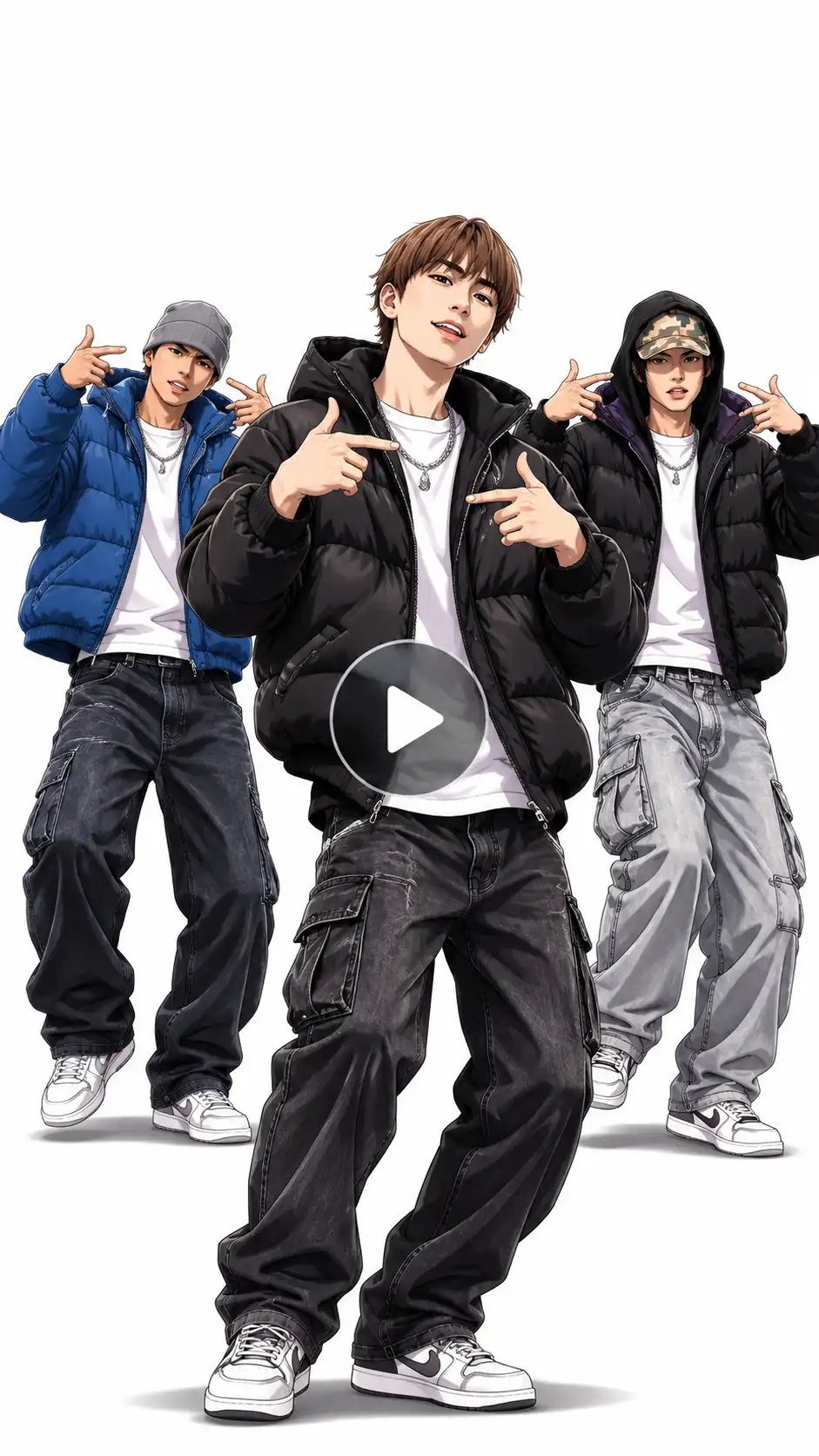
Turn the three people in my uploaded reference photos into original semi-realistic 2D anime streetwear characters.
Upload Pic 1: Middle anime dancer — this person gets the close-up.
Upload Pic 2: Right-side anime dancer.
Upload Pic 3: Left-side anime dancer.
Keep each person’s face, facial features, skin tone, hairstyle, gender, age, and body proportions recognizable and consistent with their reference photo throughout the video.
Dress all three anime characters in stylish streetwear: black puffer jackets, white T-shirts, silver chains, baggy jeans, and clean sneakers. Give each character a slightly different color accent so they remain easy to tell apart, while keeping the overall look cohesive.
Place the three characters on a clean, plain white background with soft drop shadows beneath their feet. They perform the viral Wassup in a Minute anime sway: rocking smoothly side to side from the feet, nodding their heads to a Jersey club beat, shifting their shoulders, and keeping their feet planted.
0–4 seconds: All three characters sway gently side to side and nod their heads on every beat.
4–7 seconds: Cut to a chest-up close-up of the middle character from Upload Pic 1. They look directly at the camera, smirk confidently, and lip-sync the lyric: “Wassup, been a minute.” The other two characters continue swaying behind them.
7–11 seconds: Cut back to a medium-wide shot. All three characters sway side to side, bounce lightly, and move their shoulders to the rhythm.
11–15 seconds: Finish with a wide shot as the three characters spread apart slightly and freestyle naturally to the final beat.
Use clean anime shading, sharp linework, stylish streetwear details, and confident expressions. Keep the background completely white and unchanged, with no extra objects, people, text, logos, or watermarks.
Create a 15-second vertical 9:16 video with a fixed camera, smooth natural motion, consistent character designs, and no face distortion. The final result should look like a polished anime sticker-style dance edit made for Instagram Reels and TikTok.
3. Pet Solo Hillside Version
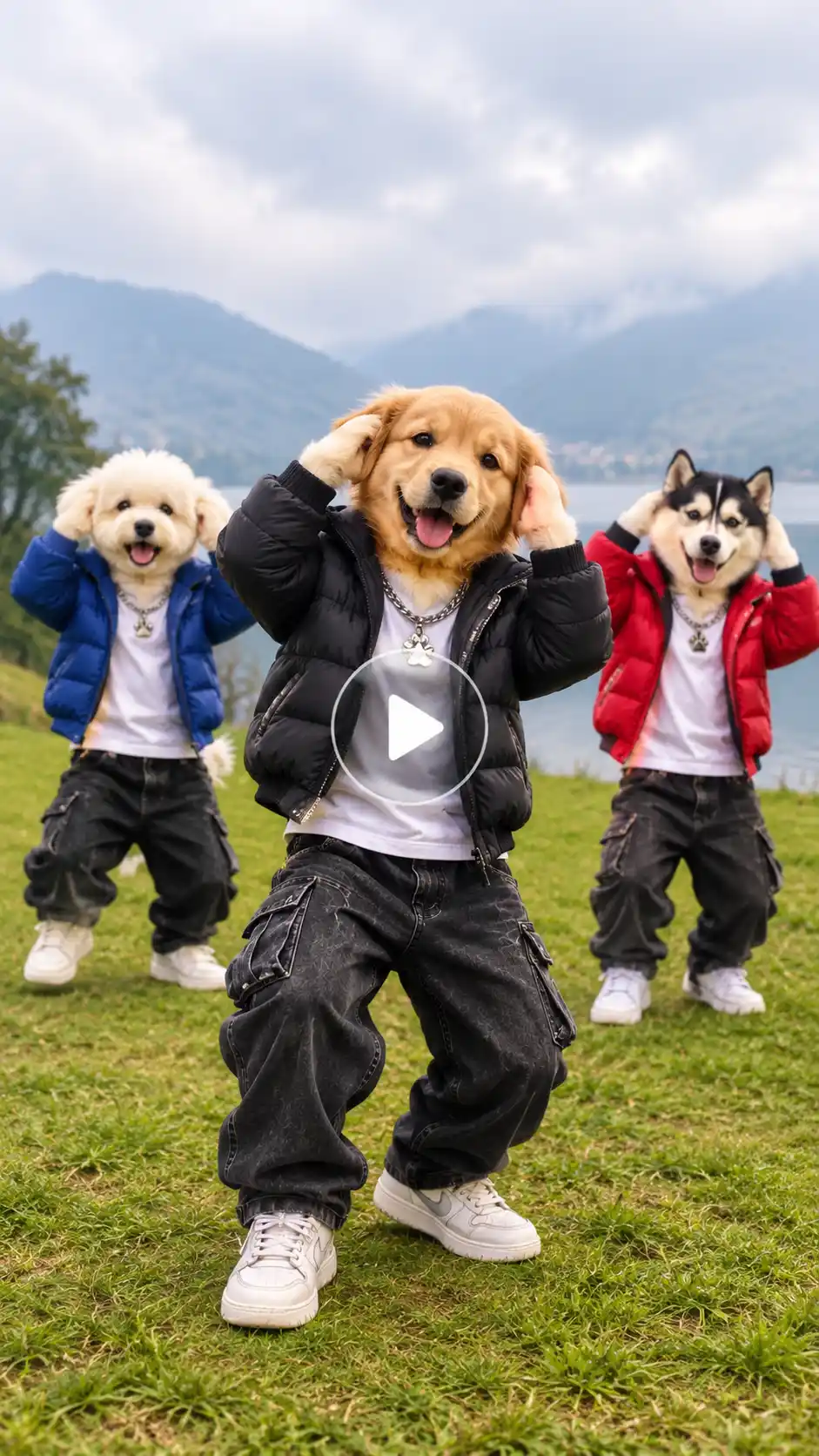
Use the pet in my uploaded reference photo as the lead dancer.
Upload Pic 1: Lead pet — place this pet in the center position and use it for the close-up.
Replace only the center dancer in the source video. Keep the other two pets, misty green hillside, lake, mountains, camera cuts, choreography, timing, and lighting unchanged.
Create a 15-second vertical 9:16 AI dance video on a misty green hillside above a calm lake. The three pets stand upright on their hind legs in a loose row close to the camera, bounce lightly, and take small steps toward the lens. On the beat, all three raise their front paws to the tops of their heads, then move their paws to their necks.
4–7 seconds: Cut to a close-up of the lead pet from Upload Pic 1. It steps forward, looks directly into the camera, tilts its head, smiles playfully, and makes small paw gestures as if it is lip-syncing the lyric: “Wassup, been a minute.” The other two pets continue dancing behind it.
7–11 seconds: Cut back to a medium-wide shot. All three pets stand shoulder to shoulder, sway side to side, bounce to the Jersey club rhythm, and shuffle one step forward.
11–15 seconds: Finish with a wide shot as the three pets spread apart across the slope and freestyle naturally.
Keep the lead pet’s breed, fur color, markings, face, ears, tail, and body proportions exactly consistent with the uploaded photo. Preserve realistic fur, natural paw movement, stable identities, and no face swaps. Do not add humans, extra pets, text, logos, watermarks, or distorted anatomy. Use soft cinematic lighting, a low camera angle, and smooth transitions.
4. Solo Hillside Version
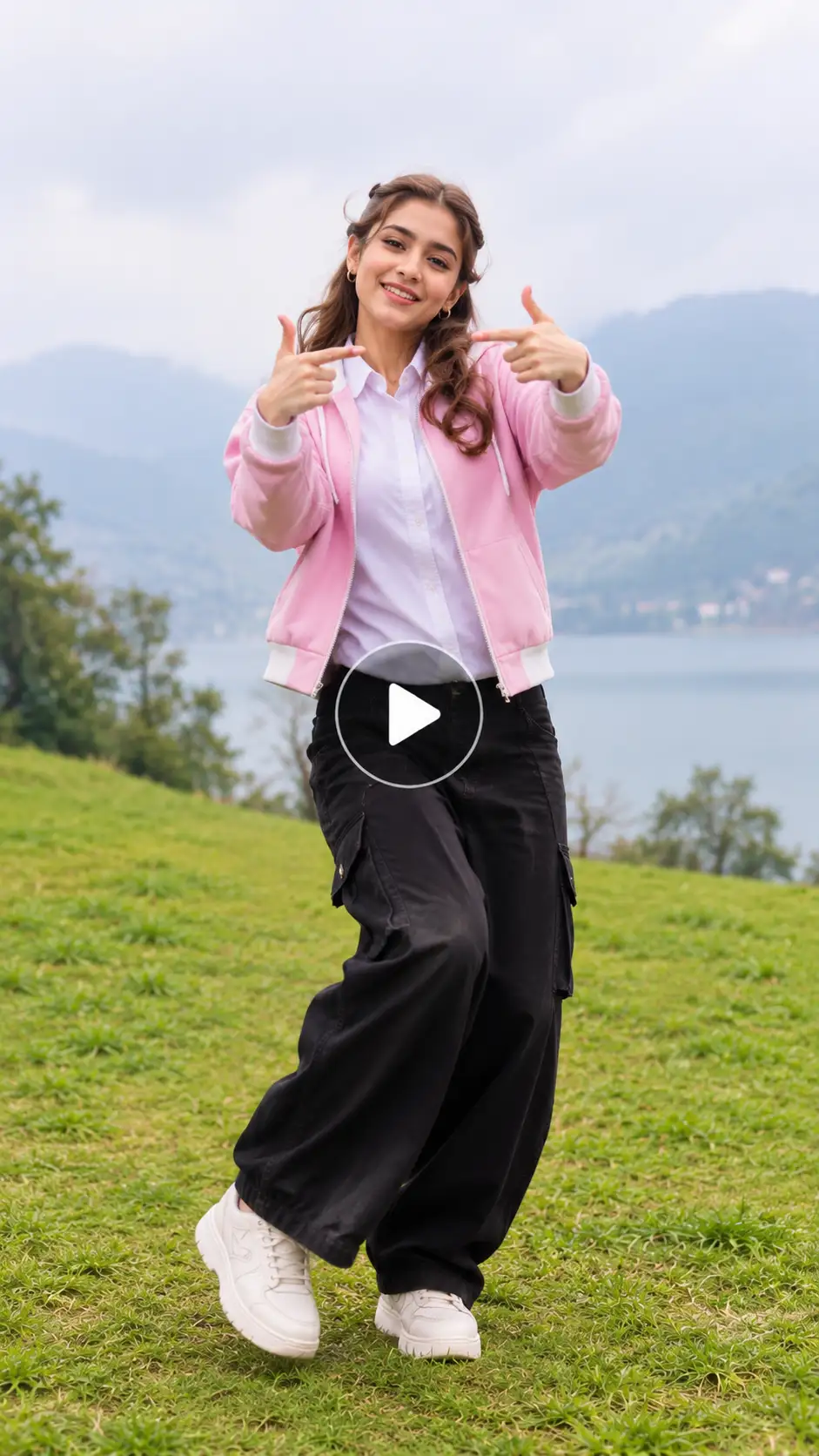
Use the person in my uploaded reference photo as the lead dancer.
Upload Pic 1: Lead dancer — place this person in the center position and use them for the close-up.
Replace only the center dancer in the source video. Keep the other two dancers, misty green hillside, lake, mountains, camera cuts, choreography, timing, and lighting unchanged.
Create a 15-second vertical 9:16 AI dance video on a misty green hillside above a calm lake. The three dancers begin close to the camera in a loose row, bounce lightly, and walk toward the lens. On the beat, all three place both hands on their heads, then move their hands to their necks.
4–7 seconds: Cut to a chest-up close-up of the lead dancer from Upload Pic 1. They step forward, look directly into the camera, smile, and lip-sync the lyric: “Wassup, been a minute.” The lead dancer points both thumbs toward their chest, then performs playful finger-gun and hand gestures while the two background dancers continue dancing naturally behind them.
7–11 seconds: Cut back to a medium-wide shot. All three dancers stand shoulder to shoulder, sway side to side, bounce to the Jersey club rhythm, and shuffle one step forward.
11–15 seconds: Finish with a wide shot as the three dancers spread apart across the slope and freestyle to the final beat.
Keep the lead dancer’s face, hairstyle, skin tone, age, gender, and outfit exactly consistent with the uploaded photo in every shot. Preserve natural fingers, realistic movement, stable identities, and no face swaps. Do not add text, logos, watermarks, celebrity likenesses, or extra people. Use soft overcast lighting, a low cinematic camera angle, and smooth transitions.
Pro Tips to Make Your Video Stand Out
- Use a clear photo. A front-facing, well-lit photo with a visible face produces more consistent AI results than a blurry or angled selfie.
- Put the strongest person in the middle. In the hillside format, the middle dancer gets the close-up, so choose the person with the most expressive photo.
- Keep outfits simple. Busy patterns, logos, hats, and sunglasses can confuse the AI or reduce likeness accuracy.
- Make a series. Post an anime version, a trio version, and a pet version as separate Reels rather than cramming them into one video.
- Match the beat. The sway should feel locked to the Jersey club rhythm—roughly two side-to-side movements per second in the anime format.
- Avoid over-editing. The trend works because it is short, recognizable, and repetitive; excessive filters, captions, or effects can distract from the dance.
Related blog: How to make a smooth criminal dance AI video
How to Post Your Wassup in a Minute Video for Maximum Reach
Post it as a trending What’s Up in a Minute video using the official sound whenever possible.
- Use the sound from the beginning, so viewers immediately hear “wassup.”
- Add hashtags such as #wassupinaminute, #atlantalock, #animation, #AIvideo, #Reels, and #TikTokTrend.
- Turn on the AI-generated content label when the platform offers one; the video depicts an AI version of you, not a real filmed dance.
- Keep the caption short and conversational, such as: “Finally made the wassup in a minute AI video with the crew.”
- Post a vertical 9:16 version for Reels, TikTok, and YouTube Shorts; retain a wider version only if you want to preserve the original cinematic framing.
- Reply to early comments and encourage friends to make their own versions; group participation is a major reason this AI group dance format spreads.
Related blog: How To Make Uptown Funk AI Video
Final Thoughts
The wassup in a minute AI video is one of the easiest viral formats to join because it needs only a photo—or three photos—and a ready-made template. Whether you choose the streetwear anime character version or the misty hillside three-person dance, keep the faces consistent, use the official sound, and post vertically for the best chance of reaching the trend’s audience.
Try one solo anime edit first, then make a group version with friends or pets. The trend rewards quick, recognizable participation,not perfection.
FAQs
Can I make a Wassup in a Minute video with my pet?
Yes. You can upload a clear full-body photo of your pet in LightX and use it as the lead dancer in the hillside version. The AI can make the pet stand upright, sway, and move along with the dance.
How long does it usually take to generate a Wassup in a Minute AI video?
In LightX, it usually takes a few minutes, depending on the AI model, video length, resolution, and how busy the servers are.
Can I use the generated video for commercial purposes or ads?
It depends on LightX’s terms and the assets you use. Many AI tools allow personal use only, so check the commercial-use policy before using the video in ads, sponsored posts, or client work.
Why does my face look different or distorted in the final AI video?
This often happens when the original photo is blurry, dark, cropped, or taken from a bad angle. Use a clear, front-facing, well-lit photo in LightX for the best face consistency.
Can I create a vertical (9:16) version of the hillside dance?
Yes. In LightX, choose the 9:16 aspect ratio before generating. The original hillside style is often wider, so avoid cropping too much or the dancers may be cut out of the frame.
What happens if the AI generation fails or looks bad?
You can regenerate the video in LightX. Try a clearer, brighter photo, simplify the outfit, or adjust the prompt to keep the faces, bodies, and dance movements more consistent.
 Gas Up the Trend ⛽🔥
Create your own gas station trend in seconds.