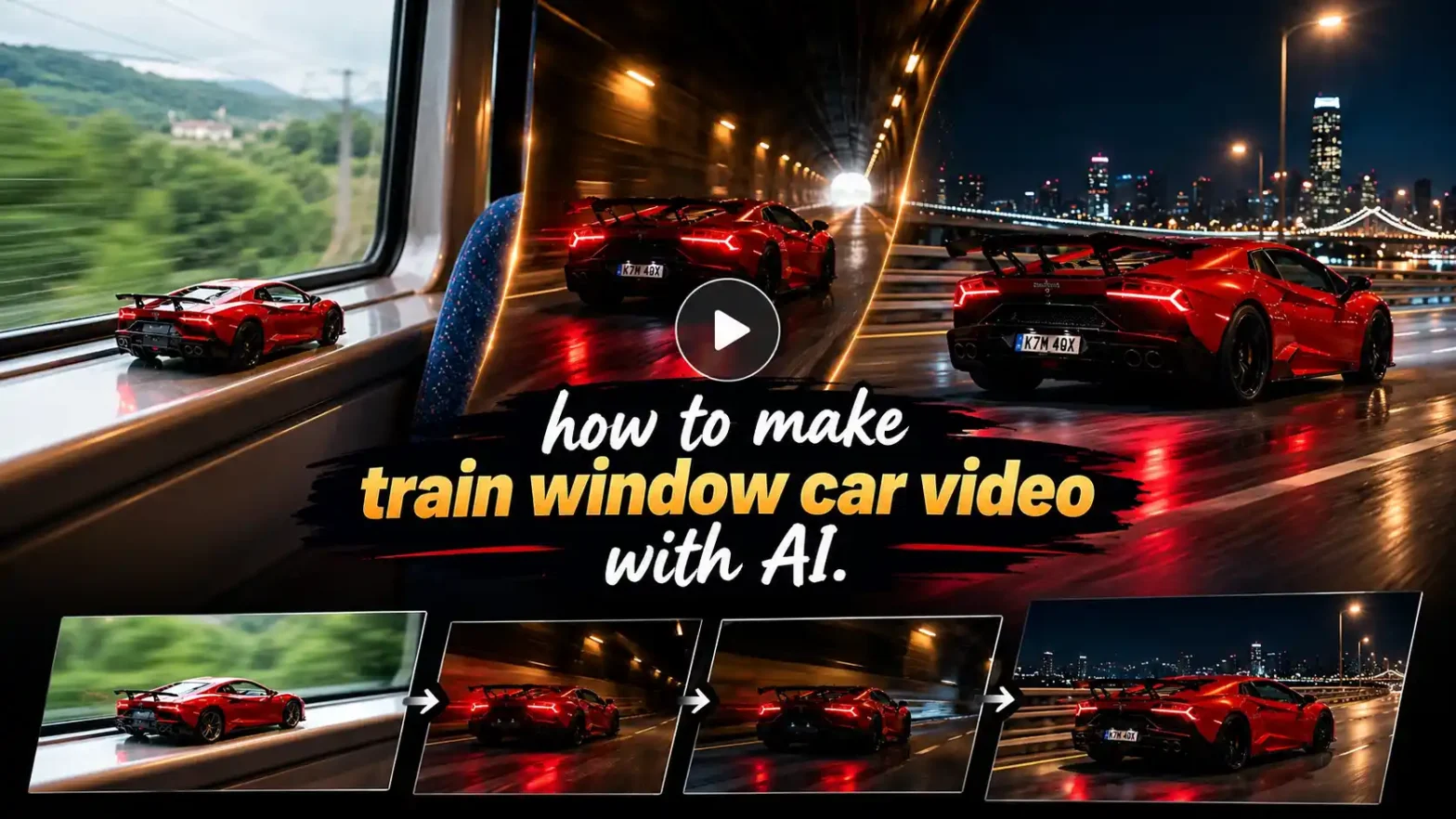
You’ve definitely seen it by now: that little toy car just sitting on a train window, the train goes into a tunnel, and boom, the same car is suddenly full-size and racing down the road. That’s the train window car AI video everyone’s making right now on Instagram Reels.
 Create the Viral Car Blast 🚗🔥
Upload your image and create a dramatic cinematic car blast.
Create the Viral Car Blast 🚗🔥
Upload your image and create a dramatic cinematic car blast.
If you’ve been curious about how to make a train window car video with AI yourself, this blog keeps it simple and actually works.
What Is the Train Window Car Video Trend?
It’s basically a miniature car video that feels like pure magic. You start with a small toy (or AI-generated toy) of a real car resting on the windowsill inside a moving train. As the train hits a tunnel, the scale flips. The window frame disappears, the toy grows into the full-size car, and it drives out onto the road like it was always meant to be there.
People call it the toy car on train window video, the viral tiny car AI trend, or the car driving out of train window video. Whatever you call it, it spread so fast for one reason: it looks expensive, it’s super personal (you can use your own car), and the transition just hits. One clear photo of a car is all it takes, and AI does the heavy lifting.
What You Need Before You Start
Honestly, not much:
- One decent photo of the car you want (side view or three-quarter angle works best — clean lighting, whole car visible)
- An AI video tool that accepts a reference image (image-to-video tool; we also have different models like Kling, Veo, wan, seedance, etc.
- A solid prompt that tells the AI, “This is the exact car, don’t change it”
- Vertical 9:16 settings so it looks right on Reels and TikTok
That’s the whole list. No fancy camera, no real toy, no editing skills required.
How to Make Train Window Car Video with AI (Step by Step)
Here’s the exact process most people are using right now:
- Open the image-to-video tool.
- Upload your car photo. Make sure it’s sharp and shows the full body. This becomes the reference so the AI doesn’t invent a different car.
- Paste a clear prompt that describes the train window start, the tunnel moment, and the final driving scene. Tell it explicitly to keep the car identical from toy to real.
- Set it to 9:16 vertical and around 8–12 seconds. Longer isn’t always better for these clips.
- Hit generate and check the result. If the color or shape drifts even a little, tweak the prompt and try again. Consistency is everything with this trend.
- Download, add a good sound (engine + whoosh usually works), and post.
Some people generate it in two parts: first the toy on the window, then the road exit, and stitch them together. It often looks cleaner.
If you don’t want to give a prompt, just choose a template & you are ready to go. It requires just three steps :
- Upload your photo
- Choose the template
- Click generate
If you want to make it with just a prompt, then we also have an option: you can directly make the trend from our text-to-video tool.
Toy Car to Real Car Prompt You Can Copy
Here’s a prompt that’s been working well. Just swap the ending scene if you want something different:
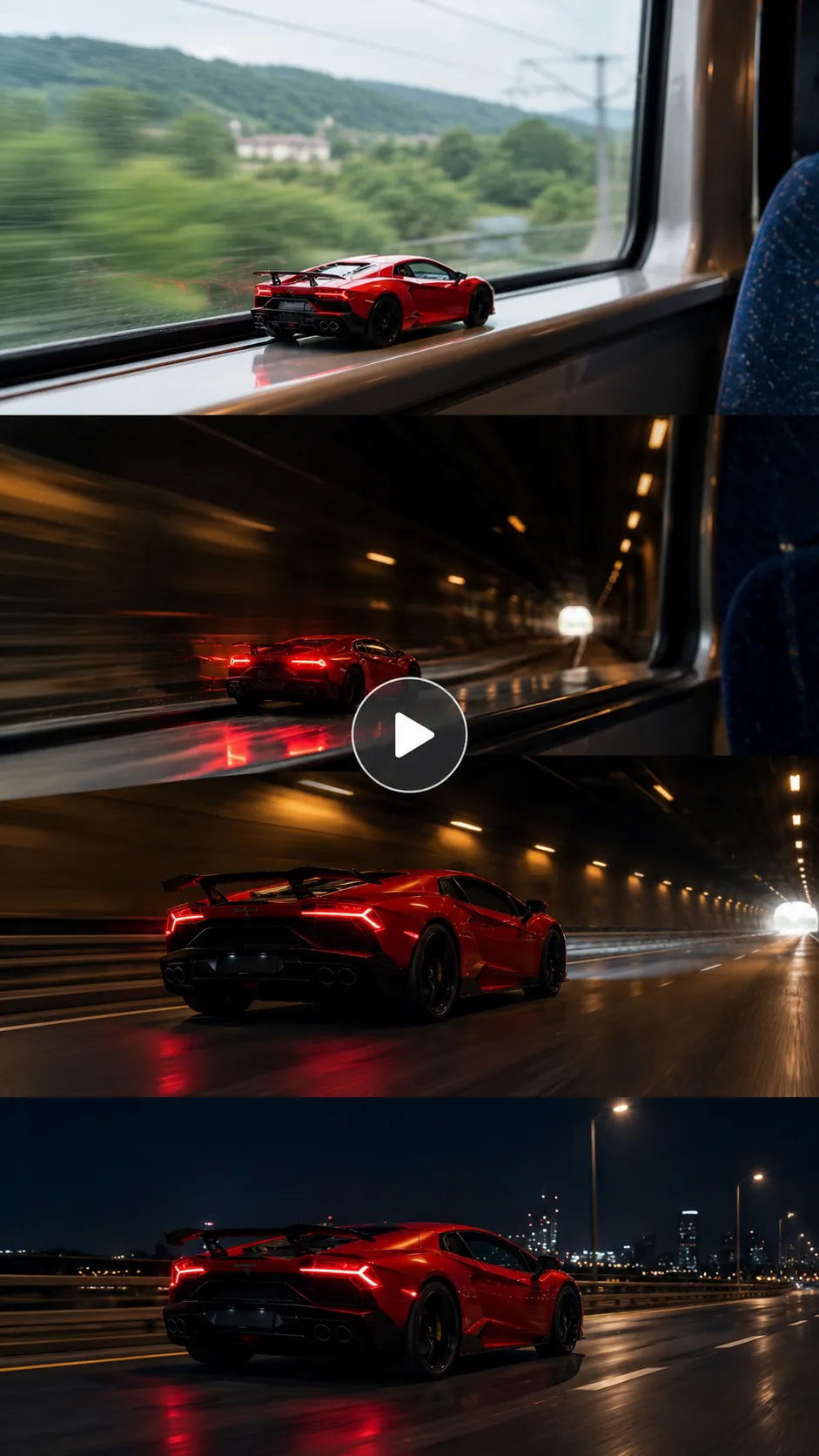
Ultra-realistic cinematic vertical 9:16 video, 10–12 seconds. Use the uploaded car photo as the absolute and unchangeable reference for the vehicle. The car in every frame (both miniature and full-size) must match the uploaded photo exactly — same body shape, proportions, paint color, wheel design, rims, headlights, taillights, and overall look. Do not change, redesign, or alter any part of the car. Start with a handheld smartphone camera view from inside a moving passenger train. A perfect miniature die-cast version of the exact car from the uploaded photo sits still on the interior window ledge. Soft natural daylight comes through the window. Outside, green hills and trees slide past smoothly. The train approaches and enters a dark railway tunnel. The window view turns dark, with streaks of light and tunnel lights passing by. The miniature car’s red taillights suddenly glow brighter. The camera then smoothly pushes forward through the window as the window frame disappears. The miniature car grows seamlessly and continuously into the full-size real car from the uploaded photo — same exact body, color, wheels, and details — now driving out of the tunnel onto a wet night highway. City lights and streetlights reflect on the glossy road surface. The car continues driving forward with realistic motion, slight camera shake, and natural perspective. Motion style: continuous single take, smooth and cinematic, no cuts, no jumps. Realistic physics on the growing transition. Soft motion blur on the scenery. Great detail on car reflections and paint.Lighting: natural daylight inside the train at the start, shifting to dramatic cool night lighting with glowing headlights, red taillights, and city light reflections after the tunnel.Audio: low train rumble and window whoosh at the beginning, then a deep cinematic engine sound as the car becomes full-size, mixed with subtle night highway ambience. No music track, only realistic sound design.No text, no watermark, no logos, no number plates with readable text, ultra-photorealistic, great detail, sharp focus on the car.
Related blog: Halloween Makeup Transition Video
Scene Ideas for Your Toy Car to Real Car Video
You can change the ending and get completely different vibes:
- Sunset country road — warm light, long shadows, peaceful feel
- Night highway — city lights, glowing taillights, the classic viral look
- Desert road — dust, open space, perfect for SUVs and Jeeps
- Mountain pass — sharp turns and big views
- City tunnel — neon reflections and wet asphalt energy
Match the car to the scene, and it just feels right. A Jeep on a desert road hits different than a sports car on a night highway.
What Cars Can You Use for a Train Window Car Video?
Pretty much anything. Sports cars and supercars look flashy, SUVs and off-road cars feel tough, classic cars give that nostalgic punch, electric cars look clean, and pickups and Jeeps work great on rougher roads. Even a regular daily driver can look cool when it “comes to life.” The more unique the shape and color, the more satisfying the miniature-to-real transition feels.
Related blog: How to make the Ramalama Bang Bang trend
Tips for a Viral-Ready Video
- Hammer the car consistency in the prompt. Say “same paint, same wheels, exact proportions” more than once if you have to.
- Keep it short. 8–12 seconds is the sweet spot.
- Always shoot for 9:16 and the highest resolution the tool gives you.
- Pair it with a trending audio that has a clear transition moment.
- Captions like “Watch my car come alive” or “Toy to real in one tunnel” help.
- Night highway versions are still performing really well right now.
- If the AI messes up the wheels or color, regenerate. It’s normal.
Conclusion
The train window car AI video trend is one of those rare ones that actually looks impressive and is still easy to make. One photo, a decent prompt, and you’ve got a cinematic car video that feels personal. Whether you’re turning your own car into content, making a dream car video, or just jumping on the miniature car video trend, the formula is simple, and the results look way better than they should.
Upload the photo, paste the prompt, and give it a shot. You’ll see why everyone’s doing it.
FAQ
What aspect ratio and video format work best for a train window car video?
Stick with vertical 9:16. That’s what fills the screen on Instagram Reels, TikTok, and YouTube Shorts. Export as MP4.
How long does generation take?
Usually anywhere from 30 seconds to a couple of minutes, depending on the tool and quality setting. Higher resolution takes a bit longer.
What resolution should I export the video in?
Export at 720p. That’s the maximum most of these AI tools currently give for this trend, and it keeps the car details sharp enough when people watch full screen on Instagram Reels or TikTok.
How do I keep the car’s color and shape consistent from window to road?
Use a clear reference photo and tell the AI multiple times that this exact car is the source of truth for both the toy and the real version. Phrases like “same body shape, paint color, wheels, and proportions” make a big difference.
 Create the Car Jump Trend 🚗💨
Upload your image and turn it into an epic car jump.
Create the Car Jump Trend 🚗💨
Upload your image and turn it into an epic car jump.