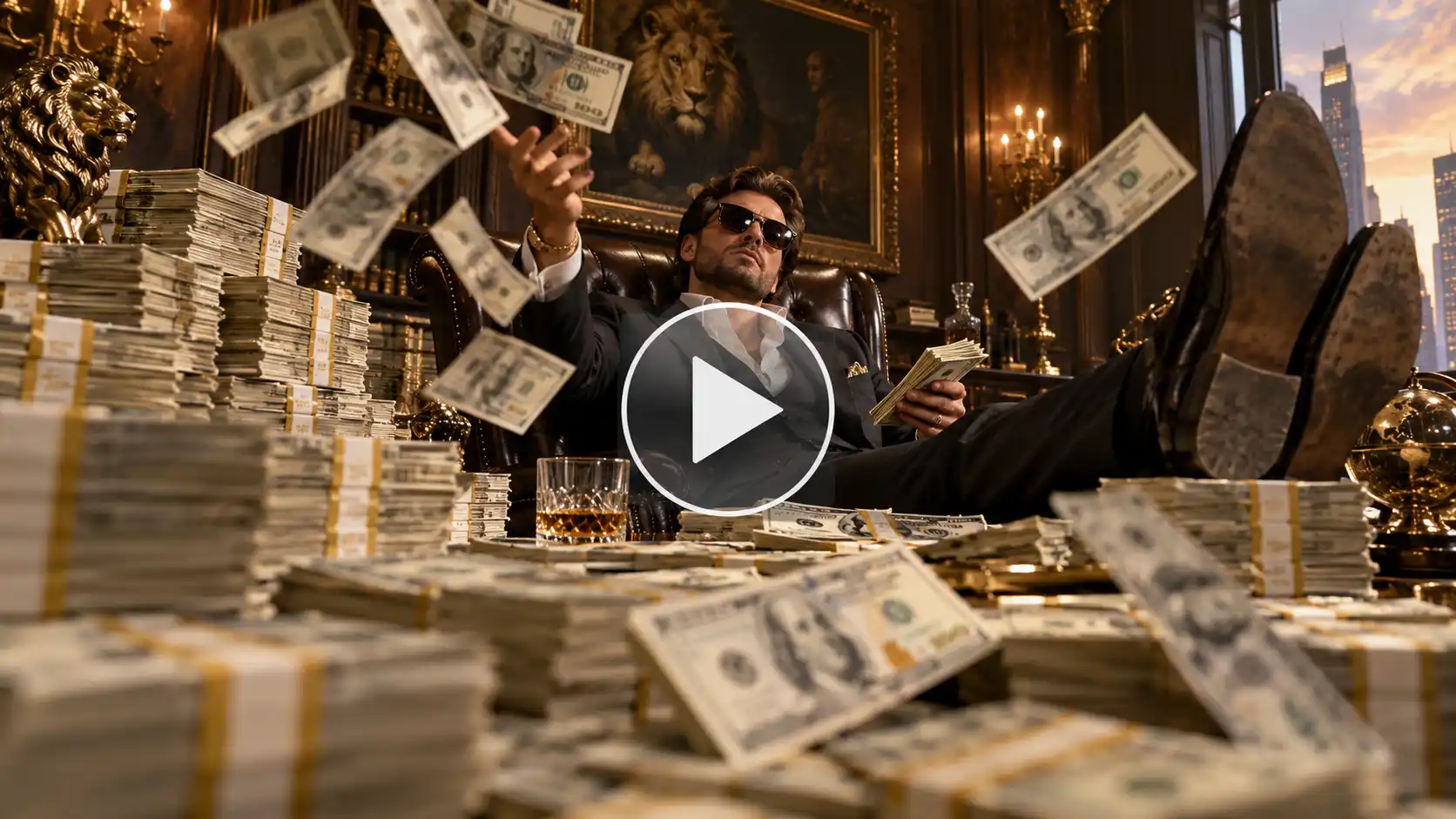
If you have spent more than five minutes scrolling through your feed every day then you have probably run into this. Today we have a guide on how to make money flex AI video for you. This clip features exaggerated lives of a person who is causally flaunting towers and mountains of money, tossing banknotes and giving off over-the-top billionaire energy for their fans online.
 Create the Unforgettable UNO Trend
Upload your image and turn an UNO move into a viral transition.
Create the Unforgettable UNO Trend
Upload your image and turn an UNO move into a viral transition.
Capitalizing on the broader money flex AI trend, this format has quickly become a favorite. Creators are looking to make people laugh without taking themselves too seriously. Whether it’s a cash stack video AI masterpiece or a viral clip of someone with a load of cash, this trend proves that internet humor loves a good parody of overnight rags to riches story.
What Is The Money Flex AI Trend?
At its core, the cash flex AI video trend is a playful, self-aware meme format. Here a person (often you or a friend) is placed into a hyper-wealthy scenario. The visual usually follows a funny formula. A low-angle camera frames the subject behind a dresser or table with piling high cash bundles. It is then followed by a dramatic cash toss fan reveal.
It spread so fast because of this cash flex meme culture on the platforms like the money flex TikTok trend and money flex trend Instagram community. Instead of posting some random luxury content, users are now digging this. This is also treated as a comedy video with an utterly ridiculous and absurd amount of money being flashed like a joke.
What You Need For This Video
Jumping into the trending money flex AI video wave doesn’t have to be a Hollywood thing. To get started, you just need a few basic things.
- Reference Image: You will need a selfie or a photo of yourself from a front camera in a clear and well-lit area.
- AI Tool: LightX supports preset templates as well as image to video tools for a better video generation.
- Concept: Decide whether you want to go the classic route and create a funny money flex AI video or just test out viral animal spin like a dog money flex AI or a cat money flex AI video.
How To Make A Money Flex Video With LightX
Depending on the platform or the look that you want to get; you can build your clip using our presets and templates or can customize the prompts. Here is the complete breakdown of this:
Using Pre-defined Template
Step 1: Upload the photo you want (yourself, cartoon or character). Select your persona and upload clear front-facing portraits. Pick one crisp photo of yourself.
Step 2: Background, outfit and prompt: Select the background you want. Get a background setting and where you are seen shooting this video. Apply stylistic things to align your outfit with the theme.
Step 3: Choose appropriate resolution and aspect. Select the layout that suits your clip. Choose from 9:16 to ensure proper optimization.
Using Reference to Video (with driving video)
- Go To Reference to Video: Navigate to LightX’s video platform’s reference or motion-transfer tool.
- Step 1: Define your Look: Establish a clear visual profile of the people in the video.
- Step 2: Use Video reference and replace Faces. If you own or have a source driving video then Configure that as your video reference. Write a precise prompt to replace the person. For example, replace person 1 with reference image 1.
Related Blog: How To Swap Face In a Video
Using Reference to Video without driving video
- Step 1: upload a photo of yourself, a cartoon or your pet. Establish a clear visual profile for your video character.
- Step 2: Generate using prompts if there is no driving video. If you don’t have a reference video, generate the whole effect using a detailed prompt. Clearly specify your parameters. Check out the Image to Video Generator for more relevant details.
1. Define person’s outfits, makeup & style
Detail the specific wardrobe pieces such as expensive suits, tuxedos, casual Tees and pants, joggers or lounge sets with makeup and hair style.
2. Define scene background, lighting, camera
Specify whether the shot uses a front facing selfie frame in the camera or ultra wide angle camera motion with natural ambience.
3. Define how the character is acting (along with motion)
Explicitly outline the motion timing, steps and actions such as flipping cash, tossing money during a specific time or moment.
Money Flex Prompt You Can Copy
If you are using a text-to-video tool or adding style to an image-to-video structure, a detailed AI video prompt can make all the difference. Try copying and tweaking this prompt according to your needs.
“A vertical 9:16 cinematic video of a relaxed person sitting behind a massive wooden desk stacked with towering bundles of hundred-dollar bills. Low-angle camera shot, dramatic lighting, the subject looks completely unimpressed while casually tossing a banknote fan video style stack of cash into the air. High-definition details, humorous luxury parody aesthetic, smooth motion.”
Funny Ways To Remix This Trend
Once you master the format, you can use creative tools to keep your audience hooked:
- The Selfie Version: Keep your everyday expression while surrounded by billions of dollars for maximum ironic contrast.
- The Pet Version: Turn your furry friend into a billionaire tycoon with a dog money flex AI video or cat money flex AI video where paws awkwardly rest on stacks of simulated cash.
- The Cartoon Character: Feed an animated avatar or cartoon graphic into the generator to see how fictional heroes handle sudden, exaggerated wealth.
- Punchline Captions: Pair the video with a relatable text twist like, “Me after successfully saving $4 on my grocery bill today.”
Related Blog: How To Make a Halloween Makeup Transition Video
Tips for a Cash Flex Video
- Keep It Brief and Interesting: Short-form content works best with a looped fast pace. Keep the video brief and allow a time frame between 10 – 15 seconds that showcasing the money toss in a compelling manner.
- Use Trends in Music: Combine your video visuals with songs that are trending in hip-hop or in luxurious irony since this would increase exposure on short video platforms.
- Optimize for Portrait Mode: To ensure that your video appears on mobile devices in the 9:16 aspect ratio.
Conclusion
The 2026 viral AI video craze is about being creative and humorous while utilizing tech tools that make people scroll more. Understanding how to use photo to video tools, creative ideas and inventive remixes allows you to participate in the trend in a matter of minutes. You can post entertaining videos about yourself or say that your pet is a rich millionaire and still ride the trend. Get the go-to vibe now with LightX.
FAQs
- Do I need to upload a photo holding cash?
No, you just need to upload a clear photo of your face or your pets face.
- How long does generation take?
For a 480p video that is 10 seconds long, it takes up to 3-4 minutes. While a 720p resolution video of 10 seconds long takes up to 10-15 minutes.
- Can I choose the setting, such as a penthouse or a bedroom?
Yes, you can change the background according to your needs.
- What video length and aspect ratio should I use?
You should make a video for 10-15 seconds and choose the aspect ration 9:16 for reels and TikToks.
 Gas Up the Trend ⛽🔥
Create your own gas station trend in seconds.
Gas Up the Trend ⛽🔥
Create your own gas station trend in seconds.