Social media is now filled with dominating, high-energy trending TikToks and Reels. The one we’re gonna talk about today is The Small Town Boy AI Video. This dance trend is based on a pulsing, nostalgic beat from the bronski beat small town boy trend track. The creators from around the world are transforming their pictures into a dramatic animation featuring sudden screams, body swaps and well rehearsed choreography.
 Create the Unforgettable UNO Trend
Upload your image and turn an UNO move into a viral transition.
Create the Unforgettable UNO Trend
Upload your image and turn an UNO move into a viral transition.
If you have been fascinated by this dance video and want to know how to make a small town boy AI video, you’re in the right place. Let’s explore what is this trend, how did it go viral & how to make a small town boy AI video using LightX video generator.
What Is The Small Town Boy Trend?
The small town boy Instagram reels trend and small town boy TikTok trend can be made using image-to-video tools. Make the AI animation with cinematic comedy and musical timing. The video starts with a portrait of two people signing and looking in the camera. As the iconic poptrack kicks in, the person (human, character or pets) are seen performing a choreographed dance. It relies heavily on the small town boy scream and swap dance video, giving people a hilarious and visually appealing view. It is also popularly a video of two cats dancing trend or a pet cat dancing with its owner.
Why Is This Trend Going Viral?
- Nostalgia Hit: The small town boy AI video trend has a popular 1980s anthem that immediately hooks older audiences while impressing the Gen Z creators.
- Humorous Contrast: The shift from a deadpan and wide camera angle screaming expression to energetic motion creates instant viral comedic value.
- AI Access: Tools like LightX make advanced photo to dance video AI accessible easily to everyone without any professional help.
How To Make The Small Town Boy Trend AI Video With LightX
Depending on the platform or the look that you want to get; you can build your clip using our presets and templates or can customize the prompts. Here is the complete breakdown of this:
Using Pre-defined Template
Step 1: Choose the character of the singers (Person 1 and Person 2) who you want to film: Select your base persona and upload clear front-facing portraits.
Step 2: Background, outfit and prompt: Select the background you want. Get a music studio recording room or a cosy living room area where you are seen shooting a wide angle shot. Apply stylistic things to align your outfit with the theme.
Step 3: Choose appropriate resolution and aspect: Select the layout that suits your project. Choose from 9:16 to ensure proper optimization.
Using Reference to Video (with driving video)
- Go To Reference to Video: Navigate to LightX’s video platform’s reference or motion-transfer tool.
- Step 1: Define your Characters: Establish clear visual profiles of the people in the video.
- Step 2: Use Video Reference and Replace Faces: If you own or have a source driving video (such as a clip of a person dancing or interacting). Configure that as your video reference. Write a precise prompt to replace the faces and models. For example, replace person 1 who is singing with reference image 1 and person 2 who is dancing with reference image 2.
Related Blog: How To Swap Face In a Video
Using Reference to Video without driving video
- Step 1: Define your Characters: Establish clear visual profiles for your video character.
- Step2: Generate using prompts if there is no driving video. If you don’t have a reference video, generate the whole effect using a detailed prompt. Clearly specify your parameters. Check out the Image to Video Generator for more relevant details. |Define character image outfits, makeup & style
Detail the specific wardrobe pieces such as party clothes, elite clothes, shirt or pants or an expensive tuxedo, statement jewellery, makeup and hair styling.Define scene background, lighting, camera
Specify whether the shot uses a wide angle lens in the camera or ultra wide angle camera motion with bright light and natural ambience.
Define how the character is interacting or acting (along with motion)
Explicitly outline the singing timing, steps and actions such as singing or simply swapping bodies during specific time or moment.
Prompt You Can Use for the Small Town Boy Trend
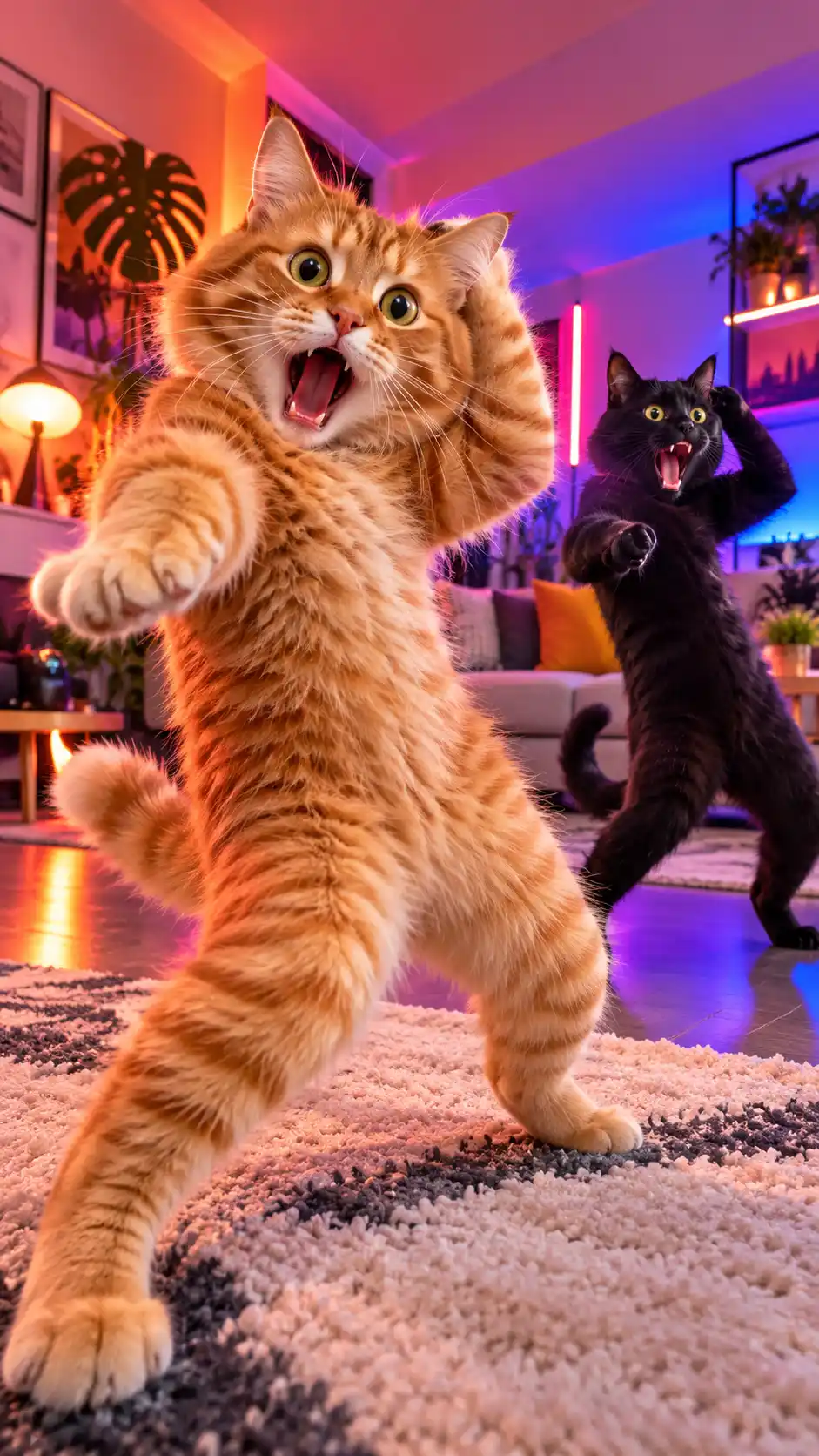
Cinematic ultra-wide angle lens shot capturing a dramatic comedic scene set to electronic synth-pop music. In a cozy modern living room, a fluffy orange tabby cat and a black cat stand side-by-side facing the camera with exaggerated wide-eyed screaming expressions and open mouths. Suddenly, on the heavy bass drop, a seamless position swap occurs, and both figures break out into high-energy, perfectly synchronized club dance choreography with fluid robotic and liquid body movements. Neon ambient backlighting, sharp resolution, hyper-realistic fur and texture details, dynamic camera panning, viral TikTok and Instagram Reels aesthetic and smooth motion.
Best Use Case Types of Popular Small Town Boy AI Trends
- Small town Boy Cat Dance: a fluffy cat who is executing a complex hip-hop or dance on electronic beats.
Best Use Case: Pet owners and animal lovers looking for viral cute content. - Two Cats Dancing Trend: Two pets animation showcasing synchronized movements and funny outfits.
Use Case: Multiple pets in a house and high engagement comedy clips. - Scream & Swap Friend Dance: Two people shouting into the camera and swapping bodies suddenly with the beats.
Use Case: Best friends, couples and creators.
Tips To Make Your Video Look Natural
- Image Quality: Always upload an image that is HD and in high resolution. The AI can maintain better consistency this way.
- Match the Beat: Align the exact frame and sound transitions with the dance moves and sync it all with the main theme audio.
- Leverage Wide Angles: Emphasize the distorted perspective inspired by lens trends to make more people scroll your content.
Conclusion
The viral small town video trend and the human swap bodies trend has a combined creativity. The smart AI tools have made this easy now. Creating such videos with LightX can skyrocket your social media presence overnight. By following our steps, you can post a catchy and memorable video on your social media. Jump into the trend now and watch your likes and views soar.
FAQs
1. What type of photos work best for the Small town Boy AI video?
A well-lit and clear photo works best for AI video generation.
2. What image formats can I upload?
You can upload images in PNG, Webp and JPEG format.
3. Does the generated video include the Bronski Beat song?
You can ask the AI tool to include the song in the video along with some modifications to avoid any copyright issue.
4. Is there a watermark on the exported video?
No, there are no watermarks on the exported videos.
 Gas Up the Trend ⛽🔥
Create your own gas station trend in seconds.
Gas Up the Trend ⛽🔥
Create your own gas station trend in seconds.