If you have been scrolling through your social media feeds daily, it is likely you have come across the viral how to make ozil goal ai video trend taking over your ‘for you’ page. And if you are a football fanatic just like other millennials, you might just remember this world famous goal. This football AI video trend has completely tensed audiences, making everyday people, memes, and celebrities into football legends.
 Create the Roadster Ramp Trend 🏎️
Upload your image and create a thrilling backward car jump off a ramp.
Create the Roadster Ramp Trend 🏎️
Upload your image and create a thrilling backward car jump off a ramp.
What Is the Özil Goal AI Video Trend?
The ozil goal ai video trend is rooted in one of football’s legendary players and a Real Madrid F.C. icon Mesut Özil’s most remembered moments. His legendary solo goal for Arsenal against Ludogorets on November 1, 2016 is still missed by many. The goal was a fan favorite that fans still recall as Ozil’s comeback. In the original match, Özil calmly chips the goalkeeper after defenders slide past him, before speeding away in celebration.
On platforms like Instagram and TikTok, creators are recreating this play using ozil goal AI video trend instagram and ozil goal ai tiktok trend formats. The viral ozil goal ai video edits pair this legendary motion with the iconic “Clandestina” song as the viral Reels sound (beware of copyright, if any), creating a high powered clip that is a clickbait for the algorithm.
What You Need Before You Start
- A clear, high-resolution reference photo of yourself or your subject (essential for ozil goal ai video with photo and to keep face consistency).
- An AI video generation or motion-transfer tool like LightX.
- A reference video (driving video) of the original goal sequence for motion transfer.
- A video editor to add the trending audio track to your final Özil goal video edit.
How To Make The Ozil Goal Video Trend
Depending on the platform or the look that you want to get; you can build your clip using our presets and templates or can customize the prompts. Here is the complete breakdown of this:
Using Pre-defined Template
Step 1: Upload the image of the people who are starring in this video. Select your model type and upload clear pictures. Make sure to describe the reference images with the subject images clearly. For ex: Use Image 1 to replace Subject 1 (striker), Image 2 is for Subject 2 (defender) and so on).
Step 2: Background, camera settings: Select the type of football field you want. You can also change the background all together according to the theme (like office, car parking, road, hotel lobby, and more) where you are seen playing football in this video. Apply necessary details that align your ideal video theme.
Step 3: Choose appropriate resolution and aspect: Select the layout that suits your project. Choose from 9:16 to ensure proper optimization.
Using Reference to Video (with driving video)
- Go To Reference to Video: Navigate to LightX’s video platform’s reference or motion-transfer tool.
- Step 1: Define your Characters: Establish clear visual profiles of the football players in the video.
- Step 2: Use Video Reference and Replace Images: If you own or have a source driving video. Configure that as your video reference. Write a precise prompt to replace the other details. For example, replace person 1 (Striker) in the video with reference image 1.
Using Reference to Video without driving video
- Step 1: Define your Characters: Establish clear visual profiles for your footballers.
- Step 2: Generate using prompts if there is no driving video. If you don’t have a reference video, generate the whole effect using a detailed prompt. Clearly specify your parameters. Check out the Image to Video Generator for more relevant details.
1. Define Football Player Jersey & Boots
Describe the specific footballer such as jersey, football club, player name, colour, look, sneakers and more.
2. Define scene background, lighting, camera
Specify whether the shot uses a slow motion goal striking shot or a cinematic wide angle camera motion with perfect lighting and stadium ambience.
3. Define how the players are in the motion
Explicitly outline the goal velocity, defending movements and actions such as striking or scoring during a specific time or moment.
Related Blog: How To Swap Face In a Video
Özil Goal AI Prompt To Use
To get started with your video, you can use this prompt directly in the textbox:
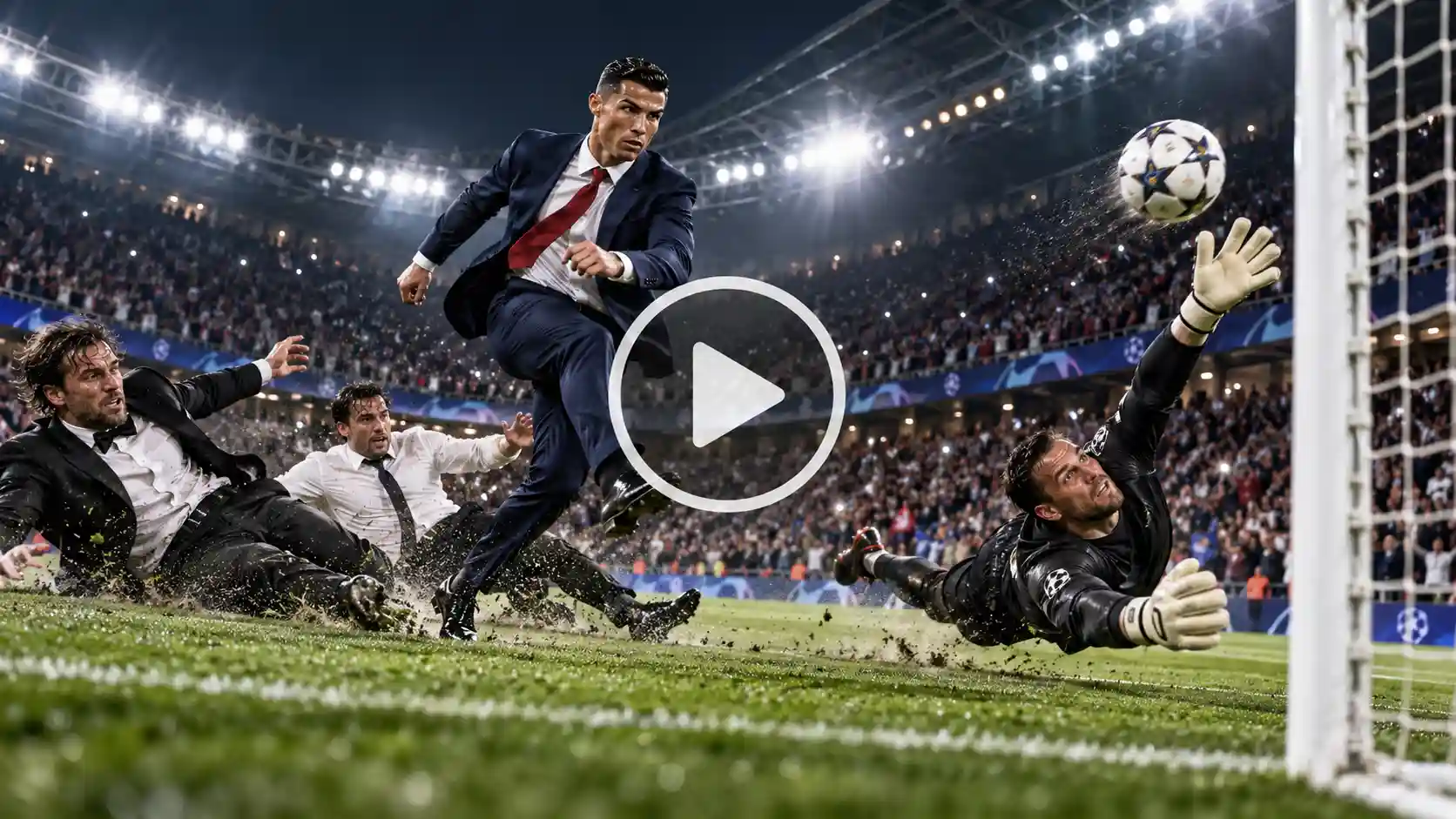
Prompt:
A hyper-realistic slow-motion cinematic tracking shot of a professional footballer (Image 1) in a sharp formal navy suit and red tie sprinting at high speed toward the camera across a packed, vibrant football stadium pitch under stadium floodlights. As he approaches, two opposing defenders (Image 2 & Image 3) in formal attire, one is wearing a tuxedo and other is wearing a shirt and pants, slides aggressively past him on the turf, missing their tackle. The professional footballer is seen taking the ball away in swift motion the player expertly chips the ball over the diving goalkeeper into the back of the net. Dynamic camera angle, intense emotional celebration, photorealistic textures, dramatic cinematic lighting, 4k resolution.
Pro tip: You can also experiment with humorous variations also, such as a grandma scoring or an office co-worker playing on the football ground.
Tips to Make Your Video Look Realistic
- Face Consistency & Body Mapping: Ensure your source photo has even natural lighting and a clear front-facing angle to prevent any sort of distortion and smudge during motion. The AI will copy the face, hair and body structure from these reference images only.
- Wardrobe/Outfit Details: Specifying clothing like a suit and tie helps the AI make a clean and neat dress code during high-speed running sequences. It is very important to be specific and make sure the person is consistent throughout.
- Aspect Ratio: Always generated in vertical (9:16) format optimized for mobile viewing on Instagram and TikTok. You can also use a 16:9 ratio for a landscape view like in the movies.
Conclusion
The Mesut Özil goal ai video trend is one of the most creative ways to blend football history with modern generative AI. It is an ode to the iconic football player Mesut Özil in the most memorable way. If you are a football fan and love to watch yourself play like your legends, simply follow these steps. And use the right prompts to create a professional viral AI video that stands out on your feed.
FAQs
- What kind of photo works best for the Özil goal AI video?
A well lit and natural high definition photo will work best for this AI video.
- What aspect ratio and video length should I use?
You should use a 9:16 aspect ratio and 10-15 seconds long video.
- Do I need a reference video, or is a text prompt enough?
You can use both. If you have a video reference, that will work too otherwise the text prompt is available too.
- What video quality or resolution should I export?
You can export video quality according to your needs. LightX offers 480p, 720p and 1080p video resolutions.
 Create the Viral Hotel Lobby Trend 🎵🔥
Upload your image and transform it into a viral music video.
Create the Viral Hotel Lobby Trend 🎵🔥
Upload your image and transform it into a viral music video.