Hey, have you also seen that viral high-altitude trampoline jump video, but you have a fear of heights, so you can’t recreate it? Now, nothing is impossible. You can easily make this viral trend where someone leaps from a cliff, helicopter, or rooftop, lands on a tiny trampoline far below, and gets launched straight back up like it’s the most normal thing in the world.
 Follow us on Instagram
And get prompts daily
If you’ve been wondering how to make a high-altitude trampoline video with AI yourself, it’s actually very doable with just one photo.
What Makes This Trend So Viral
The high-altitude trampoline trend hits hard because the scale feels completely wrong, in the best way. The drop is huge, the trampoline looks tiny, and the rebound somehow brings the person all the way back to the starting point. That closed-loop jump, bull’s-eye landing, massive bounce, return is what keeps people rewatching.
It started with a clip by JustAfzalKhan in August 2026 and quickly spread under names like extreme trampoline jump AI, high-altitude trampoline effect, and AI high altitude stunt. Creators began mixing locations: AI helicopter trampoline jump, stadium roof trampoline stunt, crocodile pit trampoline jump, dam drops, night rooftops, and other extreme location trampoline jump ideas.
The result is a steady flow of viral trampoline stunt videos, Instagram viral trampoline videos, and TikTok extreme jump trend clips that feel like an AI-generated, death-defying jump.
People love the high-energy trampoline content because it looks dangerous but is completely safe. The impossible trampoline jump, AI floating trampoline effect, and jaw-dropping trampoline stunt combination just works.
How to Create the High Altitude Trampoline Video with AI
Using a Pre-defined Template
Step 1: Choose the character for the video. Upload a clear photo of yourself, a friend, or anyone you want in the clip. A sharp, well-lit, front-facing photo works best.
Step 2:Select the preset you like. we have mall, crocodile, helicopter, jump video, and more.
Step 3: Choose the appropriate resolution and aspect ratio (select vertical 9:16 for TikTok, Reels, and Shorts).
Step 4: Click Generate, then download the final 10-second video with sound.
If you want to make a video from scratch, you can also use our image-to-video tool.
Using Image to Video or Reference to Video (Step-by-Step Guide)
Step 1: Go to the Reference to Video tool.
Step 2: Define your character. Upload a clear photo of yourself or the person you want in the video. This photo acts as the identity lock so the face, hair, and outfit stay consistent.
Step 3: If you have a driving video, add a short reference clip of a high-altitude jump and rebound. Then write a simple prompt such as: “Replace the person in the video with the person in my reference image while keeping the exact leap, freefall, bull’s-eye trampoline landing, and full rebound back to the starting edge.”
Step 4: If you don’t have a driving video, create the whole effect with a prompt. Be clear about the look and the action. In your prompt, you can mention:
- Character: the person from the photo, outfit, expression, and style
- Scene: background, lighting, camera angle, and location (cliff edge, helicopter door, rooftop, dam, etc.)
- Action: the exact high-altitude trampoline sequence where the person stands at the edge, leaps off, free-falls toward a small trampoline far below, lands dead center, deep compression, strong rebound that launches the person back up to the original edge, and final landing with a natural reaction
Then generate and download the video.
Copy-and-Paste Prompt
If your tool needs a high-altitude trampoline jump AI video prompt, try this:
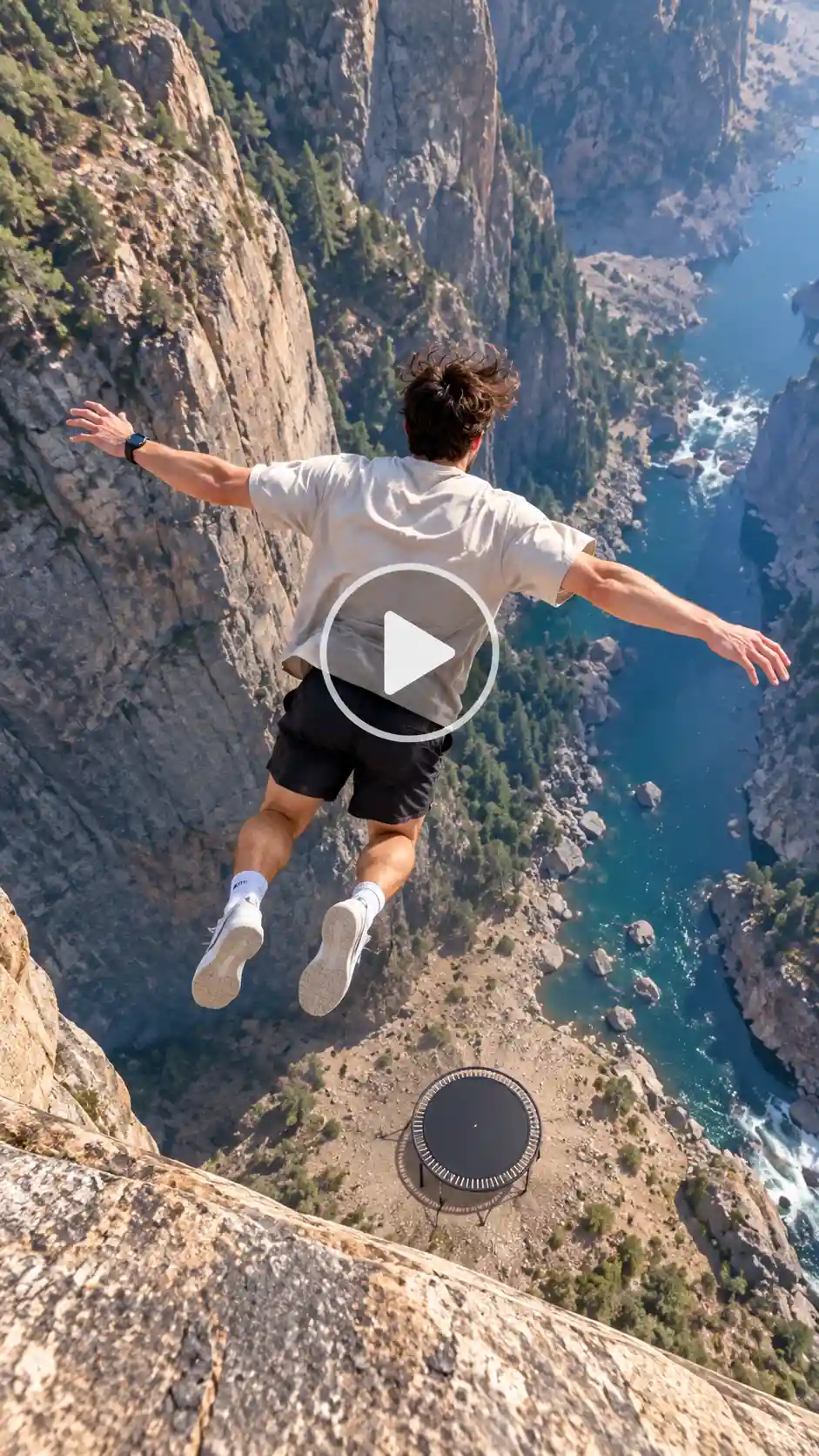
Character: A [age/gender/look] with natural facial features, clear skin texture, and realistic hair from the reference photo. Keep exact face, hairstyle, skin tone, and body type consistent. Wear the same outfit from the photo. Natural expression that shifts from focused to a relieved smile at the end.
Background setting: High cliff edge/helicopter door/city rooftop overlooking a dramatic drop. Vast realistic scale so the trampoline looks tiny far below. Natural outdoor lighting, strong wind, slight atmospheric haze.
Camera angle: Handheld vertical 9:16 phone-style shot. Starts medium-close at the edge, tilts down to follow the freefall, then tilts up to track the rebound, ending on a close-up after landing. Slight natural shake, one continuous take.
Motion and action: Stands at the edge, leaps cleanly with arms slightly out, freefalls toward a small round trampoline, lands dead center, mat compresses deeply, then rebounds hard and launches the person straight back up the same path. Lands on feet on the original edge with knees bent and a natural smile.
Style: Ultra-realistic, great detail, consistent character, natural fabric and hair movement, no artifacts, no face morphing, no text or logos. Reject CGI look.
Length: 10 seconds.
You can swap in a stadium roof trampoline stunt, crocodile pit trampoline jump, or any other extreme location trampoline jump. Add “AI floating trampoline effect” or “jaw-dropping trampoline stunt” if the model responds well to those phrases.
Related blog: How to make a Couple Coffee Mess AI video
Pro Tips to Make Your Video Go Viral
- A clear full-body or head-to-knees photo makes a big difference in face consistency.
- Keep the video around 10 seconds. That’s the sweet spot for high-altitude trampoline jump videos and viral Reels trampoline trend clips.
- The full rebound back to the starting point is the signature move of the high-altitude trampoline trend — don’t skip it.
- Try different locations. AI helicopter trampoline jump and dam versions often perform differently from basic cliff jumps.
- Use the trend’s sound or a strong rising-and-hit audio track.
- Always turn on the AI-generated label. These clips look real, so disclosure keeps things clean.
- Sporty clothes and tied-back hair travel better through the motion than flowing outfits or loose long hair.
These small choices help your clip stand out in the trending trampoline challenge 2026 wave and the wider AI extreme sports video space.
Related blog: How to Make a Walking Away from an Explosion Video
Common Mistakes to Avoid
- Blurry or side-profile photos. The face drifts during the long fall.
- Skipping the rebound description. Without the return to the edge, the clip loses its punch.
- Landscape format. Vertical 9:16 is required for Instagram viral trampoline video and TikTok.
- Making the video much longer than 10–12 seconds. The impossible bounce loses impact.
- Forgetting the AI label on platforms that require it.
Conclusion
Making a high-altitude trampoline jump video is straightforward once you know the formula. One photo, the right AI tool, and a clear idea of the leap-bounce-return sequence is enough to recreate high-altitude trampoline trend clips and join the current wave of viral AI action video and AI adventure stunt video.
The High Altitude Trampoline AI format is still early and growing. Upload a good photo, generate your extreme trampoline jump AI clip, and post it. That’s how you create viral stunt video with AI and ride the trending AI challenge video moment while it’s still hot.
FAQs
What kind of photo works best?
A clear, well-lit, front-facing full-body or head-to-knees photo works best for high-altitude trampoline jump AI video from photo results. Sporty clothes and no sunglasses help the AI keep identity consistent.
What resolution should I export the video in?
Vertical 9:16 at the highest quality available (usually 720p). This is the format that performs best for Instagram viral trampoline video and TikTok extreme jump trend clips.
What file formats and sizes can I upload?
Most tools accept JPG, PNG, WEBP, or HEIC up to around 10 MB. Generated videos usually come as MP4.
How long can the video be?
Around 10 seconds is ideal. That length matches the classic high-altitude trampoline jump video structure and keeps the high-energy trampoline content punchy.