I still laugh every time a new Couple Coffee Mess AI video lands on my feed. Two people stand at a kitchen counter, one spoons coffee grounds that miss the red mug completely, the other pours milk that floods the whole surface, and both keep straight faces like nothing went wrong. The viral couple coffee AI trend makes it easy for anyone to join.
 Create the Rain Dance Trend ♫
Upload your image and create rain dance music video
Just upload photos of yourself and a friend, family member, or partner, and the AI creates the full kitchen coffee chaos in seconds.
What Is the Couple Coffee Mess AI Trend?
The Couple Coffee Mess AI trend (also called the Coffee Making AI video or AI coffee spill video) is a short, deadpan comedy clip that took over TikTok, Instagram Reels, and YouTube Shorts in late October 2026. It started with an AI video of two dogs making a mess in the kitchen and quickly spread to human couples, celebrities, and friends.
In almost every version, you see the same scene:
- Two people stand behind a glossy kitchen counter.
- One spoons instant coffee and dumps the grounds on the counter instead of the round red mug.
- The other pours hot water or tips a jug of milk that spreads into a big white puddle.
- Both keep calm, almost bored expressions while the mess grows.
- One finally lifts the empty red mug as if the coffee is ready.
Many clips use the Spanish track “Con la Misma Piedra” in the background, which adds a romantic yet funny contrast to the kitchen disaster. The format works so well because the humor comes from the total lack of coordination and the serious faces. Most videos you see now are AI-generated coffee fail clips made by swapping faces onto a reference scene rather than real filming.
Step-by-Step: How to Make Couple Coffee Mess AI Video
Option 1: Ready-made template (easiest)
- Open our template page that already has a “Couple Coffee Mess,” “Coffee Fail,” or “Cofi Trend” template.
- Upload one photo of each person. The AI assigns one person to the spoon side and the other to the pouring side.
- Keep the classic modern kitchen background or leave the default.
- Choose vertical 9:16 or the resolution.
- Hit generate. In a few minutes, you get a 12–15 second AI kitchen coffee mess video ready to download.
Option 2: Reference video + photos (more control)
Step 1: Open the reference-to-video tool.
Step 2: Upload your photo(s)
One clear photo for a solo version, or two photos (one person each) for the duo. Good lighting and clear faces work best.
Step 3: Use a reference video (optional)
If you have the original Couple Coffee Mess AI video from photos, upload it and tell the AI:
“Replace the two people with the people in my photos. Keep the same counter-level camera, coffee grounds spilling beside the red mug, kettle pour, milk flood across the counter, and calm straight faces.”
Step 4: If you don’t have a reference clip, you can just write a simple prompt
Describe it like this:
“Two people from my photos standing at a modern kitchen counter. One spoons instant coffee and spills the grounds on the counter next to a round red mug. The other pours from a kettle and tips milk that floods the countertop. Both keep calm, expressionless faces. Fixed counter-level camera, natural kitchen lighting, 15 seconds, vertical video.”
Step 5: Choose the AI models like Kling, Veo, Seedance, & Wan
Step 6: Click Generate & then download the video for final use.
Copy-and-Paste Prompt Idea
Here is one strong Couple Coffee Mess AI video prompt you can copy and adjust:
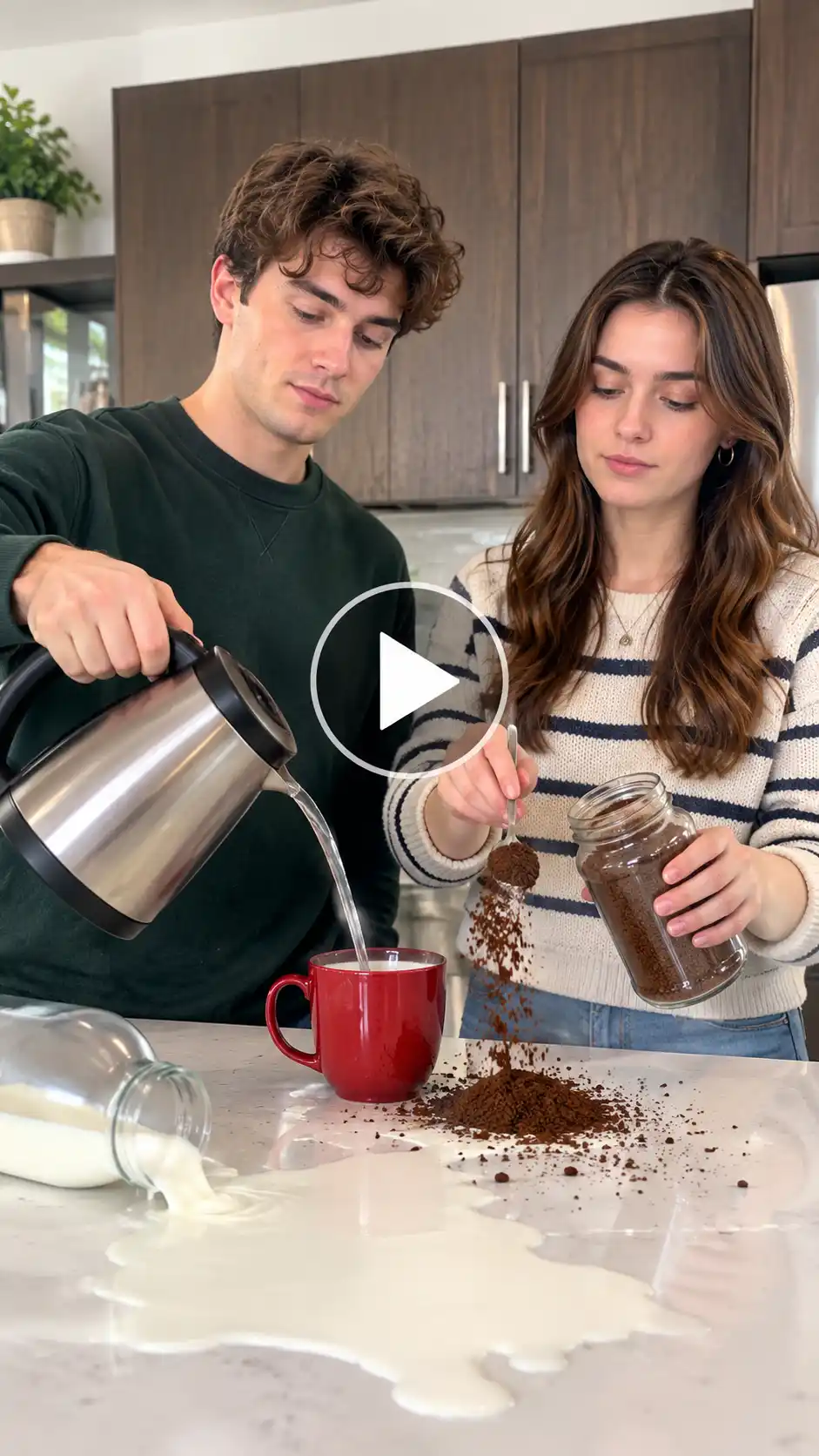
Character look: Two realistic people based exactly on the uploaded photos, with accurate faces, hair, clothing, body proportions, and natural skin texture. One stands on the left side of the counter, the other on the right. Both keep calm, almost expressionless faces throughout. Upper bodies and hands are clearly visible.
Background setting: Modern white kitchen with glossy countertop, dark wooden cabinets, and soft natural daylight coming from the side. Clean, realistic kitchen atmosphere with subtle reflections on the counter surface.
Camera angle: Fixed counter-level camera looking straight across the countertop, medium shot framing both people from the waist up, vertical 9:16 aspect ratio. Steady phone-style framing matching the original viral clips.
Motion effects: The person on the right holds a metal spoon and a jar of instant coffee, scoops grounds and deliberately spills them into a growing pile on the counter beside a round red mug. The person on the left lifts a glass electric kettle, pours water near the mug, then tips a jug of milk that floods across the white countertop in a wide white puddle. Both continue the actions with calm, straight faces and minimal reaction. Smooth, natural hand movements and realistic liquid and powder physics.
Scene description: An ultra-realistic Couple Coffee Mess AI video. Two people try to make instant coffee together but create a complete kitchen mess — coffee grounds everywhere and milk flooding the counter — while keeping completely deadpan expressions. High-quality motion, sharp detail on the red mug, coffee powder pile and milk spill, 15-second vertical 9:16 video.
You can add “with Con la Misma Piedra audio style” or “romantic yet chaotic mood” if the tool accepts audio notes. This works well for most face-swap coffee trend tools.
Pro Tips to Make Your Video Go Viral
- Use well-lit photos where both faces are clear and looking toward the camera.
- Different outfits help the AI keep the two people distinct during the action.
- Stick to the classic red mug and white counter look — it is the most recognizable version of the viral coffee spill trend.
- Export in 9:16 vertical so it plays full-screen on every platform.
- Add the trending Spanish track or a similar soft romantic song when you post.
- Caption ideas: “When we try to make coffee together,” “Zero teamwork edition,” or “This is why we order takeout.”
- Hashtags that currently perform well: #CoupleCoffeeMess #CoffeeFailAI #AICoffeeSpill #ViralCoupleCoffee #KitchenCoffeeChaos.
- Post while the trend is still climbing — early November 2026 is still peak time.
Common Mistakes to Avoid
- Using dark, blurry, or heavily filtered photos (the faces will look off).
- Choosing photos where people are looking away or wearing sunglasses.
- Making the video landscape instead of vertical.
- Over-explaining the prompt and confusing the AI.
- Forgetting to check the final faces — if one drifts, regenerate once with a clearer photo.
- Adding extra text or effects that hide the red mug and milk flood (those are the joke).
Conclusion
The Couple Coffee Mess AI trend is one of the simplest and funniest AI couple coffee video formats right now. Upload two photos, follow the steps above, and you can create a complete AI-generated coffee fail clip in minutes. Whether you use a ready template, a reference video, or a solid prompt, the kitchen coffee chaos looks the same every time — grounds everywhere, milk everywhere, and two people acting like everything is fine.
Try it with a friend, your partner, or even a celebrity face and post it while the viral couple coffee AI trend is still everywhere. The results are consistently shareable and easy to make.
FAQ
What kind of photo works best?
Clear, well-lit front-facing photos that show the full face and upper body. Simple backgrounds and natural expressions give the cleanest face-swap results.
What resolution should I export the video in?
1080×1920 (or higher) in vertical 9:16. This is the standard size for TikTok, Instagram Reels, and YouTube Shorts.
What file formats and sizes can I upload?
Most tools accept JPG or PNG photos under 10–20 MB. Avoid HEIC if the tool does not list it. Keep each photo under 5–8 MB for faster processing.
How long can the video be?
The classic Couple Coffee Mess AI video runs 12–15 seconds. Longer clips usually lose the tight comedy timing that makes the trend work.
 Create the Unforgettable UNO Trend
Upload your image and turn an UNO move into a viral transition.