You’ve seen it everywhere. A woman in a white dress walks slowly across a misty suspension bridge. She pours something on the wood, lights it, and the whole bridge catches fire while a man in the background tries to stop her.
 Follow Us for Daily Trends
Get new prompts and creative ideas every day.
This is the viral bridge-on-fire AI video trend taking over Instagram Reels and TikTok right now. If you want to know how to make a burning bridge AI video yourself, you’re in the right place.
What Is a Burning Bridge AI Video?
You must have seen it on Instagram or TikTok: someone (usually a woman) walks across a rope bridge or suspension bridge hanging over a deep, misty cliff. She carries a gas can or bottle, pours liquid on the wooden planks, drops white roses, and sets the bridge on fire. Behind her, an ex-boyfriend or someone from the past reaches out, calling or running, but it’s too late.
The fire spreads, and the bridge burns completely. This is not just cool fire effects. It is pure symbolism.
Burning the bridge means cutting off the past for good. No going back. No second chances. People use these videos as “new chapter” posts after a breakup, a toxic friendship, or any situation they want to leave behind forever. The calm walk, the white dress, the fire, and the misty background make it feel emotional and cinematic at the same time.
Why It’s Going Viral on TikTok and Instagram Reels
People love drama that feels real. The combination of a beautiful 9:16 vertical video, slow cinematic movement, realistic fire effect, and strong emotion hits hard. Viewers stop scrolling. They comment. They share. And because almost anyone can now make one with an AI video generator, the trend keeps growing. You see the same idea done with different faces, outfits, and even family versions. That’s why the viral bridge on fire AI video and rope bridge on fire AI video keep appearing in feeds every day.
What You Need Before You Start
You don’t need fancy equipment. Just:
- One clear front-facing photo of yourself (or the person you want in the video). Good lighting is important. Avoid heavy shadows on the face.
- A photo that shows at least half your body. Full body works even better if the pose is natural.
- Simple background in the photo so the AI can focus on your face and body.
- Decide what props you want: gas can, white roses, champagne bottle, lighter, etc.
That’s it. No professional camera needed.
Stepwise Guide on How to Create a Burning Bridge AI Video
Using a Pre-defined Template
Step 1: Choose your character. Upload a clear photo of yourself, your friend, your partner, or anyone you want to feature in the video. A front-facing photo with good lighting will help the AI keep the person’s facial features clear.
Step 2: Set the scene and outfit. Use prompts to create the desired look and background. For example, choose a flowing white dress, a black formal suit, or an elegant outfit. Add a misty cliff, an old wooden suspension bridge, and a dramatic background.
Step 3: Choose the video settings. Select the appropriate resolution and aspect ratio. Choose vertical 9:16 for Instagram Reels and TikTok videos.
Step 4: Click Generate. Let the AI create your burning bridge video. Once it is ready, preview the result and download your favourite version.
If you want to create a burning bridge scene from scratch, try our Image to Video Tool.
Using Reference to Video (Step-by-Step Guide)
Step 1: Go to the Reference to Video Tool.
Step 2: Define your character. Upload a clear photo of yourself, your partner, a friend, or any person you want to feature in the video.
Step 3: Add a reference video (optional). If you have a reference clip showing the woman walking across a bridge, the man trying to stop her, and the bridge catching fire, upload it. Then, write a prompt to replace the original person with the person in your reference image while keeping the same actions, camera movement, and overall scene.
Step 4: Create the video using a prompt. If you don’t have a reference video, describe the complete scene in your prompt. Be clear about the character, setting, and action sequence.
In your prompt, you can mention:
- Character: Describe the person, outfit, facial expression, and overall look (for example, a woman in a flowing white satin dress or a man in a black formal suit).
- Scene: Describe the wooden suspension bridge, misty cliff, foggy background, lighting, and camera angle.
- Props: Mention visual elements such as white roses, a metal can, a bouquet, or champagne.
- Action: Explain the sequence clearly, such as walking slowly across the bridge, leaving flowers behind, reaching the other side, and watching the bridge burn in a cinematic fire effect.
- Mood and camera movement: Add details such as a slow tracking shot, dramatic atmosphere, soft fog, realistic flames, and cinematic lighting.
Example prompt:
“A woman wearing an elegant white satin dress walks slowly across an old wooden suspension bridge surrounded by thick fog. She carries a bouquet of white roses and walks towards the other side as a man in a black suit stands behind her, trying to stop her. She reaches the other side and turns back as the entire bridge catches fire in a dramatic cinematic effect. Use a slow tracking camera movement, realistic flames, thick smoke, and a moody blue-grey atmosphere. Vertical 9:16 video, cinematic quality.
Not this one! If you want to create a music video, you can easily make one too. We also have a dedicated page for the Drake Burning Bridges AI Video.
And if you want to try something with a funny, rejected vibe, you can also create a Cupid AI Video!
Best Prompts for a Burning Bridges Video
For women
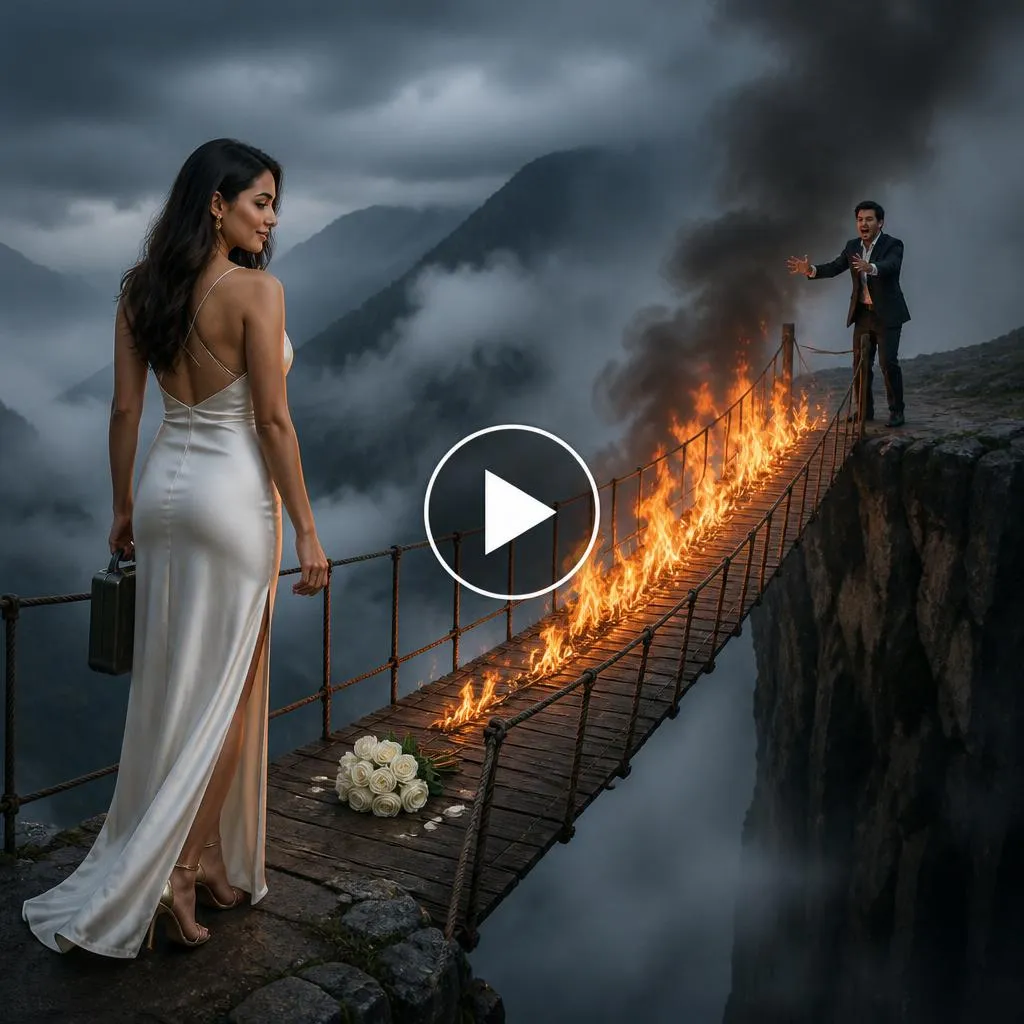
Prompt :
Create a realistic cinematic 9:16 vertical video using the uploaded woman’s photo as the identity reference. Preserve her original facial features, skin tone, hairstyle, and body proportions. Dress her in an elegant, flowing white satin dress with gold earrings and heels.
Scene: An old wooden suspension bridge stretches over a deep, misty mountain valley. Thick white fog surrounds the bridge, creating a dramatic blue-grey atmosphere.
Characters: The woman carries a bouquet of white roses and walks confidently across the bridge. A man in a black formal suit stands behind her, desperately reaching out as if trying to stop her.
Action: She walks slowly towards the other side without looking back. She leaves the white roses behind and continues walking. Once she reaches the other side, a dramatic cinematic fire effect spreads across the wooden bridge. Bright flames and thick smoke fill the background. She turns around calmly and watches the bridge burn completely.
Camera: Start with a wide shot of the suspension bridge, then slowly track the woman as she walks. Capture her expressions in a close-up before revealing the burning bridge in a final wide shot.
Use realistic fire and smoke effects, smooth movements, natural lighting, and consistent facial identity. Emotional, powerful, and cinematic atmosphere symbolising leaving the past behind and starting a new chapter.
For men
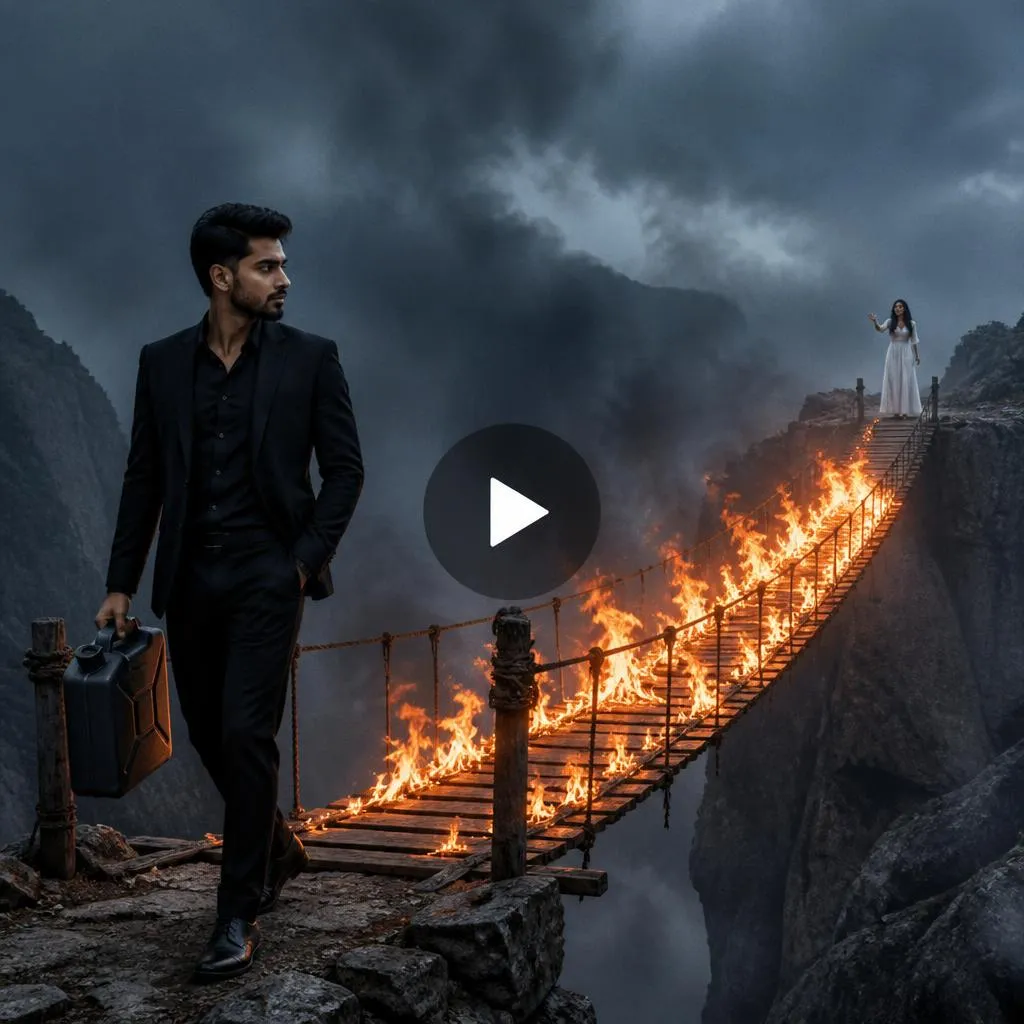
Prompt :
Create a realistic cinematic 9:16 vertical video using the uploaded man’s photo as the identity reference. Preserve his exact facial features, hairstyle, skin tone, and body proportions. Dress him in a stylish black long coat, black trousers, and formal shoes.
Scene: An old wooden rope suspension bridge hangs above a deep mountain valley covered in thick white fog. The atmosphere is cold, mysterious, and dramatic.
Characters: The man walks alone across the bridge with a serious, confident expression. Another person stands far behind him, trying to call him back.
Action: He slowly walks towards the other side of the bridge, briefly looks over his shoulder, and then turns forward without looking back. As he reaches the other side, a cinematic fire effect spreads across the wooden bridge behind him. Bright orange flames cover the bridge while thick smoke rises into the misty sky. He continues walking calmly, leaving everything behind.
Camera: Begin with a wide shot of the bridge, followed by a slow tracking shot of the man walking. Capture a close-up of his expression and finish with a wide shot of the bridge burning in the background.
Use realistic fire effects, natural shadows, smooth movements, and consistent facial identity. The mood should feel powerful, emotional, fearless, and cinematic, symbolising moving on and beginning a fresh chapter.
How to Build Your Own Prompt (Template)
Subject + Outfit + Bridge and misty setting + Props + Action sequence + Camera movement + Mood and lighting
Example:
Create a realistic, cinematic 9:16 vertical video using the uploaded photo as the main character reference. Preserve the person’s original facial features, skin tone, hairstyle, and body proportions.
1. Subject: [A woman / A man / A couple / A family] walking confidently across an old suspension bridge. [Describe facial expression, personality, and appearance.]
2. Outfit: Dress the character in [a flowing white satin dress / a stylish black formal suit / an elegant red gown / casual modern clothes]. Add [gold earrings / sunglasses / heels / boots / other accessories].
3. Bridge and Misty Setting: Set the scene on [an old wooden suspension bridge / a narrow rope bridge / a long hanging bridge] connecting two rocky cliffs. Add a deep valley, thick white fog, distant mountains, cloudy skies, and a dramatic blue-grey atmosphere.
4. Props: The character carries [a bouquet of white roses / a champagne bottle / a suitcase / a metal can]. Add [scattered flower petals / a dropped bouquet / other visual details] on the bridge.
5. Action Sequence: The character walks slowly towards the middle of the bridge with a confident expression. [Describe the main action, such as dropping flowers, turning around, or walking away.] A cinematic fire effect gradually spreads across the wooden bridge behind them. [Add another character on the opposite side, desperately trying to stop them.] The main character reaches safety and watches the bridge burn completely without looking back.
6. Camera Movement: Start with a wide establishing shot, followed by a slow tracking shot. Capture close-ups of facial expressions, a side-angle walking shot, and a final wide shot of the burning bridge.
7. Mood and Lighting: [Emotional / dramatic / fearless / romantic / mysterious]. Use cinematic lighting, realistic fire and smoke effects, natural shadows, smooth movements, and consistent facial identity. The final video should symbolise [moving on / ending a relationship / leaving the past behind / starting a new chapter].
Tips for the Best Results
- Use a high-quality, well-lit photo. The clearer the face, the better the result.
- Keep the prompt focused on one main action sequence.
- Add words like “cinematic”, “realistic fire effect”, “misty”, and “slow movement” for better quality.
- Generate a few versions and pick the strongest one.
- Always label it as AI content when you post.
Conclusion
Making a burning bridge AI video is easier than it looks. With one good photo and a clear cinematic prompt, you can create a powerful 9:16 vertical video that feels emotional and professional. Whether you want a personal “new chapter” post or just want to try the trend, this is one of the most striking AI video styles right now. Go create yours and watch it burn.
FAQ
What is the best video length for this trend?
8 to 15 seconds works best. Long enough to tell the story, short enough to keep people watching.
What aspect ratio and video length should I use?
Always use 9:16 vertical video. Aim for 8–15 seconds.
Can I use a selfie or a half-body photo?
Yes. A clear front-facing selfie or half-body photo works well. Full-body photos give even better results if the pose is natural.
What camera angle works best?
A slight low angle or eye-level tracking shot that follows the person walking toward the camera looks the most cinematic.
 Create the Unforgettable UNO Trend
Upload your image and turn an UNO move into a viral transition.