Learning how to make aura farming AI video content with us. This is the easiest way to jump on the internet’s most hypnotic Korean social media trend. With just a photo, an image to video tool AI video generator allows you to transform ordinary portraits into effortless cool, alluring dance clips in minutes.
 Follow Us for Daily Trends
Get new prompts and creative ideas every day.
Whether you want to become the ace of Instagram Reels or go viral on TikTok, this guide walks you through every trending aura farming AI video and how you should make it from scratch.
What Is The Aura Farming Trend?
In Gen Z lingo, aura is a word that describes someone’s presence and charm. Some people call it magnetic energy, personal pride and the term farming means collecting these traits. The TikTok aura farming trend refers to videos where someone performs calm, highly confident and smooth dance moves. The aura is untouched despite affecting the environment or losing one’s composure.
But this particular viral trend began with Pacu Jalur dance where a young dancer is seen doing his legendary boat dance. The dance is originally done on a boat but fans have turned it into a thrill using cars, bikes and trucks. Some athletes are even seen doing the dance celebration on pitch after a goal or a score. This trend was picked up from the tip of a speeding traditional rowing boat during a boat race. The young gentleman is seen impressing millions of people around the world by just his demeanour.
After this video became world famous, the Korean aura farming video came next. This type of video features school drama edits, neon lighting, and smooth desk poses. This trend spread rapidly too like the Instagram reels dance trend. The feeds are going crazy because it is a mix of humour, cool trend vibes and effortless aura farming. Influencers and content creators are using image to video to edit themselves, celebrities or pets in this clip for a single frame of dance footage.
Step by Step How To Make Aura Farming AI Video Guide
Depending on the platform or the look that you want to get; you can build your clip using our presets and templates or can customize the prompts. Here is the complete breakdown of this:
Using Pre-defined Template
Step 1: Choose the character of the dancer (Person 1). Put an image of the person, celebrity or pet who you want in the video. Select your persona and upload clear front-facing portraits.
- For a Solo Video: Pick one crisp photo of yourself. The generator will create a synchronized person to trade the spotlight.
Step 2: Background, outfit and prompt. Select the background you want. Get a background setting (highway, road at midnight, on a boat in the river) and where you are seen shooting this video. Apply stylistic things to align your outfit with the theme.
Step 3: Choose appropriate resolution and aspect. Select the layout that suits your project. Choose from 9:16 to ensure proper optimization.
Using Reference to Video (with driving video)
- Go To Reference to Video: Navigate to LightX’s video platform’s reference or motion-transfer tool.
- Step 1: Define your Characters: Establish clear visual profiles of the people in the video.
- Step 2: Use Video Reference and Replace Faces: If you own or have a source driving video (such as the Pacu Jalur boat race video). Configure that as your video reference. Write a precise prompt to replace the faces and models. For example, replace person 1 who is singing with reference image 1 and copy the same dance steps and hand movements as shown in the video.
Using Reference to Video without driving video
- Step 1: Define your Character. Establish clear visual profiles for your video character.
- Step 2: Generate using prompts if there is no driving video. If you don’t have a reference video, generate the whole effect using a detailed prompt. Clearly specify your parameters. Check out the Image to Video Generator for more relevant details.
1. Define character image outfits, makeup & style
Detail the specific wardrobe pieces such as party clothes, elite clothes, shirt or pants or an expensive tuxedo, statement jewellery, makeup and hair styling.
2. Define scene background, lighting, camera
Specify the shot uses a ultra wide angle camera motion with bright light and natural ambience with perfect motions attached to it.
3. Define how the character is interacting or acting (along with motion)
Explicitly outline the dancing timing, steps and actions such as dancing during a specific time or moment.
Prerequisites to Begin
Here’s a list of necessary requirements before making your AI Make aura farming AI video.
- A single clear image for solo video recording.
- An image which captures face, body, arms and legs.
- Bright light preferably natural or indoor lighting.
- A picture with high resolution without any blur and filters applied.
- Optional aura farming dance trend AI prompt for image-based video maker.
- Vertical adjustment of screen 9:16 for platforms like TikTok, Instagram Reels, and YouTube Shorts.
- LightX image-to-video or reference-to-video AI tool as they have motion reference video of the current trend.
- Audio & Lyrics: You can also add the trending Pacu Jalur boat race beat or track for the dramatic Korean aura farming edit.
Tip: LightX recommends full-body photos where the head, arms, and legs are visible. This is because the AI uses that image to build accurate movement. Its reference-to-video tool also supports multiple reference images, prompts, model selection, aspect ratio, resolution and audio settings.
Use These Prompts Directly
If you are using a prompt-driven image to video AI generator, just copy and paste this prompt aura farming AI prompt:
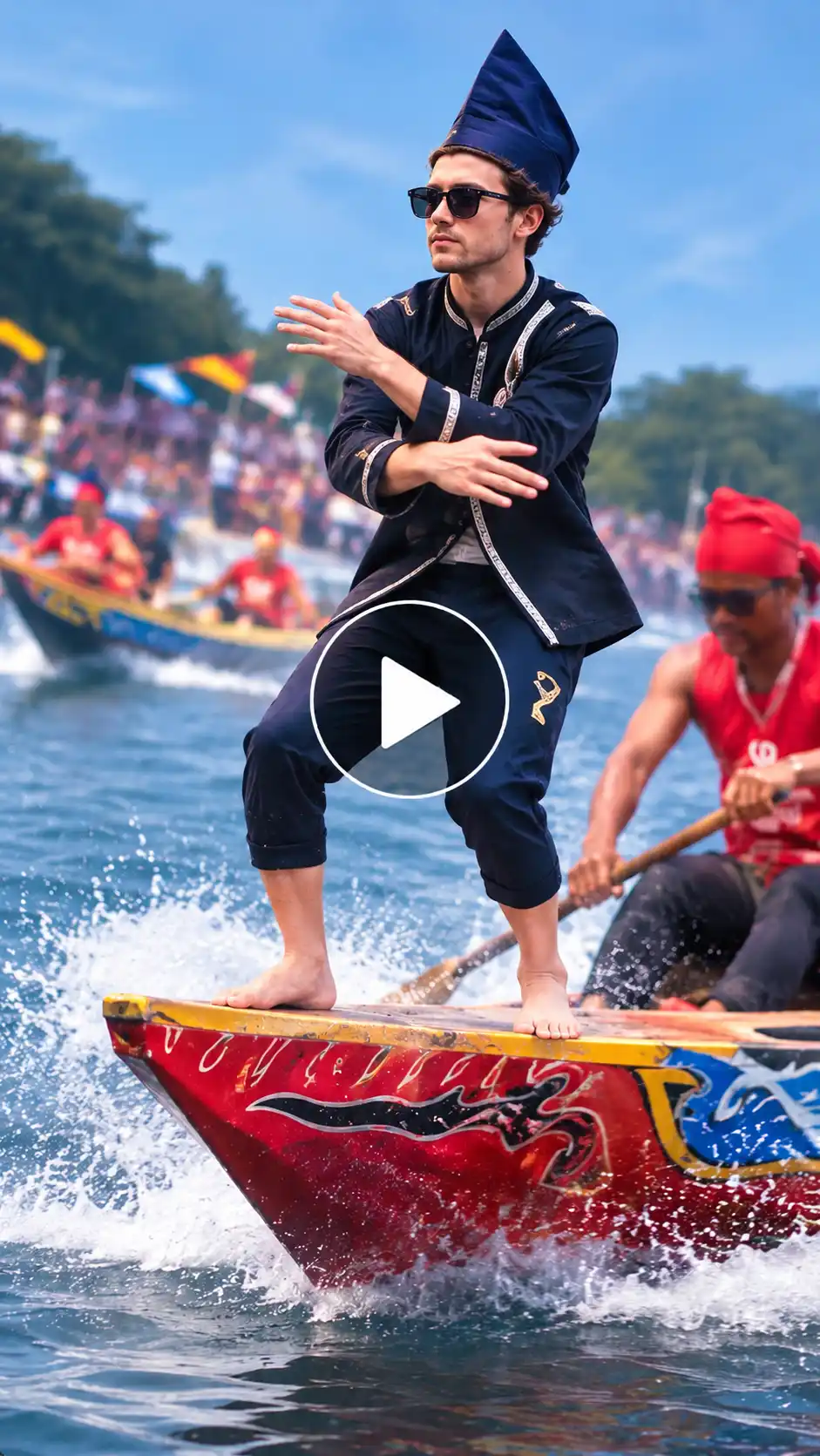
“A cinematic, high-energy video of the person in the reference photo performing a smooth, effortless aura farming dance move. Standing confidently on the front of a speeding boat over blue water, extreme balance, relaxed expression, dynamic camera movement, soft dramatic sunlight, ultra-realistic motion, trending TikTok viral edit style.”
Also read: How To Make Jisoo Addicted AI Video Trend
Use These Trends to Remix The Korean Aura Farming Video
Stand out in social media with creativity. These are some trends according to our research that you can use to get some boost:
1. Boat Bow Version: You can make this original Pacu Jalur style dance style by placing your character on the tip of a racing boat riding through river waves.
2. Car Hood Version: people are creating these videos along with the dance steps on top of a car hood. Especially a moving luxury sports car.
3. Rooftop or Stadium Version: place your character on the edge of the stadium or a large skyscraper.
4. Friends and Group Version: Make two or more friends doing the trend in a synchronized chill way.
Common Mistakes You Can Avoid
- Avoid using complex prompts. Use simple language when writing prompts. Do not add too many complex ideas in complex language.
- Don’t use low quality photos. Poor lighting and blurry images can make your image look mediocre.
- Don’t ignore background and motion references. Always mention lighting, camera angle, background setting and environment of your character.
Conclusion
To make this trending aura farming AI video, you must use the fastest and most effective way to capitalize on the current internet culture. By making a perfect video using just an image/images, you can create something worth bingeing. Use audios, modify lyrics and make your desired video online in just a few clicks.
Follow Us for Daily Trends
Get new prompts and creative ideas every day.