“POV: Your first time in a fancy cafe…” — then the character sits on the tiny round table, sips coffee like it’s a stool, and only realizes the mistake when someone walks in and sits properly. If you’ve seen this viral clip on Instagram and want to make your own, you can create a fancy cafe POV AI video with just one clear photo and a well-written prompt.
This blog walks you through the full step-by-step AI video guide: what the trend is, what you need, how to generate it in LightX, and how to remix it into a funny cafe skit AI video that feels original rather than copied.
What Is the Fancy Cafe POV Trend?
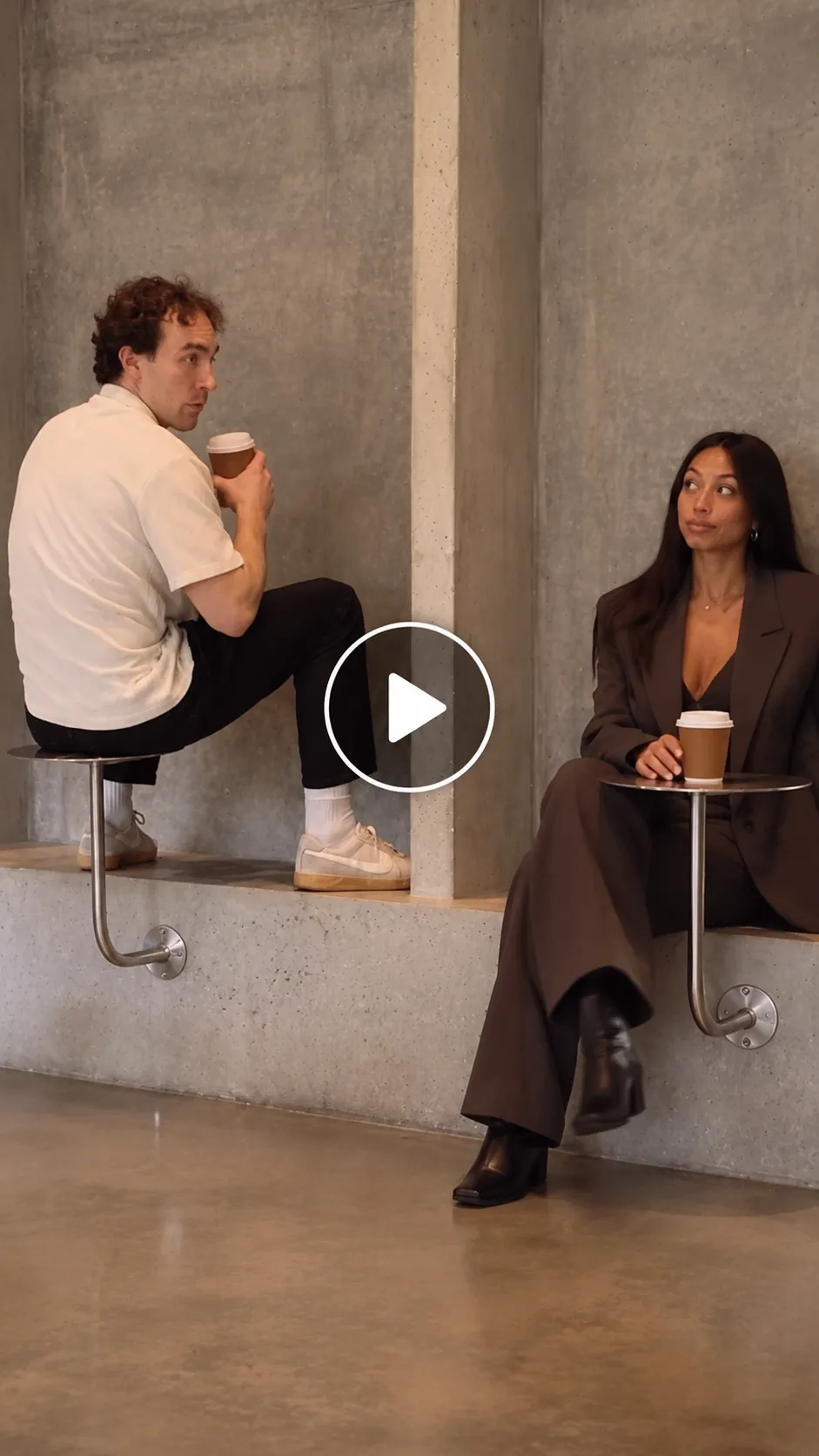
The POV first time in a fancy cafe trend is a short, relatable comedy video set in an aesthetic cafe. The main character misreads the minimalist cafe interior: instead of sitting on the bench and using the tiny round table normally, they perch awkwardly on top of the table and drink coffee from it as if it were a seat.
The punchline comes when another person enters, sits on the bench, places their coffee on the table, and uses the space normally. The first character slowly realizes they have been sitting on the table the whole time, then climbs down in embarrassment. It is a classic awkward moment video: simple setup, visual comedy, and an instantly understandable punchline.
The awkward cafe video trend spreads because it combines three things that perform well in short-form video:
A POV video trend format that makes viewers feel like they are inside the joke.
A relatable “I don’t know the rules of fancy places” moment.
A clean, minimalist cafe setting that looks premium and cinematic.
The minimalist cafe awkward seating video works especially well because the humor comes from the contrast: the cafe looks calm, expensive, and stylish, while the character’s behavior is completely wrong. That contrast makes it a strong Instagram Reels POV trend and an easy-to-remix viral cafe POV AI video.
How to Create the Fancy Cafe POV Video with AI
Using a Pre-defined Template
Step 1: Choose the character for the video. Upload a clear photo of yourself, a friend, a couple, or even a pet. A sharp, well-lit, front-facing photo works best for keeping the face and outfit consistent.
Step 2: Select the preset you like. Look for a First Time in a Fancy Cafe, POV Cafe, Awkward Cafe, or similar viral POV template.
Step 3: Choose the appropriate resolution and aspect ratio. Select vertical 9:16 for TikTok, Instagram Reels, and YouTube Shorts.
Step 4: Click Generate. Review the clip, then download the final 10–15 second video and add your caption, sound, and AI-generated label before posting.
If you want to make the fancy cafe POV AI video from scratch, you can also use an image-to-video tool. LightX lets you upload a JPEG or PNG, enter a detailed prompt, generate the animation, and download the result as an MP4.
Using Image to Video or Reference to Video (Step-by-Step Guide)
Step 1: Go to the Reference to Video tool.
Step 2: Define your character. Upload a clear photo of yourself or the person you want in the video. This photo acts as the identity lock so the face, hair, skin tone, and outfit stay consistent. You can upload up to five reference images, using them for the person, outfit, cafe background, table, or coffee cup.
Step 3: If you have a driving video, add a short reference clip of the viral fancy cafe POV video. Then write a simple prompt such as: “Replace the person in the video with the person from my reference image while keeping the exact minimalist cafe, tiny round steel table, awkward table-sitting action, coffee-sipping movement, second person entering, and the final embarrassed climb-down.”
Step 4: If you don’t have a driving video, create the whole effect with a prompt.
Be clear about the look and the action. In your prompt, mention:
Character: The person from the photo, their outfit, expression, and style.
Scene: A minimalist aesthetic cafe with concrete walls, polished concrete floors, soft daylight, a small round steel table, a low bench, and a cup of coffee.
Action: The person enters the cafe for the first time, mistakenly sits on top of the tiny round table, sips coffee as if it were a stool, then watches another person enter and sit correctly on the bench. They realize the mistake, freeze, and carefully climb down to sit properly.
Camera: A handheld vertical 9:16 phone-style shot, one continuous take, starting medium full-body and ending closer on the embarrassed reaction.
Style: Ultra-realistic live-action, natural movement, consistent identity, no face morphing, no artifacts, no text or logos.
Then click Generate and download the video. LightX recommends referring to images in order, keeping one main action per clip, and describing the camera move and lighting for a more polished result.
Related blog: How to make a Couple Coffee Mess AI video
A Fancy Cafe POV Prompt You Can Copy
Use this fancy cafe POV AI prompt as your starting point. Replace the bracketed details with your own.
Character: A [age/gender/look] person from the reference photo, keeping the exact face, hairstyle, skin tone, body type, and casual outfit consistent. Natural expression: curious, slightly nervous, then embarrassed at the end.
Scene: A minimalist, aesthetic cafe with polished concrete floors, pale concrete walls, warm soft daylight from large windows, a small round steel side table, a low bench, and a cup of black coffee on the table. Clean, premium, realistic cafe interior. No text, no logos.
Action: The person enters the fancy cafe for the first time and looks around uncertainly. They mistakenly sit on top of the tiny round steel table, holding the coffee cup and sipping from it as if the table were a stool. A second person enters, sits correctly on the low bench, places their coffee cup on the table, and looks at them. The first person slowly realizes the mistake, freezes, then carefully climbs down from the table and sits properly on the bench, looking embarrassed.
Camera: Handheld vertical 9:16 phone-style shot. One continuous take. Start with a medium full-body shot, hold steady during the awkward seating moment, then slightly zoom in on the realization and final embarrassed expression.
Style: Ultra-realistic cinematic live-action, natural body movement, realistic fabric and hair motion, accurate physics, consistent character identity, no face morphing, no extra limbs, no artifacts, no CGI look, no captions or watermarks.
Length: 12–15 seconds.
Tips for a Viral-Ready POV Video
- Keep it short. Aim for 10–15 seconds so the awkward moment lands quickly and viewers can rewatch it.
- Use vertical 9:16. This is the natural format for Instagram Reels, TikTok, and Shorts.
- Make the mistake visible early. Show the character sitting on the table within the first two seconds.
- Let the second person deliver the punchline. Their normal behavior is what makes the awkward cafe video trend funny.
- Choose a clean cafe look. Concrete walls, soft daylight, minimal furniture, and a small round table make the aesthetic cafe setting instantly recognizable.
- Use a strong caption. A good hook such as “POV: first time in a fancy cafe” tells viewers exactly what joke to expect.
- Use natural clothes and expressions. Casual outfits usually animate more realistically than stiff formalwear or heavy accessories.
- Turn on the AI-generated label. Since this is a realistic-looking photo-to-video AI result, disclosure keeps your post transparent.
Common Mistakes to Avoid
- Using a blurry or side-profile photo. The AI may struggle to keep the face consistent during movement.
- Making the action vague. If you only write “person sits awkwardly in cafe,” the model may not understand the table-sitting joke.
- Skipping the second character. The entrance of someone who sits correctly is the moment that makes the funny cafe video work.
- Using landscape format. Vertical 9:16 is essential for the Instagram Reels POV trend.
- Making it too long. A 30-second version usually loses the punch; keep the setup tight.
- Overloading the prompt. Avoid adding several unrelated actions, dialogue lines, and camera changes in one generation.
- Forgetting the AI label. Add it before publishing, especially when the clip looks realistic.
Conclusion
Making a fancy cafe POV AI video is simple once you break it down: one clear photo, a minimalist cafe scene, a tiny round table, and one perfectly awkward mistake. With a detailed AI video prompt, an image-to-video or reference-to-video tool, and a tight 10–15 second edit, you can create a relatable comedy video that fits the current viral AI video trend 2026 wave.
Start with the copy-paste prompt above, generate a test clip, refine the seating action, and post your own version while the Instagram Reels POV trend is still gaining momentum.