If you’ve been scrolling lately, you’ve definitely seen those short clips of people belting out a soulful performance behind a cluttered office desk, complete with a laughing lead singer, backing band, and saxophone solo. That’s the outstanding tiny desk AI trend, and it’s everywhere right now on TikTok, Instagram Reels, and YouTube Shorts. The best part? You don’t need a real band, studio, or even musical talent. Just drop in one clear photo of yourself (or a friend), and AI does the rest. It turns your photo into a full, outstanding tiny desk set video that looks surprisingly real, complete with warm studio lighting and energetic performance vibes
 Create the Viral Hotel Lobby Trend 🎵🔥
Upload your image and transform it into a viral music video.
Create the Viral Hotel Lobby Trend 🎵🔥
Upload your image and transform it into a viral music video.
I’ll walk you through exactly how to make an outstanding tiny desk AI video, which photos work best, some ready-to-use prompts, and a few small tips that can help your video get more views while the trend is still hot.
What is the Outstanding Tiny Desk AI Trend?
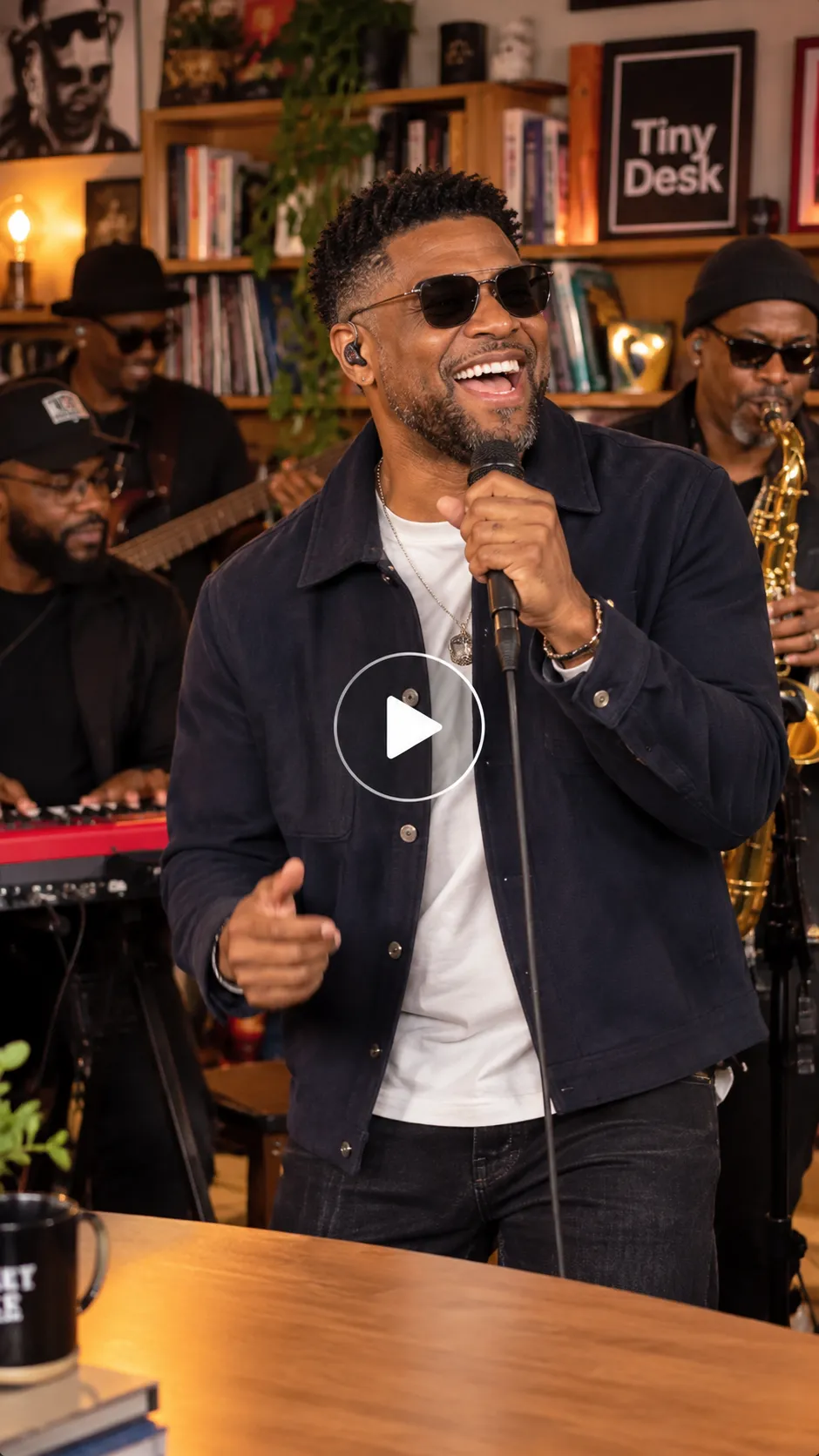
The outstanding tiny desk AI trend (also called the tiny desk AI TikTok trend or outstanding tiny desk set) exploded in mid-October 2026. It started when a creator posted an AI parody putting losing college football coaches into Charlie Wilson’s 2023 NPR Tiny Desk performance of The Gap Band’s “Outstanding.” The 19-second clip of coaches singing and laughing behind a desk packed with records and a red keyboard racked up millions of views within days, and people immediately started recreating it.
The viral outstanding tiny desk AI video keeps the intimate desk-side energy: a lead singer with expressive reactions, a backing band, saxophone solo, keyboard, bookshelf backdrop, and warm studio lighting. Creators now use image-to-video and photo-to-video AI tools to put themselves or friends into the same outstanding tiny desk set. The result is a short, vertical, trending outstanding tiny desk AI video that fits perfectly on TikTok, Instagram Reels, and YouTube Shorts. Whether you want a solo performance or a full band version, the format works for almost anyone.
Stepwise Guide on How to Create an Outstanding Tiny Desk AI Video
Using a Pre-defined Template
Step 1: Choose the character for the image. Upload one clear photo of yourself, a friend, or anyone you want as the lead singer in the video.
Step 2: Change your background and outfit using prompts (for example, “warm bookshelf backdrop” or “cozy desk concert setting”).
Step 3: Choose the appropriate resolution and aspect ratio (select vertical 9:16).
Step 4: Click Generate, then download the final video.
If you want to make a video from scratch, use our Image to Video Tool.
Using Reference to Video (Step-by-Step Guide)
Step 1: Go to the Reference to Video Tool.
Step 2: Define your character. Upload one clear photo, such as of you or a friend.
Step 3: If you own a driving video, add it as the video reference and write a prompt to replace the person in it. For example: “Replace the person in the video with the person in my reference image while keeping the exact outstanding tiny desk performance moves.”
Step 4: If you don’t have a driving video, create the whole effect with a prompt. Be clear about the look and the performance. In your prompt, you can mention:
- Character: image, outfit, and style (for example, expressive lead singer with natural look or headphones)
- Scene: background, lighting, camera angle, and more (for example, cluttered office desk with bookshelf backdrop and warm studio lighting)
- Action: the exact outstanding tiny desk performance — singing into a mic, laughing mid-line, head bobbing, handing off to the saxophone solo, and energetic band energy
To learn more about the tool and the steps, visit this blog: How To Swap Face In a Video
Sample Prompt and Structure to Follow
You can swap the subject to suit your idea to yourself, a friend, or a full group for the outstanding tiny desk set.
Prompt example:
A person performing as the lead singer in an outstanding tiny desk AI video, standing near a wooden desk with a red keyboard, singing expressively into a handheld microphone with a big laugh, warm studio lighting, bookshelf backdrop, and a backing band including saxophone solo.
Character look: A person with clear facial features and natural skin texture, wearing everyday clothes or headphones, showing an expressive, laughing lead singer style. Upper body or full body visible.
Background setting: Cozy office desk concert with packed bookshelves, warm amber studio lighting, red keyboard, and small instruments. Clean and focused.
Camera angle: Steady front-facing and close-up shots, vertical 9:16 aspect ratio, subtle camera push-in.
Motion effects: Performs the exact outstanding tiny desk sequence — expressive singing, head bobbing, big laugh close-up, energetic gestures, and saxophone solo handoff with realistic band energy.
Song: “Outstanding” by The Gap Band (as performed by Charlie Wilson).
Scene description: In a warm desk-side studio, the character executes the viral outstanding tiny desk AI performance with total energy and face consistency. Ultra-realistic motion, high quality, 15–19 second vertical 9:16 video.
What You Will Get in the Videos
Here’s what your finished outstanding tiny desk AI video will look like:
- Length: A short clip of about 15 to 19 seconds, perfect for scrolling.
- Shape: Vertical video in 9:16 — the same tall format used on TikTok, Instagram Reels, and YouTube Shorts.
- Setting: Cozy office desk with bookshelf backdrop, red keyboard, and warm studio lighting.
- What you are doing: The full outstanding tiny desk performance with expressive lead singing, laughing reactions, and saxophone solo.
- Camera style: Mix of close-ups and group shots that feel natural and performance-filmed.
- Sound: The trending “Outstanding” audio plays throughout (add the official or licensed audio when you post).
- Overall feel: Soulful, energetic, and fun, exactly like the original viral outstanding tiny desk AI video that started the trend.
In short, the AI takes one photo and turns it into a ready-to-post version of the viral outstanding tiny desk AI trend.
Related blog: How to Make Train Window Car Video with AI
Tips for the Best Results
- Use a clear, well-lit front-facing or half-body photo looking straight at the camera for the best make tiny desk AI video from photo results.
- Keep the background simple so the AI focuses on the performance and face consistency.
- Mention “warm studio lighting,” “bookshelf backdrop,” or “expressive lead singer with saxophone solo” in your outstanding tiny desk AI prompt for stronger trend matching.
- Add the trending audio when you post so your video joins the tiny desk AI TikTok trend.
- Try different models — some handle lip sync and multi-person band shots better than others.
- Stick to vertical 9:16 for maximum reach on short-form platforms.
- Want something different? Use the same process for a full outstanding tiny desk set with friends or a funny sports coach parody version.
Conclusion
The outstanding tiny desk AI trend is energetic, easy to join, and perfect for sharing. Whether you want a classic lead singer recreation, a full backing band version, or a fun photo-to-video take on the Charlie Wilson NPR Tiny Desk parody, it only takes a few minutes.
Upload one photo, use a clear, outstanding Tiny Desk AI prompt, generate your clip, and post it with the trending sound. That’s all it takes to create your own version of the viral outstanding tiny desk AI video.
FAQs
What is the best video length for this trend?
10 to 15 seconds works best. It matches the original outstanding tiny desk set clips and keeps viewers watching on TikTok and Instagram Reels.
What aspect ratio should I use?
Use 9:16 vertical video. It fills the screen on TikTok, Instagram Reels, and YouTube Shorts.
Can I use a selfie or a half-body photo?
Yes. A clear front-facing selfie or half-body photo works for one-photo outstanding tiny desk AI video results. Full-body or upper-body photos give better motion performance.
Can I make this video with a friend or group?
Yes. Upload one or more photos. You can create solo lead singer versions or a full outstanding tiny desk set with a backing band and saxophone solo.
Do I need a studio photo?
No. A clear everyday photo is enough. You can describe the warm studio lighting, bookshelf backdrop, and desk concert setting directly in the prompt.
 Create the Unforgettable UNO Trend
Upload your image and turn an UNO move into a viral transition.
Create the Unforgettable UNO Trend
Upload your image and turn an UNO move into a viral transition.