

Open Instagram this week and your feed already looks like a snow globe: Santa sneaking cookies, a woman breaking out of a block of ice, a car with a giant red bow rolling into a living room. If you want to learn how to make a trending Christmas video with AI, the good news is that you no longer need a camera crew, a costume, or a snowy backyard. Just a photo, one clear idea, and a few minutes are enough to join the Santa and Christmas clips filling Reels right now.
 Follow Us for Daily Trends
Get new prompts and creative ideas every day.
This blog tells you what is working, why it is spreading so fast, and exactly how to build your own version, from the first prompt to the final export.
What Is the AI Christmas Video Trend
The AI Christmas video trend is a wave of short, cinematic clips where AI places a person, product, or pet into a festive scene and adds one surprise. Think of a woman breaking out of a block of ice into a Christmas party, Santa getting tricked out of his gift sack, or someone lighting up like a Christmas tree.
The clips are usually vertical, around 10 to 15 seconds, and built on a single idea: a strong opening image, one clear twist, and a quick payoff. They often start from just one photo, so anyone can make a personal version in minutes. That mix of a movie-like look and a personal touch is why people keep watching, sharing, and recreating them.
Trending Christmas Video Styles
1. Santa Sleigh Swap AI Video Trend: A woman in a cream fur jacket finds Santa relaxing in his red velvet gift sack, scrolling his phone and eating a cookie. She distracts him by saying his sleigh is over there. While he looks away, she jumps into the sack with her own phone and a gingerbread cookie. Santa ends up dragging her through the snow like a sleigh, and the joke is that he does all the work while she enjoys the ride.
2. Santa Delivers a Car Gift AI Video Trend: On a snowy night, Santa stands on a lift platform outside a high-rise apartment and pushes a white BMW with a giant red bow toward the living-room window. Inside, a woman in candy-cane pajamas sits on the sofa scrolling her phone. The car smashes through the glass into the living room beside the Christmas tree, and she runs to it, overjoyed. It plays as an over-the-top dream gift fantasy.
3. Santa “Love or Money” Challenge AI Video Trend: In a luxurious setting with a gold velvet throne and string lights, Santa asks a woman in a white fur coat and hat to choose between love and money. She chooses money straight away; he hands her cash, and she keeps asking for more. She then takes the money and walks off while Santa sits there amused. The comedy comes from her shameless punchline.
4. Become the Christmas Tree Transformation Trend: A woman in a green puffer coat and red beanie stands in a snowy yard next to a decorated fir tree, holding an unlit string of lights. She spins until the lights wrap around her body, then they switch on in multiple colors and a gold star appears on her hat. The real tree behind her looks bare, as if she has taken its place.
5. Ice Break Christmas AI Video Trend (kickoff trend ): A woman is trapped inside a giant block of ice in a magical frozen setting. The ice slowly cracks and breaks, and as she steps out, the scene transforms into a joyful Christmas celebration. Her icy look becomes a festive outfit, and snow-covered mountains, decorated trees, and colorful lights appear while people dance around her. The appeal is the dramatic jump from a frozen world to a warm Christmas party.
6. Santa’s Sleigh Ride Christmas AI Video Trend: In a snowy cabin decorated with warm lights and festive trees, Santa pulls a traditional wooden sleigh with a person sitting inside. A man wearing a giant red gift bow and a woman in a white fur jacket then step out of the cabin, adding a playful, unexpected twist. It feels like a cinematic Christmas movie scene.
How to Make a Trending Christmas Video with AI Step by Step
Using a Pre-defined Template
Step 1: Choose the character for the image.
Upload one clear, well-lit photo of yourself facing the camera. For a group video, upload one photo per person.
Step 2: Change the background and scene using prompts (for example, “snowy cabin with warm fairy lights, a decorated Christmas tree and Santa’s wooden sleigh” or “cosy living room with a glowing Christmas tree, gift boxes and a giant red bow”).
Step 3: Choose the appropriate resolution and aspect ratio (select vertical 9:16).
Step 4: Click Generate, then download the final video.
If you want to make a video from scratch, use our Image to Video Tool.
Using Reference to Video (Step-by-Step Guide)
Step 1: Go to the Reference to Video Tool.
Step 2: Define your character.
Upload one clear photo of yourself, or one photo per person for a group scene.
Step 3: If you own a driving video, add it as the video reference and write a prompt to replace the person in it.
For example: “Replace the person in the video with the person in my reference image while keeping the same movement, camera angle, timing, and final shot.”
Step 4: If you don’t have a driving video, create the whole effect with a prompt.
Be clear about the look and the action. In your prompt, you can mention:
- Character: reference image, hairstyle, outfit, expression, and style (for example, a woman in a cream fur jacket with a warm smile, or a person in candy-cane pajamas with a surprised, delighted expression)
- Scene: background, lighting, camera angle, and mood (for example, a snowy Christmas cabin at night, a cosy living room with a glowing Christmas tree and fairy lights, warm golden light, cinematic lighting)
- Action: the exact Christmas sequence, such as Santa pushing a gift through the window, a surprised look, a quick run toward the gift, and a joyful reaction, or the ice cracking, a step forward, and the outfit changing into a festive Christmas dress
Copy-and-Paste Prompts
Prompt 1: Santa Wish Fulfilled (Dream Car Gift)
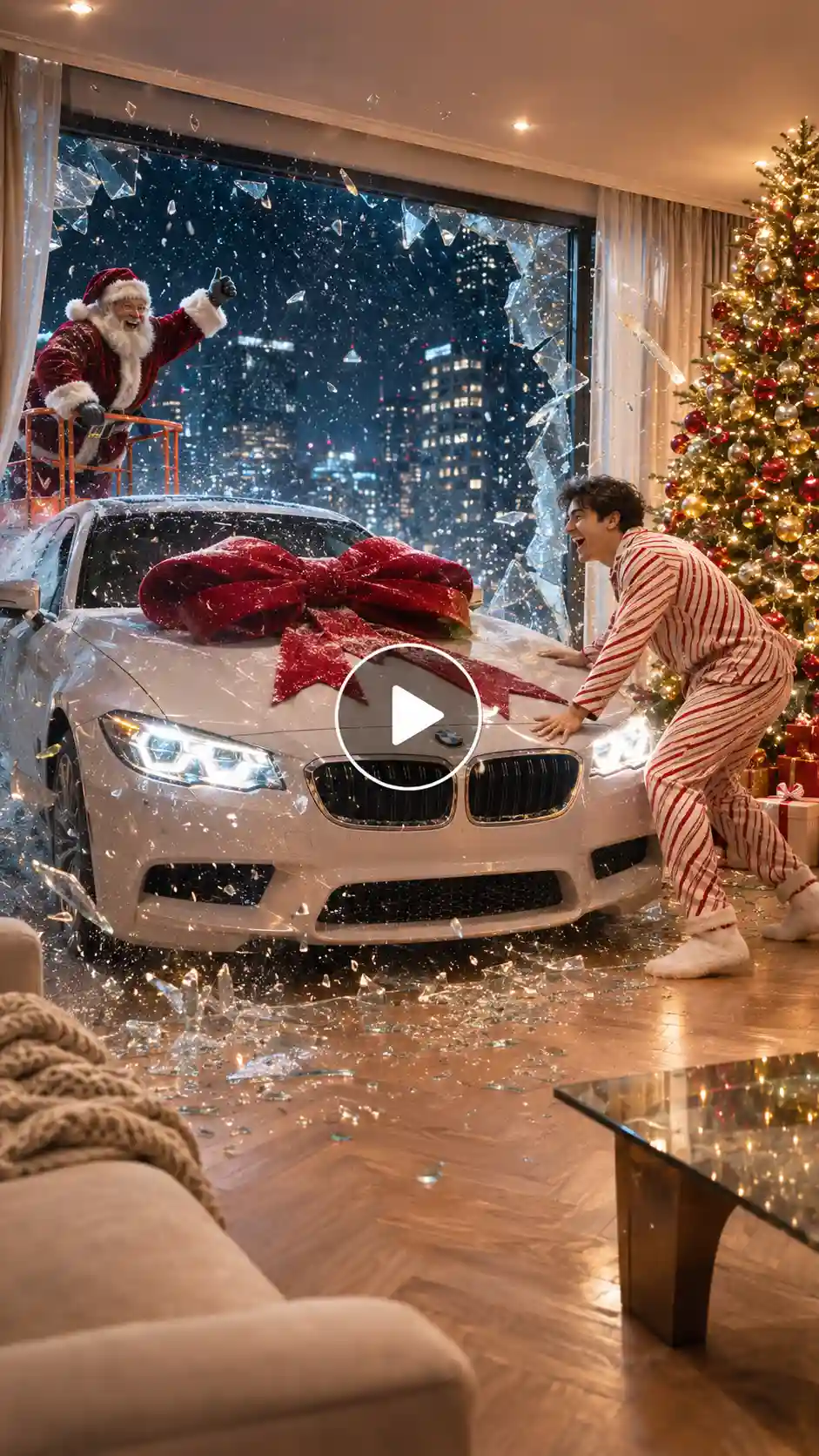
Use the person from my uploaded photo as the main character, keeping their face, hairstyle, skin tone and body proportions exactly consistent in every frame. Setting: a modern, luxurious living room in a high-rise apartment at night, with a huge floor-to-ceiling glass window showing heavy snowfall and glittering city lights outside. A tall, beautifully decorated Christmas tree stands in the corner with warm gold lights, red and gold baubles and wrapped gift boxes underneath. The floor is light herringbone wood, the sofa is cream-colored, and soft recessed ceiling lights fill the room with a warm glow.
The character sits relaxed on the sofa in soft candy-cane pajamas and fuzzy socks, scrolling on their phone, completely unaware of what is about to happen. For the first two seconds, show a calm medium shot of them with gentle snow falling outside. At about second two, headlights glow faintly through the snowy window. At second three, Santa Claus, in a rich red velvet suit with white fur trim, round glasses and a full white beard, appears outside on an orange lift platform, pushing a glossy white luxury sedan with a giant red velvet bow on its hood toward the window.
At second four, the glass cracks and shatters inward in slow motion, with sparkling shards and swirling snowflakes, and the car glides into the living room, stopping beside the Christmas tree. The character looks up, jaw dropping in shock, then jumps off the sofa and runs to the car with both hands on the hood, laughing with pure joy. Final shot: a wide frame of the character, the car with the red bow, the glowing tree and Santa waving from the window.
Camera: starts static, then a smooth push-in during the glass break, with a handheld feel on the character’s reaction. Lighting: warm, cinematic and golden indoors, with a cool blue snowy night outside. Style: realistic, high-detail, movie-trailer quality. Duration 12 seconds, vertical 9:16.
Prompt 2: Ice Break to Christmas Party
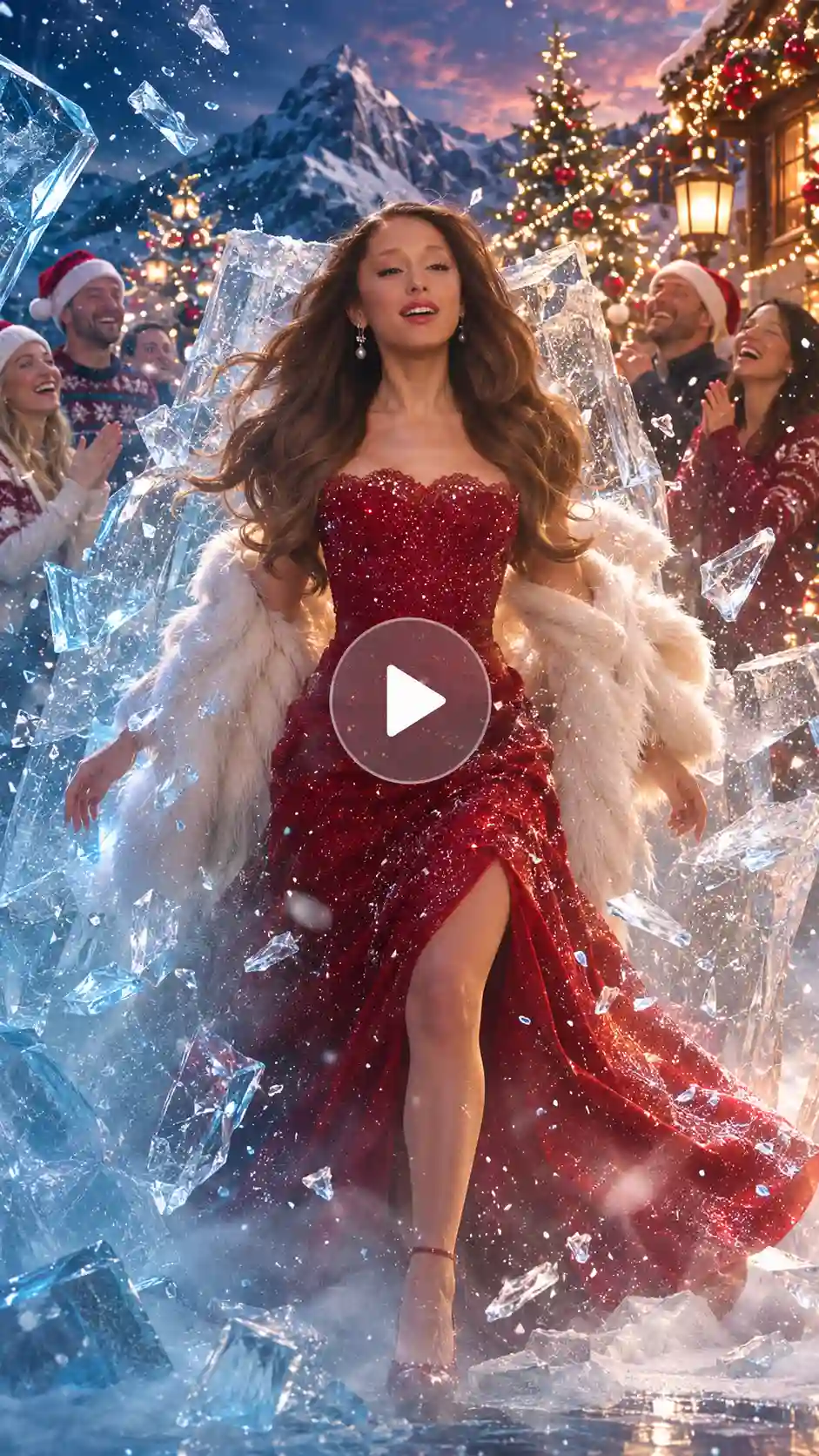
Use the person from my uploaded photo as the main character, keeping their face, hairstyle and body proportions exactly consistent in every frame. Opening scene: a dark, misty, magical winter world at twilight, with deep blue light and soft snow in the air. The character stands perfectly still, trapped inside a giant, thick, glassy block of ice, with frost patterns on the surface and their silhouette softly blurred behind it. They wear a glamorous winter look: a white faux-fur coat, a matching fur hat and black leather gloves. A faint cold mist drifts along the ground, and the camera starts with a low-angle, slow push-in toward the ice.
At second two, a thin crack appears across the ice and a low glowing light shines through it. From seconds three to five, the cracks spread outward in slow motion, with ice shards and sparkles flying toward the camera, until the whole block shatters. The character opens their eyes, takes a confident step forward, and in that exact moment the scene transforms. The winter coat changes into a stunning red Christmas dress with sparkling details, and the dark frozen world lights up.
The new setting is a joyful outdoor Christmas celebration: snow-covered mountains in the distance, tall decorated pine trees with warm fairy lights, red and gold baubles, glowing lanterns and falling snow. A group of happy people in cosy Christmas sweaters, Santa hats and festive outfits dance around the character in rhythm, laughing and clapping. The character smiles warmly, does a graceful spin, and the camera pulls back into a wide, cinematic shot of the full party.
Camera: low-angle push-in at the start, a fast burst on the ice break, then a smooth pull-back. Lighting: cold blue and silver at first, shifting to warm golden Christmas light after the transformation. Style: realistic, cinematic, magical atmosphere, natural movement, sharp detail. Duration 12 seconds, vertical 9:16.
Related page: Free Christmas Photo Editor
Pro Tips to Make Your Video Go Viral
- Win the first second. A strong Reels first-second hook is what makes viewers stay: a cracking ice block, a car about to hit a window, or Santa caught mid-snack. Put your strongest visual in the opening frame, before any text or setup. The best Christmas Reels hooks show the payoff is coming.
- Keep the story simple. The most shared trending Christmas Reels use one location, one character, and one twist. An AI Santa video works best when the joke is clear without any explanation.
- Keep it short. A trending Christmas Reel video of about 10 to 15 seconds gets replayed more, and replays help it travel.
- Make your prompt specific. A good trending Christmas video prompt describes the camera movement, the lighting, and the action. Mentioning details like a soft twinkle lights effect is what makes the clip feel cinematic instead of flat.
- Start with a great photo. To make a viral Christmas video from a photo, use a sharp, well-lit image with your face fully visible, so the AI keeps your features consistent.
- Choose your sound carefully. Check trending audio for Reels in the app before you post, and pick a track that matches the mood of your scene. If your export doesn’t include audio, add it when you upload.
- Build around a before-and-after moment. A Santa wish fulfilled video, a transformation, or a surprise payoff is what people share, so pick trending Christmas video ideas with a clear reveal at the end.
- Stay consistent with your style. A snowy setting, warm lights, and a soft cinematic look make your videos feel polished.
- Post early and follow up. Post early in the season, and make a second version while the first one is still performing.
Common Mistakes to Avoid
- A slow opening. If nothing happens in the first second, viewers scroll past. A weak Reels first-second hook is the fastest way to lose people, so show your strongest visual straight away.
- An overloaded prompt. Asking for Santa, reindeer, elves, a dance, and a car in ten seconds usually gives a messy result. Keep to one main action per clip. If you want a reindeer video, let the reindeer have the whole scene.
- A weak photo. When making a viral Christmas video from a photo, a blurry, heavily filtered, or crowded image makes faces warp. Use a clear, well-lit photo with your face fully visible.
- A vague trending Christmas video prompt. Without details about the scene, the action, and the lighting, the AI fills in the gaps with generic results. Be specific, like “Santa cookie prank in a snowy forest, cinematic lighting, 10 seconds, vertical 9:16.”
- Ignoring the sound. Posting a silent clip or using audio that doesn’t match the mood loses much of the festive feel. Check trending audio for Reels before you post.
- Skipping the final check. Faces, hands, and the last shot can drift between generations, so watch the full clip before you upload.
- Copying another video frame for frame. Use trending Christmas video ideas as a starting point, then add your own outfit, location, or twist so your Reel trending Christmas video feels original.
Related page: DIY Christmas Card Ideas
Conclusion
You don’t need a studio, a costume, or a big budget to join the trending Christmas Reels this season. Pick a style, upload a clear photo, write a focused prompt, and build your clip around a strong first second. Once you know how to make a trending Christmas video with AI, you can create an AI Santa video, a Santa wish-fulfilled video, or a festive transformation in minutes, and keep experimenting as new trends emerge. Start with one idea, post it, and see what your audience loves.
FAQs
What kind of photo works best?
Upload a clear, well-lit photo where your face is fully visible. Avoid blurry shots, heavy filters, sunglasses, and busy backgrounds. In LightX’s Reference to Video tool, you can add up to five reference images, so group videos are easy too.
What resolution should I export the video in?
Choose 9:16 as the aspect ratio so your video fits Instagram Reels, TikTok, and YouTube Shorts. Set the resolution to the highest option available for the model you pick.
What file formats and sizes can I upload?
Upload a standard JPG or PNG photo, up to [5 mb] per image. Your finished video downloads as an MP4, ready to post.
How long can the video be?
You can set the video length in LightX’s settings before you generate. For Reels, 10 to 15 seconds works best, since short clips get replayed more.
 Create the Car Jump Trend 🚗💨
Upload your image and turn it into an epic car jump.


