Transform any portrait or pet photo into a dramatic, emo-country performance inspired by “Choosin Texas.” Hasn’t this trend taken over feeds lately too? Haven’t you also noticed a moody, dramatic wave of content taking over TikTok, Reels and Shorts. So, learn how to make choosin texas emo remix AI video clips with us. It has become one of the internet’s most exaggerated obsessions.
 Create the Viral Hotel Lobby Trend 🎵🔥
Upload your image and transform it into a viral music video.
Create the Viral Hotel Lobby Trend 🎵🔥
Upload your image and transform it into a viral music video.
It blends the heartbroken storytelling of country music with angsty. The over-the-top rock performances are the essence of this trend. So, let creators turn ordinary photos or pet photos into dancing rock stars. Turning a selfie into an emotional icon or creating a funny viral clip of your dog, cat or pet. Using LightX makes the process surprisingly simple.
What Is the Choosin Texas Emo Remix Trend?
The phenomenon stems from the massive popularity of country tracks like Ella Langley’s hit song, which has sparked a massive wave of covers, mashups and edits across social media platforms. While the original track carries a deep, storytelling country-pop vibe, the choosin Texas emo remix AI trend flips the script entirely.
Creators take the choosin Texas emo version featured with a dramatic bass, slowed and reverbed with high-energy rock-style dance. It builds and pairs with today’s trends perfectly. The trend spreads rapidly because it hits a sweet spot of internet humor. A static image suddenly turns into headbanging, nostalgic lyrics with exaggerated facial expressions. You can drop to one knee in a cinematic finale. It is the ultimate expression of popular country lyrics meeting chaotic late-night emo energy.
How To Make A Choosin Texas Emo Remix Trend
Depending on the platform or the look that you want to get; you can build your clip using our presets and templates or can customize the prompts. Here is the complete breakdown of this:
Using Pre-defined Template
Step 1
Upload the image of the person. Select your persona and upload clear front-facing portraits. Pick one crisp photo of yourself.
Step 2
Background, outfit and prompt: Select the background you want. Get a background setting and where you are seen shooting this video. Apply stylistic things to align your outfit with the theme.
Step 3
Choose appropriate resolution and aspect. Select the layout that suits your clip. Choose from 9:16 to ensure proper optimization.
Using Reference to Video (with driving video)
- Go To Reference to Video: Navigate to LightX’s video platform’s reference or motion-transfer tool.
- Step 1: Define your Look: Establish a clear visual profile of the people in the video.
- Step 2: Use Video reference and replace Faces. If you own or have a source driving video then Configure that as your video reference. Write a precise prompt to replace the person. For example, replace person 1 with reference image 1.
Using Reference to Video (without driving video)
- Step 1: upload a photo of yourself, your friend or your pet. Establish a clear visual profile for each video character.
- Step 2: Generate using prompts if there is no driving video. If you don’t have a reference video, generate the whole effect using a detailed prompt. Clearly specify your parameters. Check out the Image to Video Generator for more relevant details.
1. Define everyone’s outfits, makeup & style
Detail the specific wardrobe pieces such as expensive outfit, dancing joggers, top and skirts or the official song’s wardrobe with makeup and hair style.
2. Define scene background, lighting, camera
Specify whether the shot uses a front facing selfie frame in the camera or ultra wide angle camera motion with natural ambience.
3. Define how the character is acting (along with motion)
Explicitly outline the motion timing, steps and actions such as dancing, lip syncing, prancing or any other choreographed steps you want during a specific time or moment.
What You Need Before You Start
In order to assure that your trendy texan emo AI video looks clean and real, you should do some pre-emptive work before you enter into the image-to-video conversion tool.
High Definition Image
Choose an image of you or your pet or friend taken at a front-assuring location which shows every detail of your face in a good light and in ease of background.
AI Video Generator
You will have to find a good AI video generator like LightX that’s capable of generating videos using image-to-animation conversion technology.
Audio Files
You should make sure that your audio track is either from a licensed source or is made through the tools provided by the video platform provider.
AI Tools
You need to find a good mobile or PC app for editing your created video so that you cut the vertical video into parts, add subtitles, and synchronize the sound track.
Copy + Paste This Prompt
Getting the right output from an AI video prompt requires balancing descriptive tags with precise physical features. Use this prompt to create the video:
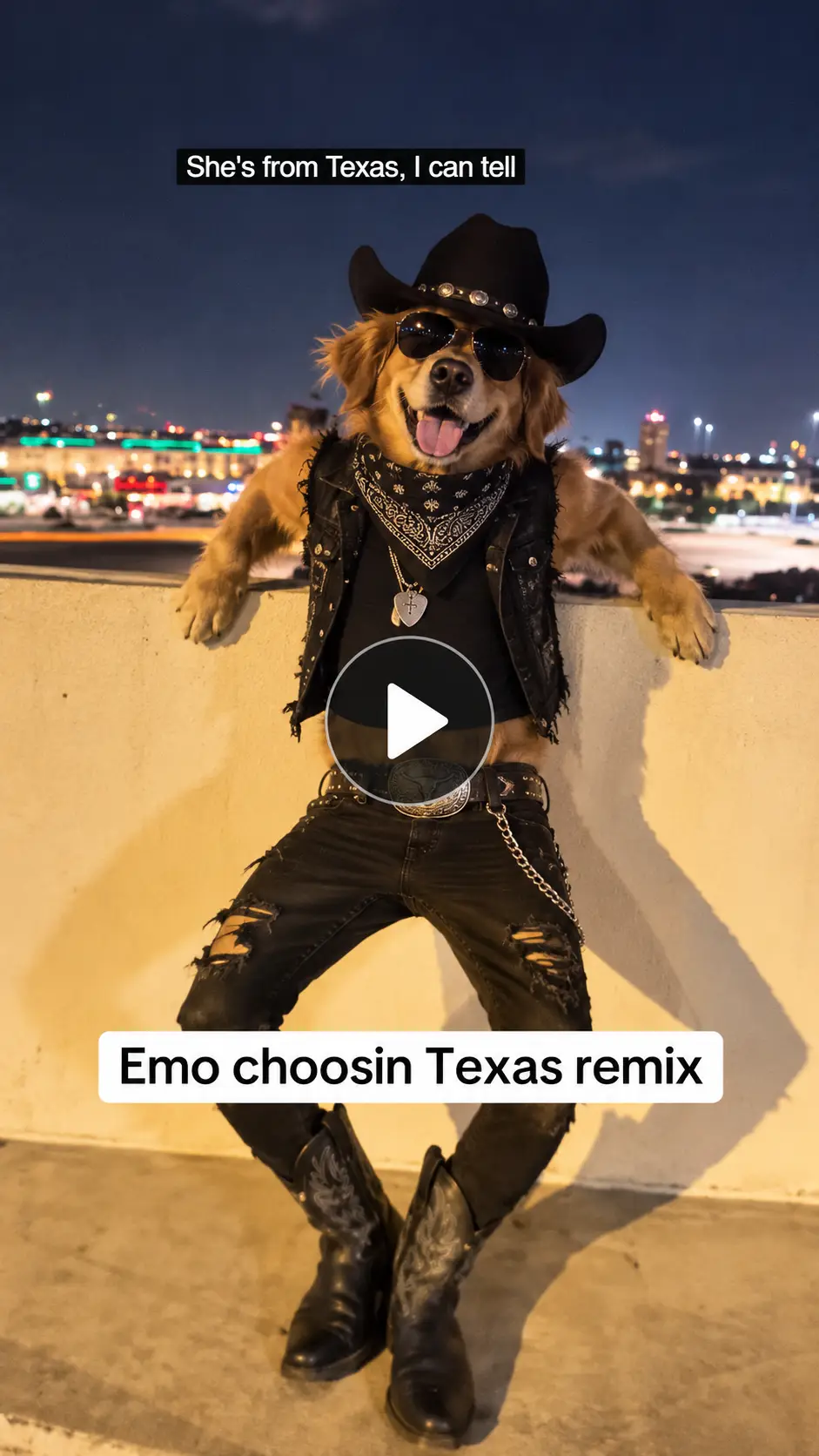
Prompt :
A dramatic vertical 9:16 cinematic video of the dog performing a funny dance on emo-country rock ballad on his terrace railing. cute dance moves, passionate headbanging, intense leg flipping, and rocking hand gestures. The camera slowly pushes in as they belt the chorus, culminating in a theatrical drop to one knee with a passionate final note. High contrast, film grain, dramatic shadows, dance motion.
Related Blog: How To Make A Gangnam Style Video
Things to Get Before Starting Texas Emo Mix AI Video
To ensure your video can be noticed on TikTok, Reels and Shorts, always keep these tweaks and optimization techniques in mind:
- Face & Features Mapping
To carry this out, select source photos with neutral or slightly smiling faces and without shadows that can lead to oscillations during motion effect generation.
- Humor for Pets
If you choose the funny pet version of the trend, be aware that showing animated mouthing of the animals would look more stylized than natural. Thus, lean into the funny performance of the act in order to make it more engaging.
- Lighting Effects
For example, including the words “moody light” or “neon backgrounds” or “smoky bar atmosphere” in the text prompt allows applying traditional country aesthetics to emo style.
Conclusion
The Texas Emo remix AI video is a trend that brings together an unexpected mix of musical styles in combination with the fun of AI characters. Make such viral trends and become popular on the Internet in just a few minutes. Try LightX now.
 Create the Unforgettable UNO Trend
Upload your image and turn an UNO move into a viral transition.
Create the Unforgettable UNO Trend
Upload your image and turn an UNO move into a viral transition.