Ever wondered what it would be like to go against all odds and throw down a slam dunk on an official basketball court? The how to make basketball dunk video with AI has completely overthrown every other trend on social media. Here, people are turning photos into high jump basketball slam masterclasses. If you want to feature yourself, your friends, your pets or just follow a trend, do it with LightX.
 Create the Unforgettable UNO Trend
Upload your image and turn an UNO move into a viral transition.
Create the Unforgettable UNO Trend
Upload your image and turn an UNO move into a viral transition.
What Is The Basketball Dunk AI Video Trend?
The basketball dunk AI video trend is a sensational viral clip where a single static photograph of the subject/person, pet or a celebrity is seen being animated into a smooth basketball motion sequence.
In this video, a gymnasium or a professional basketball court is seen. The subject (person 1) is seen dressed in a formal suit then receives a ball and goes ahead to attempt a quick crossover past a defender. The other players are often seen wearing jersey no. 12. The shooter then launches into the air with an incredible hang time and finishes this powerful move. The net snapping two handed slam is done and the crowd cheers.
The thing that makes this basketball meme dunk trend so likeable is because of its versatility. You can use it for virtually any type of photo, a portrait of your best friend or a movie character. These videos are also popular among people who have pets.
Why Is This Trend So Popular?
The trend is going off the charts as it bridges the gap between realism and pure comedy. Seeing this trend performed by a person who has never played basketball before is nothing but pure absurdity. The effortless transition of the person into a slam dunk champion is an ultimate NBA dunk video that has a comedic angle to it. Paired with the iconic audio track like the classic Rakhim Look At Me Habibi sound bites, these clips feel right at home on vertical video platforms.
What’s Needed Before You Start This Video
Before diving into an AI basketball video you need to make sure you have the following things handy:
- High Quality Source Photo: Choose a clear cut front facing and well-lit image for this. Avoid heavy shadows, sunglasses and a blurry resolution. This way, AI can accurately map facial features.
- Image-to-Video Tool: platforms like LightX are equipped with advanced AI tools that can make these videos from image-to-video tool hassle-free.
- Concept & Audio: Decide whether you are going for a comedic scene or a dramatic sports highlight theme. Keep your audio choice ready and your reels ready to upload.
Related Blog: How To Make a BbY WOW Dance Video
How To Make a Basketball Dunk Video With AI
Using a Pre-defined Template
Step 1: Select the template you want. Upload one clear image of yourself, friend or any other person.
Step 2: Use prompts. You can vary up the scene with prompts and retain the original dunking scene video AI if desired.
Step 3: Identify the right resolution and aspect ratio for this project. That is to take a vertical 9:16 format.
Step 4: You are to hit the Generate option hence downloading the finished video.
Using Image to video tool
Step 1: Start the Image to Video tool.
Step 2: Upload a clear image of yourself or your friend, partner or pet.
Step 3: Write the prompt.
Write a basketball dunk AI video prompt which describes the precise action. Indicate the court, slam dunking, defenders who are playing at the moment. Write it all in detail.
Ex: a player dressed in formal wear appears on the basketball court. He runs straight to the basket, avoids the defenders and executes a slam dunk moving away from them confidently while enjoying the shouts of the crowd.
You may modify minor details like: formal dress, tracksuit, sports outfit, etc.
Step 4: Select the right AI video model.
Step 5: Click Generate and let AI turn your photo into a personalized basketball dunk AI video with your photo.
Step 6: Download your video and share it as an Instagram Reel, Story, YouTube Short, TikToks.
If you don’t want to upload a photo, you can simply create it with a strong text prompt in a text-to-video tool.
Using Reference To Video Tool
- Go To Reference to Video: Navigate to LightX’s video platform’s reference or motion-transfer tool.
- Step 1: Define your Characters: Establish clear visual profiles of the person in the video.
- Step 2: Use Video Reference and Replace Images: If you own or have a source driving video. Configure that as your video reference. Write a precise prompt to replace the character. For example, replace reference image 1 with subject 1.
If you have reference images, then write a prompt to make the basketball dunk video and assign the images to person, object and background. For example, the reference image 2 with the ball.
Sample Prompt To Use
If you are using an open-ended prompt generator tool rather than the preset template then use the sample given below.
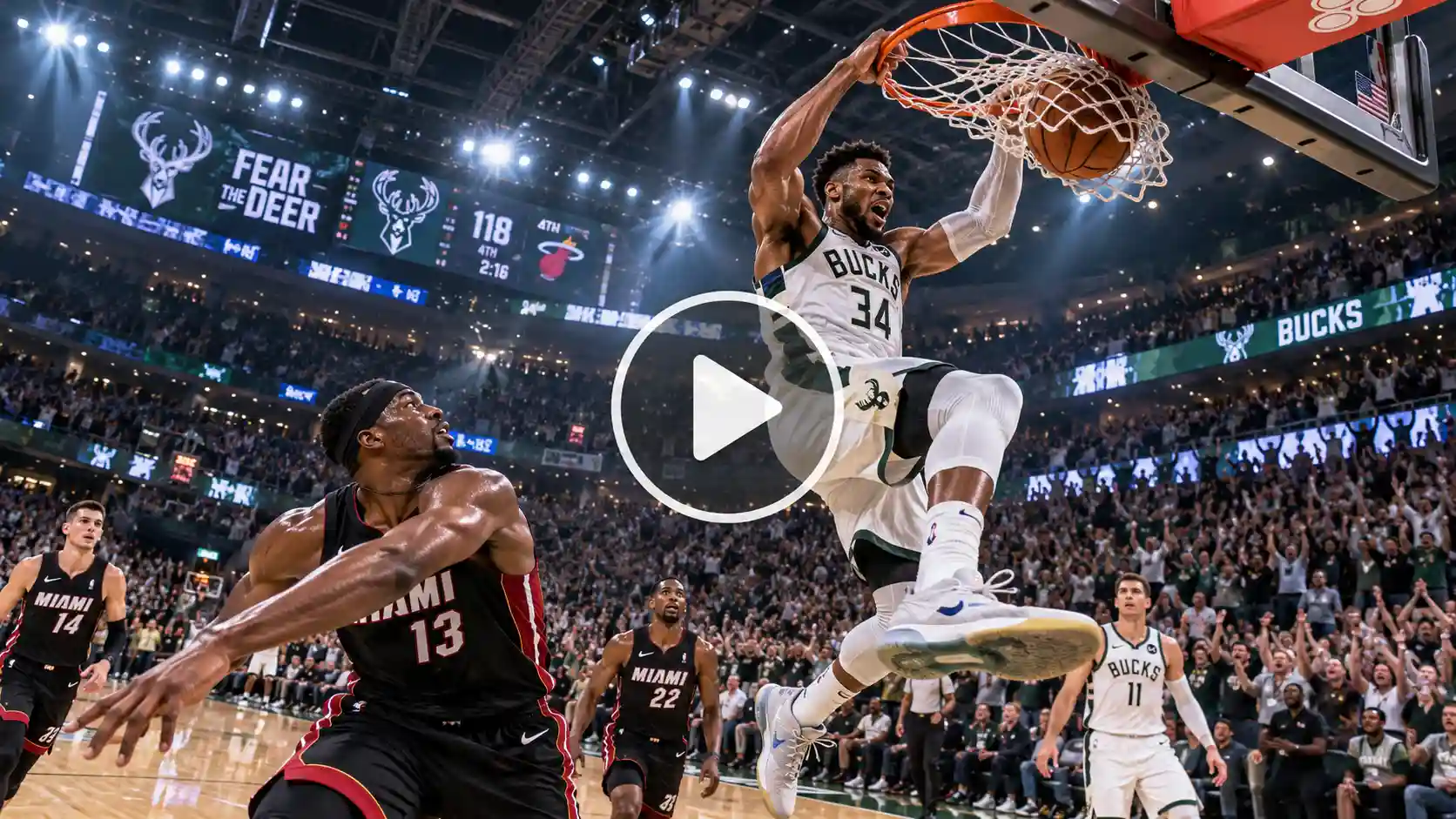
Prompt:
A wide-angle cinematic shot of a basketball player driving down an indoor wooden court, performing a lightning-fast crossover past a defender, launching into a powerful two-hand slam dunk that snaps the net, packed bleachers cheering in the background, dramatic side lighting, hyper-realistic sports action.
Trending Ways To Remix The Basketball Dunk Videos
If you have to create a trending video with creative twists to make your viral basketball dunk Ai video stand out, you can use this:
- Pet and Animal Dunker: Upload a funny picture of a cat or a dog’s face and watch the AI morph it into an athletic body.
- Cartoon or Anime: turn your fictional fantasy into an animated video. Choose your favorite characters and anime.
- Outfit or Costume Twist: Give your subject a funny wardrobe twist. Go for a business attire, sports clothes,
Tips for a Viral Ready Dunk Video
- Keep the subject clear
Make sure the image of the main person is clear and well defined.
- Optimize for Mobile
- Always export your video in a 9:16 vertical aspect ratio so that it fills the screen perfectly when you put it on reels or shorts.
- Add Audio
Align your clip’s main twist with the beat drop of a trending song to maximise viewer’s engagement rate.
- Use Humour
The most successful funny dunk meme posts are often featuring unexpected twists and funny subjects.
Conclusion
We are at the crossroads between generative AI and sports culture that has opened up endless possibilities for content creators. By making a simple photo into an epic athletic feat, you can now capture attention and join the wave of viral trends online. Fire up with LightX, pick a photo and just start creating your own legendary basketball dunk AI video today.
FAQs
What photo works best for a basketball dunk video?
A well lit clear and front facing image works best for this video.
How long does generation take?
For a 480p resolution video of 10 seconds, it takes 3-4 minutes. For a 720p resolution 20 seconds long video it takes up to 10-15 minutes.
What resolution should I export the video in?
You can choose from 480p, 720p and 1080p resolution.
Can I make a dunk video from a pet photo?
Yes, basketball AI dunk videos featuring pets are very popular online.
 Gas Up the Trend ⛽🔥
Create your own gas station trend in seconds.
Gas Up the Trend ⛽🔥
Create your own gas station trend in seconds.