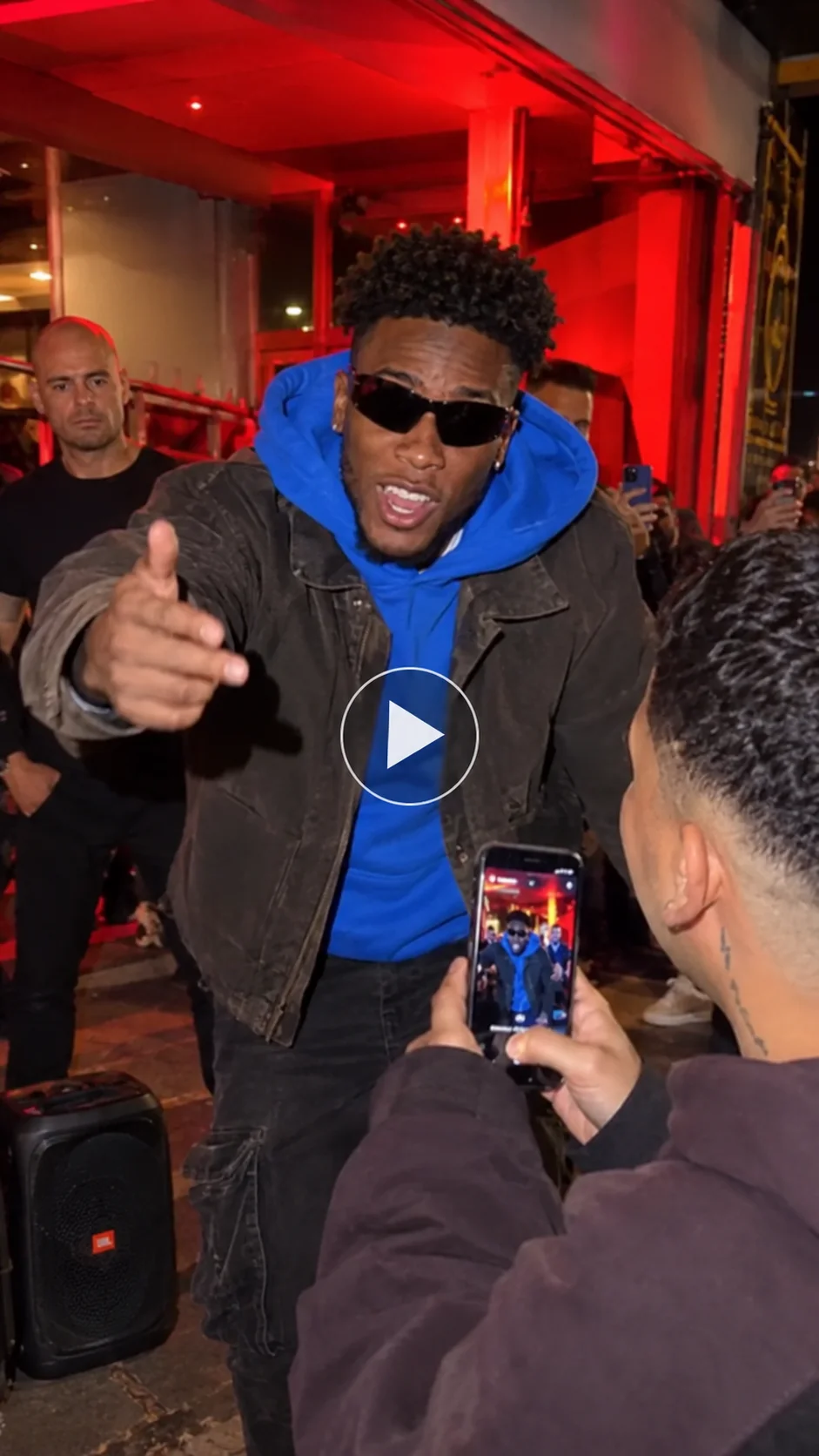
Want to know how to make Bulin 47 AI video and jump into one of the hottest TikTok AI trends and Instagram Reels trends right now? The idea is simple. You take one clear photo of yourself (or a friend, pet, or character), and AI drops you straight into the viral street freestyle. You become the central performer outside a red-lit restaurant, freestyling over a dembow beat while a crowd films on their phones.
 Create the Viral Hotel Lobby Trend 🎵🔥
Upload your image and transform it into a viral music video.
Create the Viral Hotel Lobby Trend 🎵🔥
Upload your image and transform it into a viral music video.
You don’t need to film anything or learn the moves. The original Bulin 47 freestyle already has the energy, the shoulder bounce, and the signature hook. AI just swaps the performer so the whole scene stays consistent.
In this blog, you’ll learn exactly how to put yourself in the video step by step, which photos work best, ready-to-use prompts, and tips to make a Bulin 47 video for trending reels.
What is the Bulin 47 AI Video Trend?
The Bulin 47 AI video trend started from a real moment on October 2, 2026. Dominican dembow artist Bulin 47 was walking into a restaurant in Madrid when creator Kevin Wai played a dembow beat on a portable speaker. Instead of walking past, Bulin stopped and delivered an improvised street rapper freestyle with sharp shoulder movements and the now-famous line “ya todos me conocen, soy Bulin 47.”
The clip exploded across platforms and quickly became a viral rap video. Within days, people began using AI face-swap video and photo-to-video AI tools to replace Bulin 47 while keeping the club door scene, the crowd, the speaker, the red lighting, and the original audio. The result is a short, high-energy Bulin 47 rap AI video that feels like you were right there on the street.
This tendencia bulin 47 (also searched as como hacer el video de bulin 47 and bulin 47 video con ia) works especially well on Instagram Reels and TikTok because the motion is simple.
Stepwise Guide on How to Create a Bulin 47 AI Video
Using a Pre-defined Template
Step 1: Choose the character for the main image — the person (or pet) you want as the freestyler in the video.
Step 2: Change your background and outfit using prompts if the template allows it.
Step 3: Choose the appropriate resolution and aspect ratio (recommended: 720p, 9:16 vertical).
Step 4: Click Generate, then download the final video.
If you want to make a video from scratch, use our Music to Video Tool.
Using Reference to Video (Step-by-Step Guide)
Step 1: Go to the Reference to Video Tool.
Step 2: Define your character. Upload one clear photo of the person (or pet) you want in the video.
Step 3: If you own a driving video (the original Bulin 47 freestyle clip), add it as the video reference and write a prompt to replace the face in it. Example: “Replace the central performer in the pink shirt and sunglasses with the person from the reference image. Keep the same body motion, shoulder bounce, crowd, speaker, and red-lit entrance.”
Step 4: If you don’t have a driving video, create the whole effect with a prompt. Be clear about the freestyler and the scene. In your prompt, you can mention:
- Character: image, outfit, makeup, and style
- Scene: background (red-lit restaurant entrance at night), lighting, camera angle, and more
- Action: how the character is performing — energetic Dominican dembow freestyle with strong shoulder bounce, pointing, and delivering the hook
To learn more about the tool and the steps, visit this blog: How To Swap Face In a Video
Sample Prompt and Structure to Follow
Here is a strong freestyle AI video prompt you can copy and adapt:
Prompt example:
Character: A [describe age/gender/look] with natural facial features, clear skin texture, and realistic hair. The person wears casual streetwear (or keep the outfit from the reference photo). Confident expression, slight smile, energetic body language.
Background setting: Nighttime street outside a restaurant with red neon lighting at the entrance. A portable speaker on the ground, a small crowd of people filming on phones, urban atmosphere.
Camera angle: Handheld, slightly shaky vertical 9:16 shot. Medium shot focusing on the central freestyler, with natural camera movement that follows the shoulder bounce.
Motion and action: The character performs an energetic Dominican dembow freestyle, bouncing shoulders hard on the beat, pointing, leaning forward, and delivering the hook with high energy. Keep the exact timing and gestures of the original street rapper freestyle. Consistent character, realistic lip movement, natural lighting from the red lights.
Style: Ultra-realistic AI face swap video, high detail, natural motion, no artifacts.
Length: 12–15 seconds.
You can swap the character for a friend, a footballer look, a pet, or any consistent character you like. The key is keeping the club door scene and dembow freestyle energy intact.
What You Will Get in the Videos
Here’s what a finished bulin 47 AI video typically looks like:
- Length: 10 to 19 seconds — short enough for maximum retention on Reels and TikTok.
- Shape: Vertical 9:16 format, perfect for Instagram Reels trends and TikTok AI trends.
- Setting: The original club door scene — red-lit restaurant entrance at night, portable speaker, crowd with phones, urban street vibe.
- What you are doing: You (or your chosen character) are the central freestyler, hitting the shoulder bounce, gesturing, and delivering the viral lines with full energy.
- Camera style: Handheld, dynamic, matching the original viral rap video.
- Sound: The original dembow freestyle audio (or the official “Dame Hombro” track).
- Overall feel: High-energy, spontaneous street performance that looks like you were actually there.
The AI handles the hard part — turning your photo into a consistent character inside the real scene.
Tips for the Best Results
- Use a sharp, front-facing photo with good lighting and no sunglasses so the face stays clear.
- Keep the background of your photo simple so the AI focuses on your features.
- Always mention “consistent character,” “same shoulder bounce,” and “keep the original crowd and red lighting” in your prompt.
- Stick to vertical 9:16 for maximum reach on Instagram Reels and TikTok.
- Add the trending Bulin 47 sound when you post and use hashtags like #Bulin47 #Bulin47AI.
- Try a few different AI video generator models (Wan, Seedance, Kling, etc.) — some handle the fast dembow motion better than others.
- Label the video as AI-generated if the platform requires it.
Conclusion
The bulin 47 AI video trend is one of the easiest and most fun ways to join a massive viral moment. Whether you want a classic version of yourself freestyling, a fun version with friends, or a wild celebrity/pet take, it only takes one photo and a few minutes. Follow the steps above, use a solid video prompt, and you’ll have a ready-to-post video for trending reels that feels authentic to the original street energy.
 Gas Up the Trend ⛽🔥
Create your own gas station trend in seconds.
Gas Up the Trend ⛽🔥
Create your own gas station trend in seconds.