Turn any photo into a cinematic music moment with one prompt
 Get on WhatsApp
New image & Video workflow everyday
Get on WhatsApp
New image & Video workflow everyday
🎵
Think about the photos that stop you mid-scroll. The artist standing on a rooftop with city lights bleeding behind them. The close-up with headphones on and eyes closed like the music is everything. The moody studio shot that looks like it belongs on a Spotify playlist cover.
Those photos are not accidents. They are a specific aesthetic rooted in music culture.
Album art, music video stills, artist press shots, concert photography.
For years, getting that look meant hiring photographers, renting studios, and paying for post-production.
Now you write one prompt and AI does it to your photo in seconds.
This blog gives you prompts for every music aesthetic you can think of — headphone portraits, rockstar edits, lo-fi moody shots, surreal concert visuals, album art, and more. Find your vibe, copy the prompt, upload your photo, and generate.
What Are Music Lover AI Photo Editing Prompts?
A prompt is a text instruction you give to an AI image editor. Instead of manually adjusting sliders, layers, and filters, you describe what you want in plain language and the AI builds it.
Music lover AI prompts are specifically written to transform your photo into a music-themed visual. That could mean adding headphones and a moody color grade. It could mean turning your selfie into something that looks like it belongs on an album cover. It could mean placing you in a surreal concert scene that never actually happened.
Why is this trending?
Budding artists and music lovers are building their personal brand online and they need visuals that match the sound they are going for. A clean selfie does not communicate “I make dark trap beats” or “I write acoustic indie songs at 2am.” A well-prompted AI photo does.
Beyond artists, this trend is just fun. People who love music want their photos to feel like music. The aesthetic is real, the results are shareable, and the barrier to entry is zero.
How to Use Music Lover AI Photo Editing Prompts
The process is the same across all our AI tools. Three steps and you are done.
- Upload your photo into your image to image tool
- Copy and paste any prompt into the prompt box
- Hit generate. Use Change with AI to refine specific parts without redoing the whole image
| Few things to keep in mind before you generate:
1. These prompts are written for photo realistic and cinematic results, not cartoon or illustrated styles. 2. Use a clear photo where your face and upper body are visible. 3. The orientation of your input will be the orientation of your output. So if you want to generate a horizontal photo, you gotta upload a horizontal photo. 4. If the result is not perfect on the first try, click on generate more. Variance is normal. 5. If you like the result but need small changes, click the Change with AI button and add a follow-up prompt to edit it. |
10+ Music Lover AI Photo Editing Prompts
Got a photo? Find the section below that matches the aesthetic you want. Copy the prompt, paste it in, generate.
1) Headphone Aesthetic Prompts
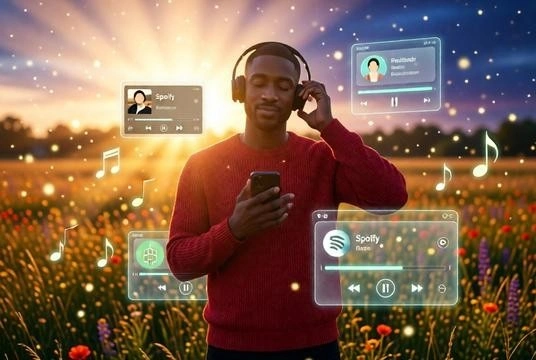
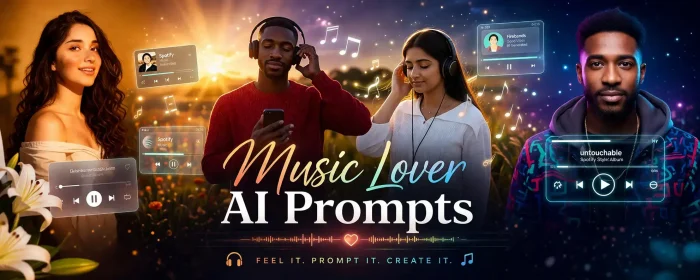
Full body photorealistic shot of the same person standing in an open meadow at golden hour transitioning to evening, dreamy cinematic vibe, candid relaxed pose holding phone to chest and touching headphones, eyes closed, natural expression, face unchanged and identity preserved, keep original clothing and hair exactly the same, shot on 35mm lens, f/1.8, shallow depth of field, warm sunset backlight with soft volumetric light rays from above, glowing particles in air, soft haze, high dynamic range, cinematic color grading Add floating Spotify-style UI panels around the subject, semi-transparent glass interface showing playlist, profile card and music player with progress bar and controls, glowing icons, depth and perspective, floating music notes and light orbs, slight motion blur on particles, blurred flowers and grass in background, immersive dreamy environment, hyper realistic lighting.
2) Singer / Rockstar Prompts
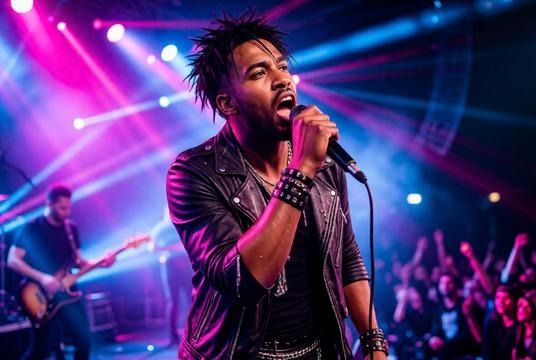
Full body photorealistic concert scene of the same person performing live on stage, dynamic candid pose holding microphone close to mouth, head slightly tilted back while singing, intense expressive face, identity preserved, change outfit to edgy rockstar style with open jacket, layered chains, wristbands, messy textured hair, shot on 70-200mm lens, f/2.8, dramatic stage lighting with colorful beams, neon pink, blue and purple lights, haze and smoke effects, bright spotlights from multiple angles, high contrast exposure. Blurred band members and instruments in background, visible crowd depth, motion blur and energy, sharp focus on subject, cinematic framing, sweat and shine on skin, hyper realistic concert atmosphere, high detail lighting and reflections.
3) Emotional and Lo-fi Music Prompts
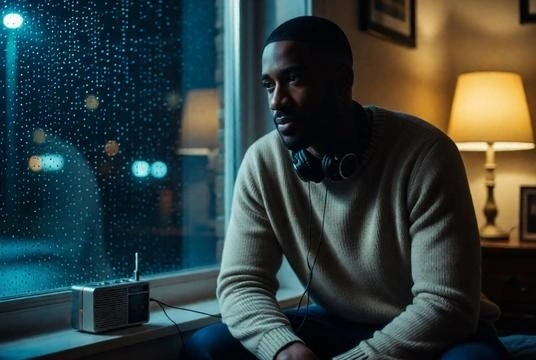
Candid indoor night scene of the same person sitting near a window, relaxed pose leaning slightly forward, thoughtful expression, face unchanged, wearing cozy casual clothes, visible music element like headphones around neck or a small radio playing nearby, shot on 50mm lens, f/1.6, low light exposure, night setting with rain outside window, cool blue tones mixed with warm lamp glow, soft shadows, grainy lo-fi texture, shallow depth of field, blurred background, intimate and melancholic cinematic mood.
4) Spotify / Music UI Prompts
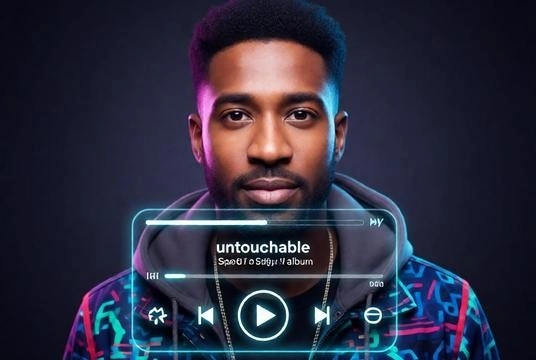
Candid portrait of the same person styled as a Spotify album cover, relaxed pose with confident neutral expression, face unchanged, change outfit to trendy modern streetwear, clean styled hair, shot on 50mm lens, f/2, studio lighting with soft highlights, dark gradient background, overlay realistic Spotify UI showing music playing, include progress bar, play/pause button, song title “untouchable”, artist name and album name placement, glowing interface elements around subject, centered composition, hyper realistic app interface blending.
5) Surreal and Futuristic Music Prompts
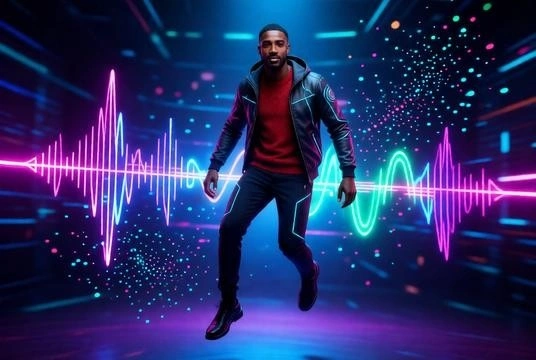
Candid floating pose of the same person in a surreal futuristic music environment, natural expression, face unchanged, modern outfit with subtle futuristic elements, shot on wide angle lens, f/2.2, neon lighting, glowing sound waves, abstract particles, volumetric lighting, vibrant colors, high dynamic range, cinematic composition, dreamlike and immersive atmosphere, photorealistic detailing.
Related: 100+ AI prompts for boys
6) Aethetic Photo Collage
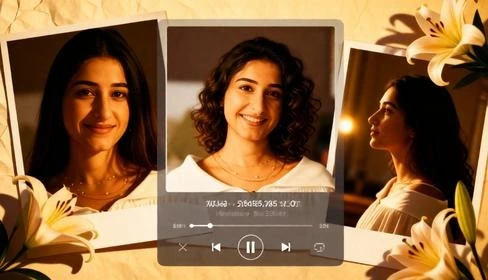
Photorealistic aesthetic collage of the same person in multiple candid portraits, warm golden indoor lighting, soft shadows, cozy intimate mood, natural expressions, face unchanged and identity preserved, loose off-shoulder outfit, soft curly hair, shot on 50mm lens, f/1.8, shallow depth of field, cinematic color grading with amber tones, film grain texture. Arrange layered photo prints with slight overlaps showing close-up, mid-shot and side profile, add realistic paper texture and soft drop shadows, include floral elements like lilies placed around images, overlay a semi-transparent music player UI with song details and controls, subtle glow, soft highlights, dreamy romantic aesthetic, high detail, hyper realistic lighting and skin texture.
7) Music Lover Prompts
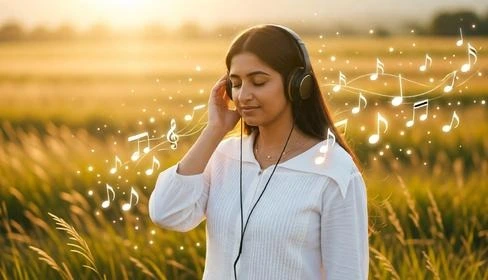
Full body photorealistic shot of the same person standing in an open field or soft outdoor setting during golden hour, relaxed candid pose with one hand touching headphones, eyes closed or looking slightly down, expression deeply lost in music, face unchanged and identity preserved, keep original clothing and hairstyle exactly the same, shot on 50mm lens, f/1.8, shallow depth of field, warm sunlight with soft haze and glow, cinematic color grading. Add subtle floating music elements like glowing notes and soft light particles around him, gentle motion in background grass, dreamy atmosphere, high dynamic range, soft shadows, immersive emotional vibe, hyper realistic lighting and textures.
8) Indian Style Music Prompts
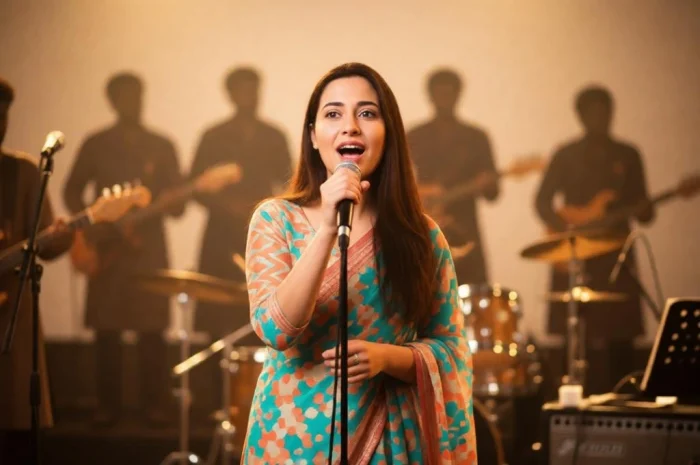
Candid mid-performance shot of the same person in an Indian-inspired music setting, natural singing pose holding a microphone, expressive face as if caught in the moment of singing, not posed, face unchanged and identity preserved, wearing simple and colored Indian attire, shot on 50mm lens, f/1.8, warm golden lighting with soft glow, subtle stage ambiance, background filled with blurred singer silhouettes, musical instruments and performance elements, layered depth, shallow depth of field, cinematic framing, focus on music environment and emotion, hyper realistic details.
9) Feature in a Music Video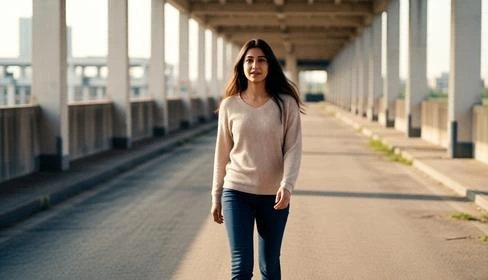
Full body photorealistic shot of the same person inside a cinematic music video scene, candid mid-action pose like walking slowly, turning, or performing naturally, expressive but subtle emotion, face unchanged and identity preserved, outfit styled realistically to match setting such as casual streetwear or soft neutral tones, natural hair, shot on 35mm lens, f/2, shallow depth of field, realistic lighting setup with soft key light and natural ambient light, warm or neutral cinematic color grading. Background like a real location such as empty street, rooftop, hallway or field, slight motion blur for movement, depth and perspective, no neon or futuristic elements, grounded storytelling vibe, high dynamic range, hyper realistic textures and lighting, film still quality.
10) Make Album Art With Your Photo
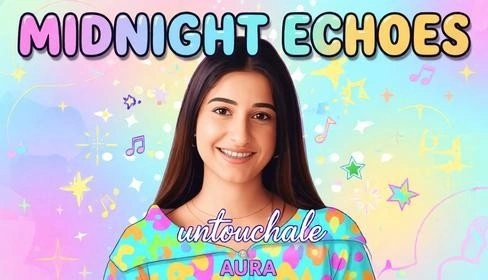
Vibrant semi-cartoon styled album cover of the same person, candid relaxed pose with a soft happy expression, face unchanged and identity preserved, outfit enhanced with bright playful colors, smooth skin with slightly illustrated finish, shot on 50mm lens look, f/2, soft depth of field, even lighting with pastel highlights, colorful background with gradients, abstract shapes and soft patterns, cheerful upbeat mood. Add bold fun typography: album name “MIDNIGHT ECHOES” in large rounded bubble-style font at top, bright gradient colors, slight shadow, song name “untouchable” in handwritten or script style at center, artist name “AURA” at bottom in clean sans-serif, add small graphic elements like stars, sparkles or music icons, balanced layout, high detail, vibrant and eye-catching aesthetic
11) Lost in Music in a Public Place
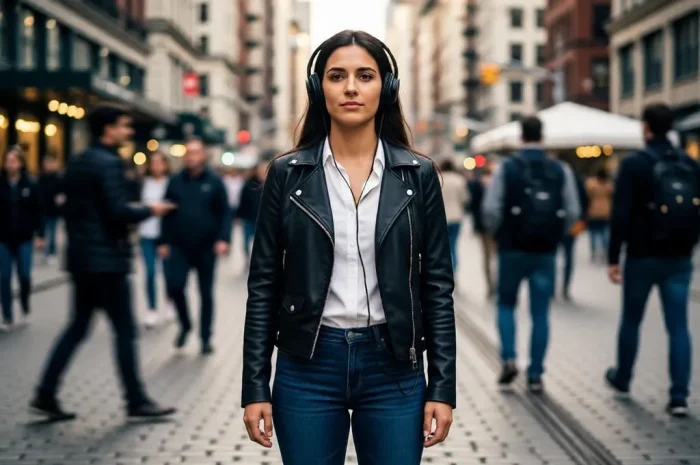
Full body candid shot of the same person standing still in a busy public place, relaxed pose with headphones on, calm expression, face unchanged, wearing everyday urban outfit, shot on 35mm lens, f/2, long exposure effect with blurred moving crowd, subject sharp, natural ambient lighting, detailed city background, cinematic depth, emotional contrast between stillness and chaos, photorealistic
Related: 70+ AI prompts for girls
AI Prompt Formula: How to Write AI Music Prompts
Once you understand how these prompts are built, you can write your own for any music aesthetic you have in mind.
| The Music Prompt Formula |
| [Subject] + [Pose/Emotion] + [Music Element] + [Environment] + [Lighting] + [Style]
[Subject] You, a person, a silhouette, a figure [Pose / Emotion] eyes closed, lost in music, performing, candid [Music Element] headphones, vinyl, mic, guitar, speaker, album cover [Environment] rooftop, dark studio, neon street, concert hall, bedroom [Lighting] neon backlight, soft studio light, golden hour, cinematic [Style] photo realistic, cinematic, lo-fi, surreal, editorial |
How to customize:
- Replace artist references with your own genre or sound description
- Change the environment to match where you actually shoot or where you want to be placed
- Modify the mood word to match the emotion of the music
- Add camera terms like 50mm lens, shallow depth of field, HDR, or film grain to push the realism
- Swap the lighting to match the time of day or the energy of the track
For music-specific results, also explore:
Once your photo is transformed, it does not have to stay a photo. Take it further with these tools:
Start with the expression changer if the mood of your generated photo does not match the energy of your track. Then hit upscale to bring the resolution up before you do anything else with it. Or, expand to fit anywhere. From there, take it in two directions. Use the add music to photo tool to turn your static image into a moving audiovisual. The kind of content that actually stops people mid-scroll on reels. Or go straight to the album cover creator and build a release-ready cover directly from your transformed photo. One prompt. Four tools. A full visual release package.
Tips, Mistakes, and the Last Thing You Need to Know
Tips
- Use a photo with a clean background if you want the AI to build a full scene around you
- Portrait orientation works better than landscape for music DPs and album covers
- If your first result looks off, generate two or three more before changing the prompt — variance is part of the process
- For the most photo realistic result, describe real locations and real lighting rather than abstract concepts
- Pair the aesthetic with music in your caption or reel audio — the visual and the sound should match
Common Mistakes
- Using a blurry or low resolution photo as the base, the AI cannot create detail that is not there
- Writing vague prompts like “make it music themed” — the more specific the prompt, the better the result
- Expecting the AI to change your face or add features that were not in the original photo
- Using the same prompt for every photo type — a studio portrait needs a different prompt than an outdoor candid
- Skipping the refinement step — most great results come from the second or third adjustment, not the first generation
🎵 The prompts are here. The tool is free to start. The only thing left is to generate.
Get on WhatsApp
New image & Video workflow everyday