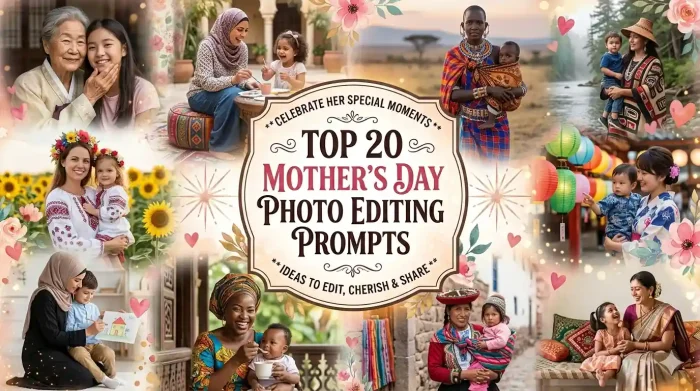
Hey, if you found this blog while searching for Mother’s Day photo editing ideas, you don’t need to worry; you will get all the ideas and tips you’re looking for. We all know that Mother’s Day is not just an ordinary date on the calendar, but it’s a celebration of warm hugs, late-night comfort, and intense love between mother & her child.
 Get on WhatsApp
New image & Video workflow everyday
Get on WhatsApp
New image & Video workflow everyday
If you are still thinking about what to gift so that she will love it, the answer lies in the question itself. The best gift isn’t always in store, but it is in creativity, memories, and feelings. Sometimes, the best gift is an old photo restored beautifully, a precious memory brought back to life, or an AI-generated portrait that shows how special she is to you. This is where Mother’s Day photo editing prompts come in.
So, if you are a designer, casual smartphone user, or anyone who wants to give their mom something meaningful, the right prompts can help you to create a gift that speaks from the heart. In this blog, you will get everything that you need to know, from how these prompts work to the most creative & trending ideas you can try today.
How Mother’s Day Prompts Work for Photo Editing
Mother’s Day prompts are a simple text that gives instructions to an AI tool. You do not need to manually adjust anything like brightness, contrast, or backgrounds; just give a simple description, and AI will do the rest. You can give a prompt like this :
“A warm golden-hour portrait of a mother hugging her daughter in a flower garden with soft cinematic lighting”
This type of prompt can help the tool to understand the subject, environment, style, and everything. Prompt uses natural language processing and generative AI models to interpret details such as:
- Facial expressions (happy, emotional, nostalgic)
- Lighting conditions (soft light, sunset glow, studio lighting)
- Background themes (garden, home, vintage, floral)
- Artistic styles (realistic, cinematic, watercolor, dreamy)
Modern tools also support Trending Mother’s Day prompts, allowing users to instantly apply popular styles used by creators worldwide. This makes it easier than ever to generate professional-level images without technical editing skills.
Types of Mother’s Day AI Photo Editing Prompts
There are 20 trending prompts that you can easily try on Gemini, ChatGPT, or LightX.
Restore & Enhance Mom’s Old Photos
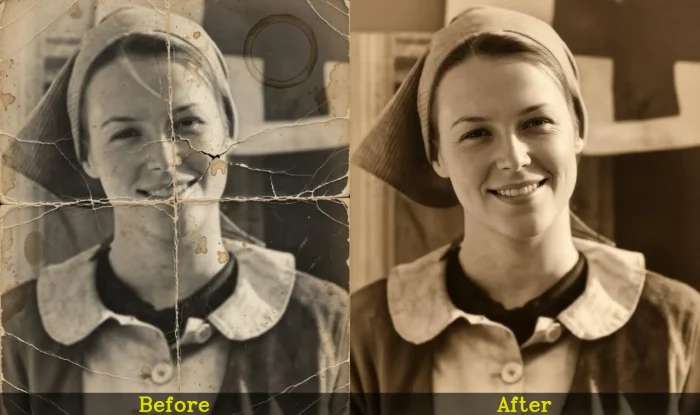
1. Restore a Damaged Vintage Family Photograph
Using the uploaded reference photo, restore this old and damaged family photograph with maximum realism and emotional authenticity. Repair visible tears, scratches, faded corners, fold marks, stains, and discoloration while preserving the original expressions and composition. Recover fine details in faces, hair, clothing textures, and background elements without making the image look artificial. Correct exposure, contrast, and color balance using soft warm tones that feel natural to the era. Maintain a nostalgic atmosphere while enhancing clarity and sharpness. Output: photorealistic, ultra-detailed, high resolution, 8K.
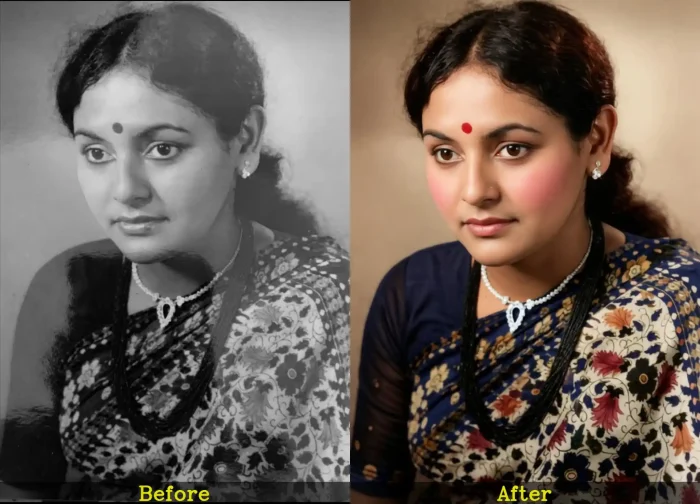
2. Colorize an Old Black and White Portrait of Mom
Using the uploaded black and white portrait of mom, naturally colorize the image with realistic skin tones, soft blush, detailed hair color, and era-appropriate clothing shades. Add subtle warmth and balanced lighting while preserving the emotional depth of the original photograph. Carefully enhance facial details, eyes, and textures without oversaturation or artificial colors. The final image should look like a naturally captured color photograph from the original time period, not digitally altered. Output: photorealistic colorization, cinematic realism, ultra-HD, high resolution, 8K.
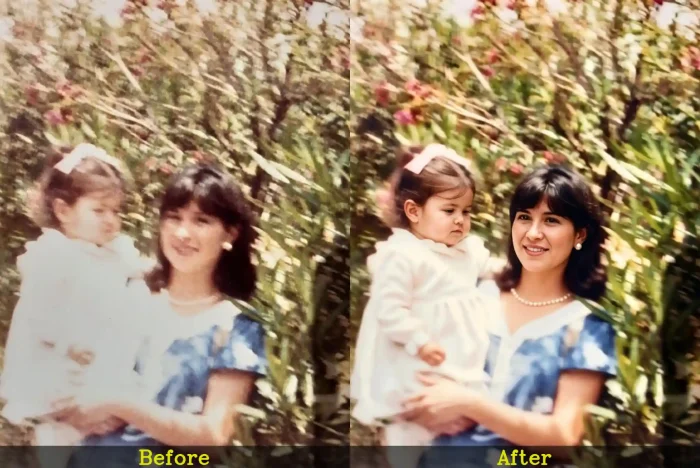
3. Sharpen a Blurry Childhood Memory
Using the uploaded low-quality family photo, enhance and sharpen the image while preserving realistic facial features and natural skin texture. Recover lost details in eyes, hair, fabric, and background objects while reducing blur, digital noise, and compression artifacts. Improve lighting balance, clarity, and depth without overprocessing the image. Keep the final result emotionally warm, authentic, and naturally detailed, as if captured with a modern professional camera. Output: photorealistic enhancement, ultra-clear details, realistic lighting, 8K resolution
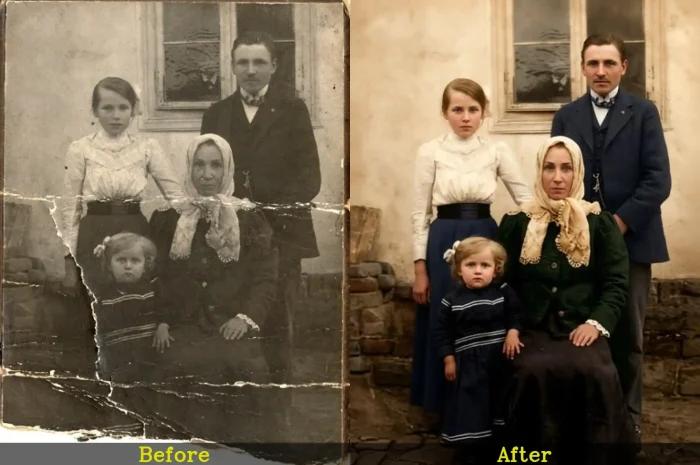
4. Repair a Scratched Printed Photograph
Using the uploaded scanned vintage print, remove all visible scratches, cracks, dust particles, faded spots, and damaged paper textures while preserving the original emotional atmosphere of the photograph. Reconstruct missing details naturally in faces, clothing, and background scenery. Improve brightness, shadows, and overall tonal balance using warm realistic colors and soft contrast. The restored image should feel timeless, authentic, and naturally preserved rather than heavily edited. Output: photorealistic restoration, highly detailed textures, professional quality, 8K.
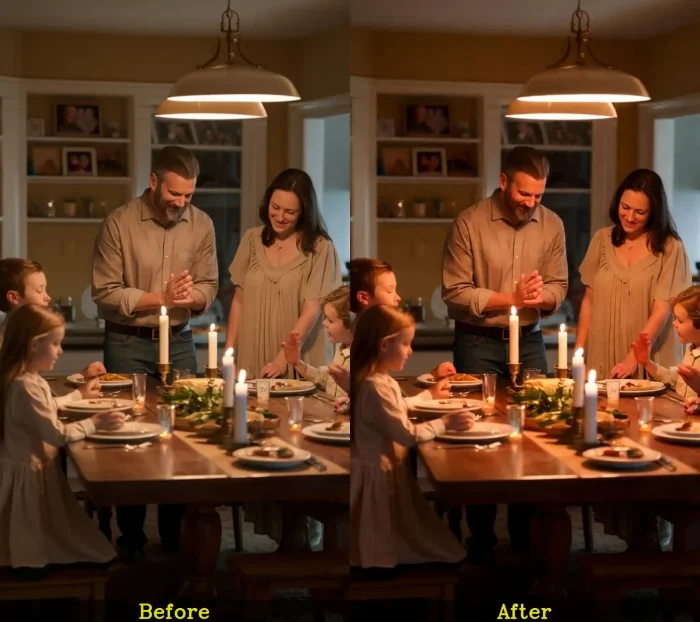
5. Enhance a Dark and Underexposed Portrait
Using the uploaded portrait of mom with family, brighten and enhance this dark underexposed image while maintaining realistic skin texture and natural lighting balance. Recover hidden details in shadows, improve facial clarity, and add soft cinematic warmth without blowing out highlights. Keep the overall atmosphere elegant, emotional, and naturally photographed. Enhance colors subtly with realistic tones and improved sharpness while preserving authenticity. Output: cinematic photorealism, natural enhancement, ultra-detailed portrait, 8K resolution.
Transform & Reimagine Mom’s Photos with AI
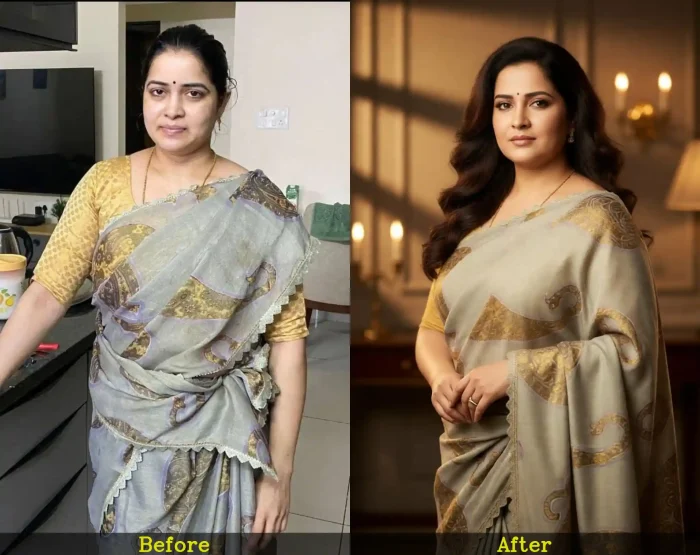
6. Turn Mom into a Luxury Studio Portrait
Using the uploaded reference image, transform mom into an elegant luxury studio portrait with professional cinematic lighting, realistic skin details, soft makeup, and a sophisticated background. Enhance posture, facial clarity, and hair texture naturally while keeping her original identity completely recognizable. Add warm tones, subtle depth-of-field blur, and magazine-style composition for a polished premium look. The image should feel realistic, timeless, and emotionally beautiful. Output: photorealistic portrait photography, ultra-detailed, studio quality, 8K
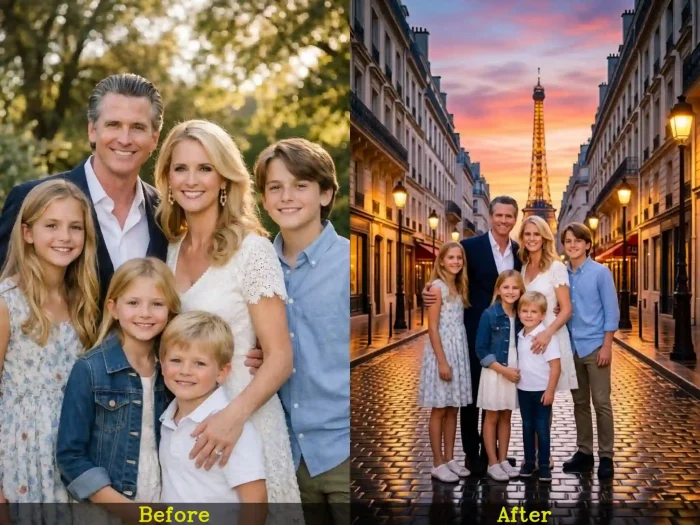
7. Create a Dream Vacation Portrait in Paris
Using the uploaded family photo, place mom and her family in a beautiful Paris evening setting with glowing street lights, romantic architecture, soft sunset skies, and realistic reflections on wet streets. Blend all subjects naturally into the environment with matching lighting, shadows, and perspective. Maintain realistic facial details and emotional expressions while creating a cinematic travel photography aesthetic. The final result should feel like a genuine luxury vacation memory. Output: photorealistic cinematic scene, ultra-HD, 8K.
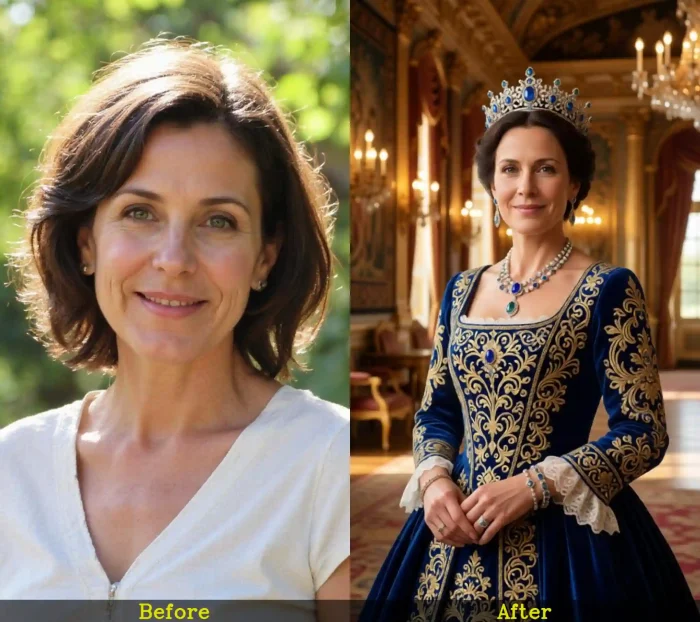
8. Reimagine Mom as a Royal Queen
Using the uploaded reference portrait, transform mom into a graceful royal queen wearing luxurious embroidered clothing, elegant jewelry, and subtle regal accessories. Place her inside a grand palace interior with warm golden lighting, rich textures, and realistic depth. Preserve her natural facial identity, skin texture, and emotional expression while adding cinematic sophistication and timeless elegance. The final portrait should feel majestic yet realistic. Output: ultra-detailed royal portrait, cinematic realism, professional quality, 8K.
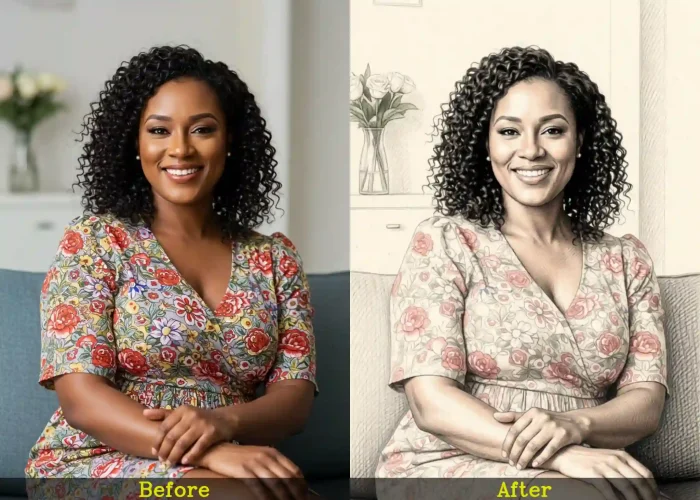
9. Convert Mom’s Portrait into a Pencil Drawing
Using the uploaded photo of mom, transform the portrait into a highly realistic hand-drawn pencil illustration with delicate shading, smooth graphite textures, and natural paper grain. Preserve all facial details, emotions, and proportions accurately while adding artistic depth and softness. Keep the sketch elegant and detailed without making it cartoonish or exaggerated. The final artwork should look like a professionally drawn portrait by a skilled artist. Output: realistic pencil art, ultra-detailed illustration, high resolution, 8K.
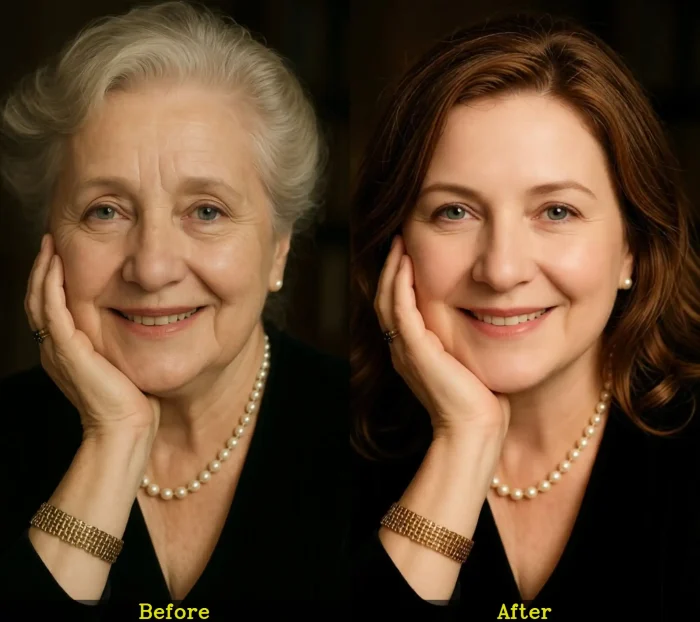
10. Create a Realistic Younger Version of Mom
Using the uploaded portrait of mom, generate a realistic age-reversed version of her appearing in her early twenties while preserving her recognizable smile, eyes, facial structure, and personality. Smooth skin naturally without over-editing, enhance youthful hair texture, and maintain realistic lighting and shadows. Avoid unrealistic beauty filters or artificial features. The result should look like an authentic vintage photograph captured during her younger years. Output: photorealistic age transformation, cinematic quality, ultra-HD, 8K.
Reunite & Remember with AI Family Photos
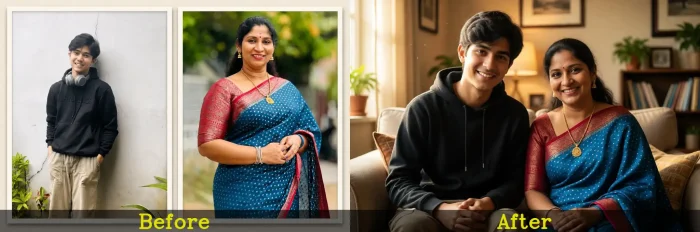
11. Combine Separate Family Photos into One Portrait
Using the uploaded individual family photos, create one realistic and emotionally connected family portrait where everyone appears naturally together in the same scene. Match facial lighting, skin tones, shadows, perspective, and camera angle across all subjects for a seamless composition. Place the family in a warm indoor setting with soft natural lighting and genuine candid expressions. Preserve realistic facial details and natural body proportions without making the image look digitally manipulated. Output: photorealistic family portrait, ultra-detailed, cinematic quality, 8K.
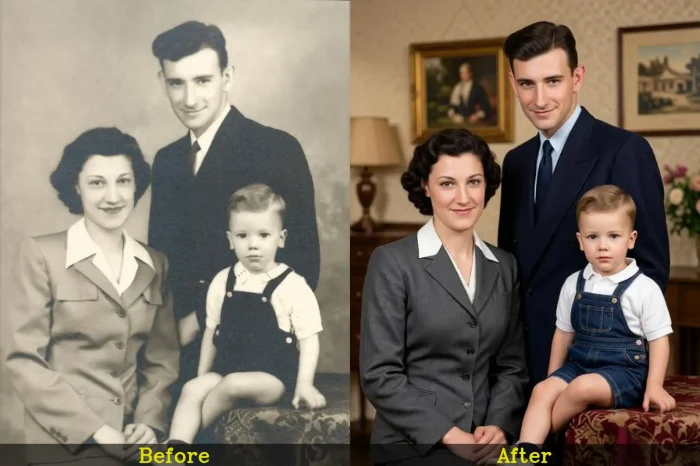
12. Recreate an Old Family Memory in Modern Time
Using the uploaded vintage family photograph as reference, recreate the exact same pose, composition, and emotional atmosphere using modern realistic photography styling. Update clothing details subtly while preserving the nostalgic feeling of the original memory. Add natural lighting, realistic skin textures, and cinematic depth while maintaining authentic family resemblance. The final image should feel like the same family memory captured years later in today’s world. Output: photorealistic recreation, cinematic realism, high resolution, 8K.
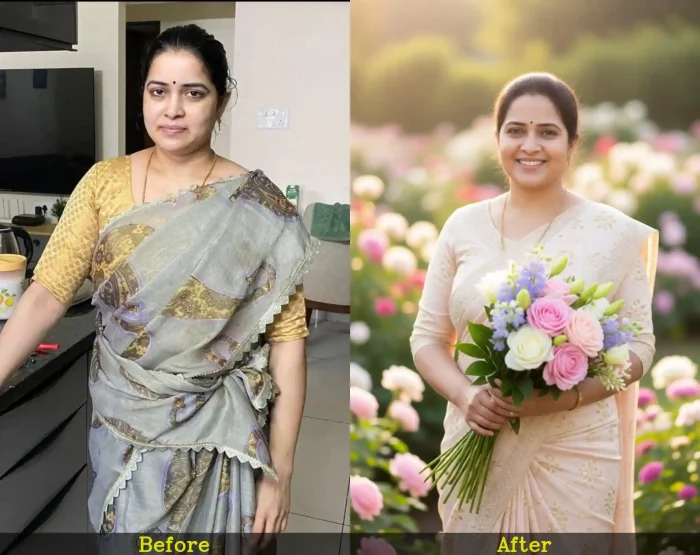
13. A Beautiful Mother Holding a Bouquet on Mother’s Day
Create a realistic and emotional Mother’s Day portrait of a smiling mother standing gracefully while holding a beautiful bouquet of fresh flowers in her hands. Use soft natural lighting, warm pastel tones, and a dreamy blurred garden background filled with blooming flowers. Add realistic facial expressions, detailed hair textures, elegant clothing, and gentle sunlight for a heartfelt atmosphere. Keep the composition cinematic, elegant, and photorealistic with natural depth and soft shadows. Output: ultra-detailed portrait photography, high resolution, 8K.
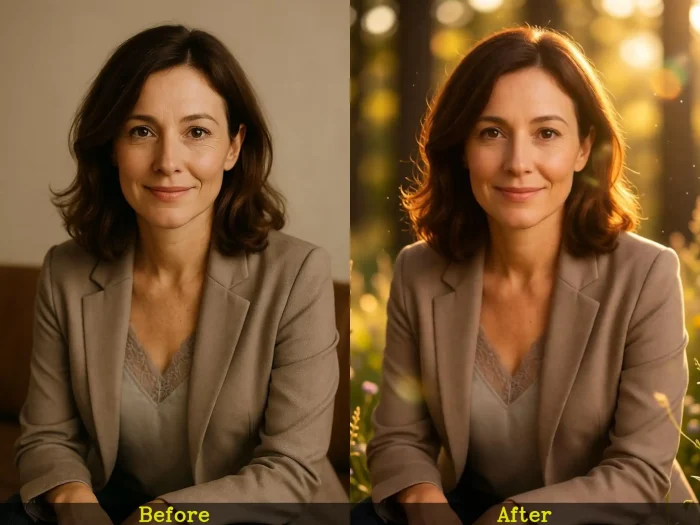
14. Create a Soft Memorial Portrait for Mom
Using the uploaded reference photo, create a peaceful and emotional memorial portrait honoring mom with soft golden lighting, subtle glow effects, and realistic natural surroundings. Preserve facial identity, warmth, and emotional expression while adding gentle cinematic depth and calm atmosphere. Avoid fantasy exaggeration or unrealistic heavenly effects. The final image should feel respectful, comforting, timeless, and emotionally meaningful. Output: photorealistic memorial portrait, cinematic softness, ultra-HD, 8K.
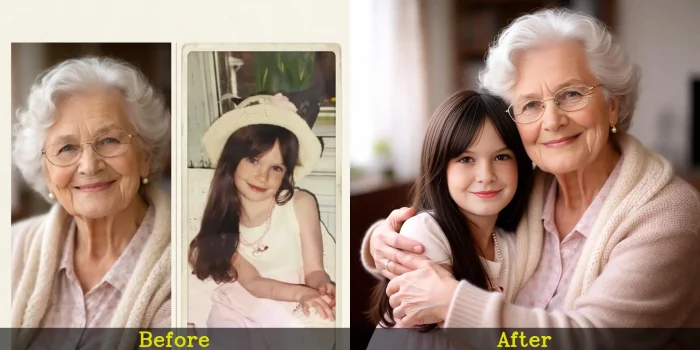
15. Blend Mom’s Childhood and Present Portrait Together
Using the uploaded childhood and current photos of mom, create a seamless double-exposure style portrait that artistically combines both stages of her life into one emotional composition. Preserve realistic facial details, natural textures, and authentic expressions from both images while blending them softly with cinematic lighting and warm tones. The final artwork should symbolize memories, growth, and motherhood beautifully. Output: photorealistic blended portrait, artistic realism, ultra-detailed, 8K.
Related blog: Mother and Daughter Prompts
Mother’s Day Cards & Wishes with AI

16. Create an Elegant Floral Mother’s Day Card
Design a luxurious Mother’s Day greeting card featuring soft pastel flowers, delicate floral borders, elegant typography, and warm glowing light effects. Use subtle cream, pink, and peach tones with realistic paper textures and soft shadows for a premium handcrafted appearance. Add a heartfelt emotional atmosphere while keeping the design clean, graceful, and visually balanced. The final card should feel sophisticated, timeless, and printable. Output: premium greeting card design, ultra-detailed, high resolution, 8K.
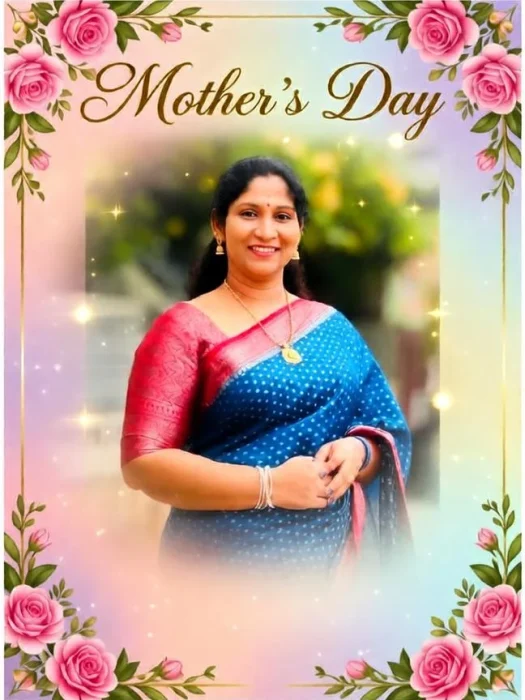
17. Design a Personalized Card Using Mom’s Photo
Using the uploaded portrait of mom, create a personalized Mother’s Day greeting card with soft cinematic lighting, floral accents, elegant typography, and a warm emotional atmosphere. Blend the photo naturally into the design while maintaining realistic skin texture and image clarity. Add soft pastel backgrounds, subtle depth effects, and luxurious visual details for a polished modern look. Output: photorealistic greeting card design, premium aesthetic, ultra-HD, 8K.
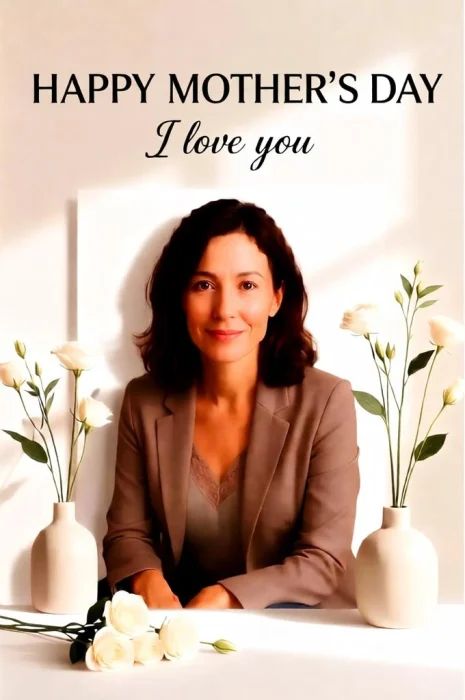
18. Generate a Minimal Modern Mother’s Day Wish Image
Create a clean and modern Mother’s Day wish image with minimalist floral elements, soft neutral backgrounds, elegant typography, and warm natural lighting. Keep the composition balanced and uncluttered while maintaining an emotional and heartfelt aesthetic. Add subtle artistic shadows and realistic textures for a premium social-media-ready appearance. The final design should feel modern, stylish, and visually calming. Output: high-end minimal design, ultra-detailed, 8K resolution.
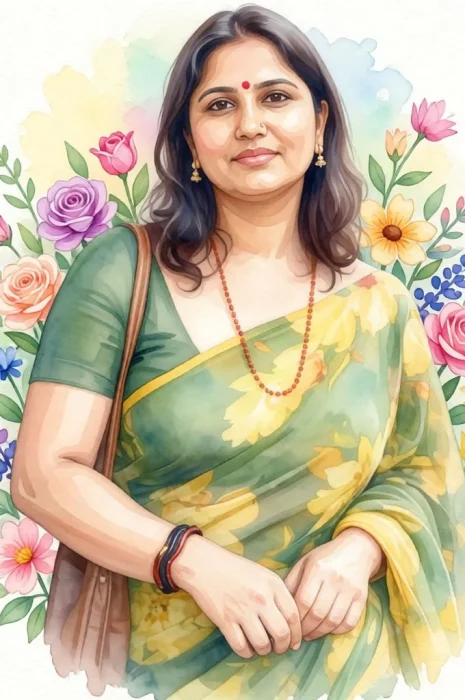
19. Create a Watercolor Style Mother’s Day Illustration
Generate a beautiful watercolor-style Mother’s Day illustration featuring a loving mother and child surrounded by soft floral elements and pastel colors. Use realistic watercolor brush textures, gentle paint blending, and subtle paper grain details while preserving emotional warmth and artistic elegance. Keep the artwork soft, dreamy, and naturally painted rather than digitally artificial. Output: realistic watercolor illustration, highly detailed artwork, ultra-HD, 8K.

20. Create a Social Media Ready Mother’s Day Poster
Using the uploaded family photo, design a trendy Mother’s Day social media poster with cinematic lighting, modern typography, soft floral decorations, and warm emotional tones. Blend realistic image enhancement with stylish composition, elegant gradients, and subtle depth effects for a premium Instagram-ready aesthetic. Preserve realistic facial details while making the overall design visually eye-catching and heartfelt. Output: photorealistic social media design, ultra-detailed, professional quality, 8K.
Tips to Write Better Mother’s Day Prompts for Photo Editing
You don’t need to be a writer to write a good prompt. You only need to think about what you want and then type it in the prompt box.
- Start with the subject, then add the setting. “A woman in her 60s” → “sitting in a sunlit garden” → “surrounded by roses” → “soft morning light.” Build outward from the center.
- Name the mood, not just the look. “Warm and nostalgic” tells the AI something; “colorful and bright” doesn’t. Emotional language actually translates well in these tools.
- Be specific about what you want fixed. “Make it look better” is vague. “Remove the scratch across her face, sharpen her eyes, and fix the color fade on the left side” gives the AI something to work with.
- Reference an era or aesthetic when it helps. “1970s Kodak film look,” “early color photography,” “watercolor painting style” — these kinds of cues push the result in a very specific, often beautiful direction.
- Don’t panic if the first result isn’t perfect. Tweak one thing and try again. The best prompts usually come from the second or third attempt, not the first.
Related blog: 35 Creative Mother and Son Prompt Ideas You Must Try
Why Use Mother’s Day Photo Editing Prompts with LightX?
There are various benefits to using LightX :
- Easy to use — just write a simple prompt, no skills needed
- Quick results — get your image in seconds
- Saves money — no need for expensive photoshoots
- Creative options — try different styles and looks easily
- Edit in one place — generate, customize, and download in one tool
- Free – you get 5 credits daily for image generation
You can simply access the tool in just 3 steps:
Step no.1: Open the LightX image-to-image Tool. Upload your photo ( jpeg, png, or webp ).
Step no. 2: Type a simple text prompt in the prompts box in a detailed way.
Step no. 3: Click generate and then download your pictures to your device for future use.
We also have a few other dedicated tools for Mother’s Day, which can help you a lot:
- Mother’s Day Templates — Edit-ready designs for posts, cards, or wishes in minutes.
- AI Poster Generator — Create a custom poster just by typing what you want.
- AI Image Generator — Make mother–daughter images in seconds with simple prompts.
- Greeting Card Maker — Design a personal card with your own message.
Related blog: 100+ Heartfelt Mother’s Day Messages
Conclusion
Here’s what it comes down to: your mom doesn’t need another generic gift. She needs to feel seen to know that you put actual thought into something, that you dug up an old photo or thought about her favorite flowers, or remembered something she mentioned once about her own mother.
Mother’s Day photo editing prompts make that possible in a way that’s surprisingly easy and genuinely moving. A restored photograph. A colorized portrait of her grandmother. A garden scene with her name in it. These aren’t just gifts, but they’re moments she’ll keep on her shelf, send to her sisters, and show people for years.
So yes, start with a prompt. But what you’re really doing is telling her: I thought about you. Not just on the way to the store. I actually thought about you.
That’s the gift. The photo is just how you wrap it.
Get on WhatsApp
New image & Video workflow everyday