



How to erase an element in a photo with AI?
Upload your photo
Upload your photo in JPEG or PNG format.
Mark the subject or object
Paint over the subject or object you want to erase.
Download and save
Download the cleaned-up photo to your device.
Erase anything in photo-get perfect background
Remove unwanted elements in your photo for an improved appeal with LightX’s AI-powered image eraser tool. Erase power lines, trash, street signs, props, clouds, strangers, birds, animals, branches or leaves, icons, datestamps, or timestamps—anything! Get a perfect background, matching the original in the output.

Refine your portraits with AI eraser
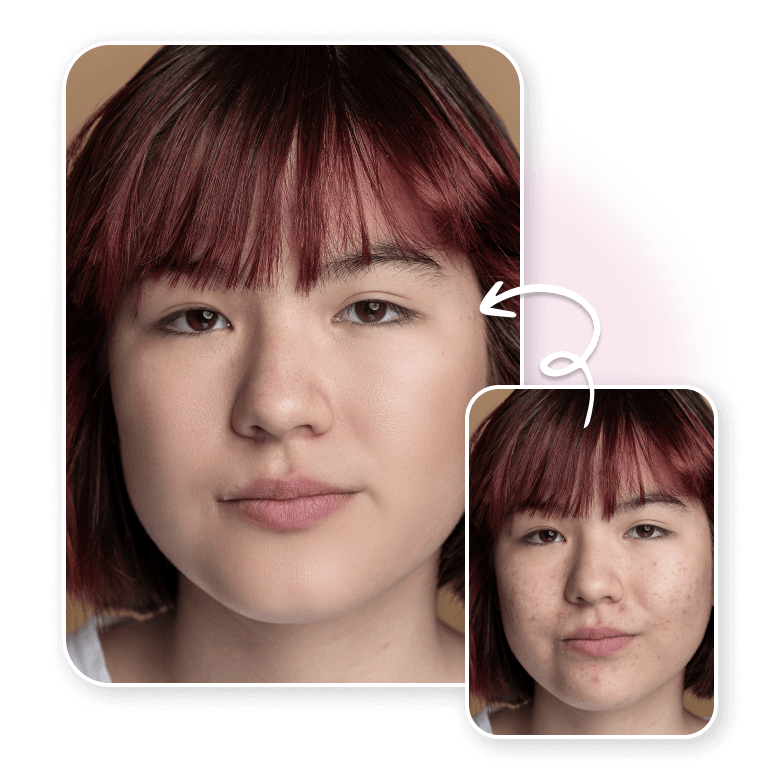
Present the best version of yourself in your portraits. Erase blemishes, wrinkles, fine lines, dark circles, spots, moles, teeth stains, uneven skin tone, makeup smudges, fix red-eye, or hair frizz. You can also correct wrinkles or folds on clothes, visible lint or tags. Remove glare, mess, people or unpleasant items. Get to retouch portraits and beautify your look further!
Edit landscapes, selfies, or group photos
Whether it’s a landscape, a selfie or a group photo, LightX’s AI image magic cleanup tool has got you covered. Get rid of common distractions like extra people, clutter, shadows, random objects, and more effortlessly. Erasing these intrusions helps focus on the subject and improve composition.

A magical eraser for everyone with many benefits
Photographers, content creators, marketers or everyday users—anyone can use this AI-powered magic photo eraser and enjoy numerous benefits:
• Free and easy-to-use image eraser.
• Fast processing time.
• User-friendly interface—ideal for beginners or pros.
• Versatile—works across all kinds of photos.
• Real-time preview to fine-tune your edits.
• High-quality results with a natural finish.
• Try the magic eraser app for iOS and Android.

Frequently Asked Questions
Yes, you can use LightX’s magic eraser photo editor to restore old photos. Remove stains, scratches, dust, and other damages from them.
Discover more tools


