

Experience the Tool
Start editing images with the tool to see how it works.
AI Headshot API for various purposes
Freelance, recruitment companies, HR platforms can design profile picture headshots for executives, corporates, and business professionals.

import requests
url = 'https://api.lightxeditor.com/external/api/v2/headshot/'
headers = {
'Content-Type': 'application/json',
'x-api-key': '<Insert your API Key>'  # Replace with your actual API key
}
data = {
"imageUrl": "https://example.com/your-image.jpg",  // Replace with the URL of your input image
"textPrompt": "YourInputPrompt"                    // Replace with your professional outfit prompt
}

response = requests.post(url, headers=headers, json=data)
print(response.status_code)
print(response.json())

# Check if the request was successful
if response.status_code == 200:
print("Request was successful!")
print(response.json())
else:
print(f"Request failed with status code: {response.status_code}")
print(response.text)
const fetch = require('node-fetch'); // If using Node.js

const url = 'https://api.lightxeditor.com/external/api/v2/headshot/';

const headers = {
'Content-Type': 'application/json',
'x-api-key': '<Insert your API Key>'  // Replace with your actual API key
};

const data = {
imageUrl: 'https://example.com/your-image.jpg',    // Replace with the URL of your input image
textPrompt: 'YourInputPrompt'                     // Replace with your professional outfit prompt
};

fetch(url, {
method: 'POST',
headers: headers,
body: JSON.stringify(data)
})
.then(response => response.json())
.then(result => {
console.log('Success:', result);
})
.catch(error => {
console.error('Error:', error);
});

}
import Foundation

let url = URL(string: "https://api.lightxeditor.com/external/api/v2/headshot/")!
var request = URLRequest(url: url)
request.httpMethod = "POST"
request.setValue("application/json", forHTTPHeaderField: "Content-Type")
request.setValue("<Insert your API Key>", forHTTPHeaderField: "x-api-key") // Replace with your actual API key

let parameters: [String: Any] = [
"imageUrl": "https://example.com/your-image.jpg",  // Replace with the URL of your input image
"textPrompt": "YourInputPrompt"                    // Replace with your professional outfit prompt
]

do {
request.httpBody = try JSONSerialization.data(withJSONObject: parameters, options: [])
} catch {
print("Failed to encode JSON: \(error)")
return
}

let task = URLSession.shared.dataTask(with: request) { data, response, error in
if let error = error {
    print("Error: \(error)")
    return
}

guard let data = data else {
    print("No data received.")
    return
}

do {
    if let json = try JSONSerialization.jsonObject(with: data, options: []) as? [String: Any] {
        print("Response JSON:", json)
    }
} catch {
    print("Failed to decode JSON: \(error)")
}
}

task.resume()
import okhttp3.*
import okhttp3.MediaType.Companion.toMediaTypeOrNull
import okhttp3.RequestBody.Companion.toRequestBody
import org.json.JSONObject
import java.io.IOException

fun main() {
val client = OkHttpClient()

val json = JSONObject().apply {
    put("imageUrl", "https://example.com/your-image.jpg")  // Replace with the URL of your input image
    put("textPrompt", "YourInputPrompt")                   // Replace with your professional outfit prompt
}

val mediaType = "application/json; charset=utf-8".toMediaTypeOrNull()
val requestBody = json.toString().toRequestBody(mediaType)

val request = Request.Builder()
    .url("https://api.lightxeditor.com/external/api/v2/headshot/")
    .addHeader("Content-Type", "application/json")
    .addHeader("x-api-key", "<Insert your API Key>")       // Replace with your API key
    .post(requestBody)
    .build()

client.newCall(request).enqueue(object : Callback {
    override fun onFailure(call: Call, e: IOException) {
        println("Request failed: ${e.message}")
    }

    override fun onResponse(call: Call, response: Response) {
        response.use {
            if (!it.isSuccessful) {
                println("Unexpected code: ${it.code}")
            } else {
                println("Response: ${it.body?.string()}")
            }
        }
    }
})
}
  Method- Post
curl --location 'https://api.lightxeditor.com/external/api/v2/headshot/' \
--header 'Content-Type: application/json' \
--header 'x-api-key: <Insert your API Key>' \
--data '{
"imageUrl": "https://example.com/your-image.jpg",   // Replace with the URL of your input image
"textPrompt": "YourInputPrompt"  // Replace with your professional outfit prompt

}'
Choose your plan
Explore a variety of pricing plans designed to meet your unique requirements. Find the perfect fit and start today.
Cut cost & time in model training
Give your apps a jump-start with the best AI headshot generator API. It’s a ready-to-use Headshot API for mobile apps and websites that developers can integrate straight away without training any AI models. The tool is already trained to recognize faces and generate headshots in various styles via text prompts.
It supports most programming languages: cURL, Python, JavaScript, Swift, and Kotlin, so devs can start coding right away in their existing tech stack.
Fast. Secure. Realistic
✓ All the outputs are generated to look realistic and not typical AI-generated.
✓ Both inputs and outputs are deleted after 24 hours. We do not use your users' data to train our own models.
✓ Even the heaviest generation takes up to a maximum of 3 seconds. We have dedicated servers for our headshot API, so for the large-volume queries, the outputs are still generated in seconds.

How does it work?
Integrate: Generate your API key and follow the step-by-step guide in the API documentation to integrate.
Customize: Developers can either hardcode certain headshot styles for their users, like lawyer, corporate, studio lighting, etc, or launch the tool as it is (text prompt to headshots).
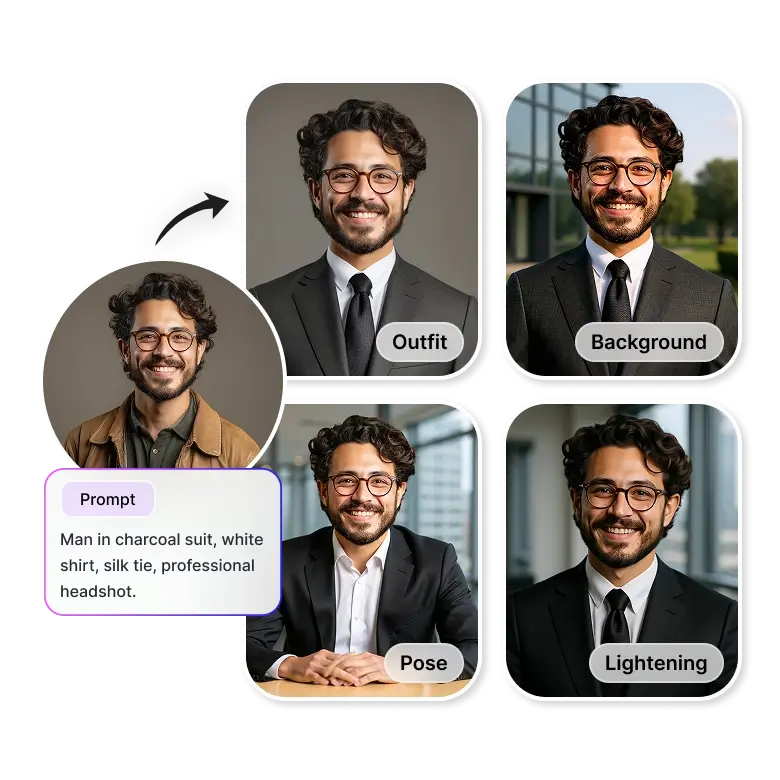
Users start using: The tool will turn your users’ selfies into professional AI headshots.
Expected results: Changes the backgrounds, clothes, lighting, pose, and expressions, keep the face intact.
Start with Free Credits
Get started with LightX APIs today! Receive 25 free credits instantly on API signup – no credit card required
Frequently Asked Questions
You can use this tool to generate headshots for LinkedIn profiles, corporate teams, doctors, actors, models, dating profiles, realtors, teachers, students, lawyers, etc.
Still Unsure? Allow Us To Assist You!
Write to us and we'd love to understand your requirements